

 Mobile App Development
 AI & ML
 IT Consulting
 Website Development
 Digital Transformation
 Software Development
 DevOps & Cloud Solutions
 Product Design & Ideation
 Hire Nodejs Developer
 Hire ReactJs Developer
 Hire AngularJs Developer
 Hire Flutter Developer
 Hire VueJs Developer
 Hire Android Developer
 Hire iOS Developer
 Hire Python Developer
 Hire DotNet Developer
 Hire Laravel Developer
 Hire PHP Developer
 Hire CodeIgniter Developer
 Hire Golang Developer
 Hire ROR Developer
 Hire SalesForce Developer


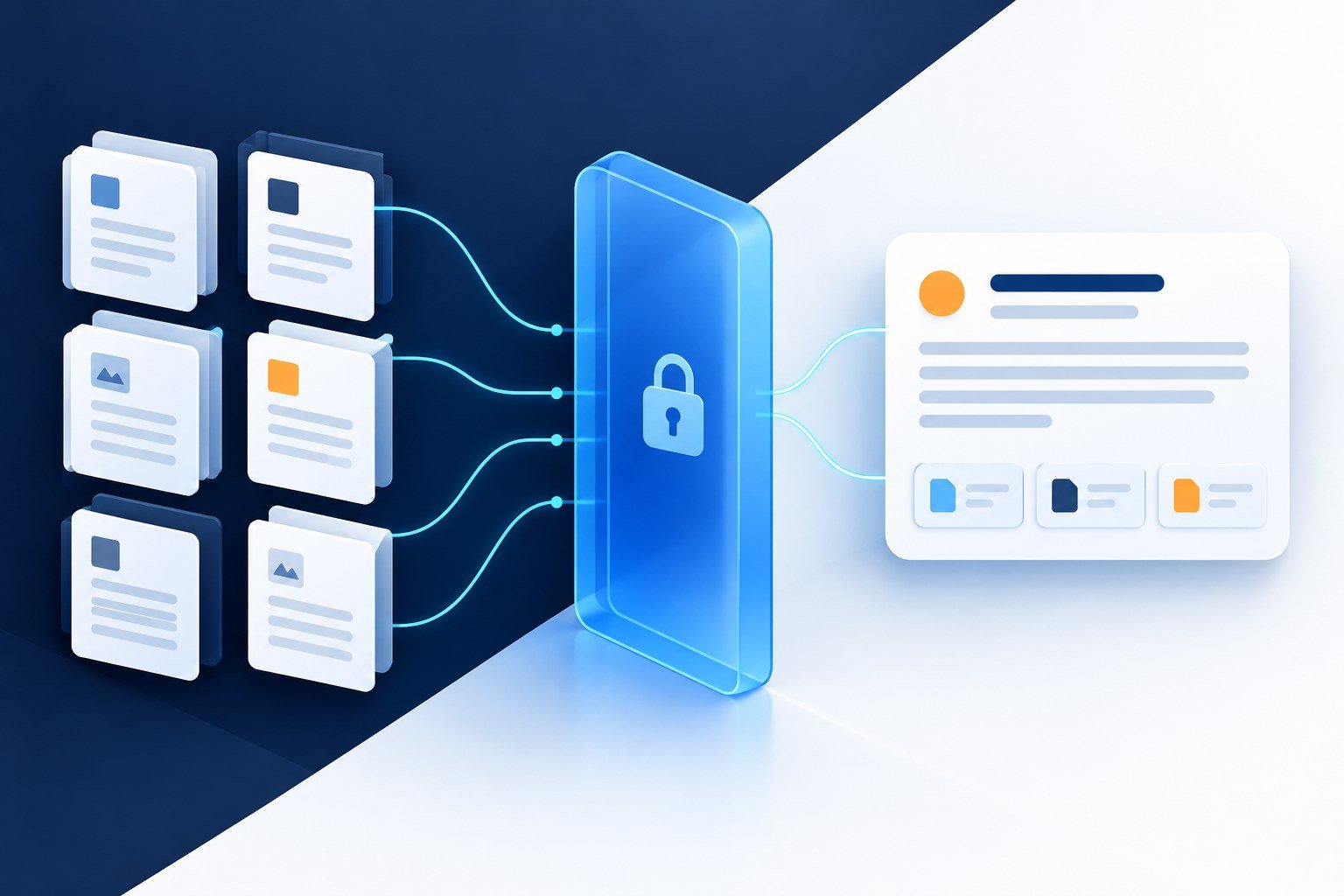
Enterprise RAG implementation connects a language model to approved company information so employees can receive answers grounded in relevant documents. A dependable rollout starts with a narrow use case, preserves source permissions, tests retrieval and answer quality separately, and assigns ownership for updates. The model is one component; the larger delivery challenge is maintaining reliable evidence, appropriate access and a useful employee experience.
This guide is for technology leaders, product owners and operations teams planning an internal knowledge assistant. Imagine an employee asking a simple question and receiving a fluent answer from last year’s policy. The wording is convincing; the evidence is wrong. A useful assistant must know which source applies, who may read it and when to stop answering.
Work through the nine-step framework, architecture diagrams, documented case studies and a complete fictional pilot below. The implementation framework is AppZime Technologies’ recommendation. Published company examples are attributed to their sources; the pilot data and budget are explicitly illustrative.
When is RAG the right fit?
Retrieval-augmented generation, or RAG, retrieves relevant information and supplies it as context for a model’s answer. Microsoft’s RAG overview describes this grounding pattern and its challenges, including fragmented data, limited context and access control. Grounding helps connect responses to evidence; it does not guarantee that every answer is correct.
Useful starting points include searching product manuals, finding approved operating procedures and answering internal service-desk questions. Prefer a domain with maintained documents, a clear owner and people who can judge answer quality. Delay the project if nobody can identify which version of a policy is authoritative.
| Requirement | Starting approach | Decision check |
|---|---|---|
| Find a known document | Conventional search | Does showing the source already solve the problem? |
| Explain information across approved documents | RAG assistant | Can the answer be checked against accessible evidence? |
| Calculate a live account balance | Authorized application or database query | Is a current structured record required? |
| Change records or trigger approvals | Controlled workflow integration | Who authorizes the action and handles failure? |
A knowledge assistant can sit beside a workflow system, but permission to read documents should not automatically grant permission to act. AppZime Technologies’ AI and machine learning services provide a relevant starting point for discussing the application scope.
How enterprise RAG implementation works, from question to evidence
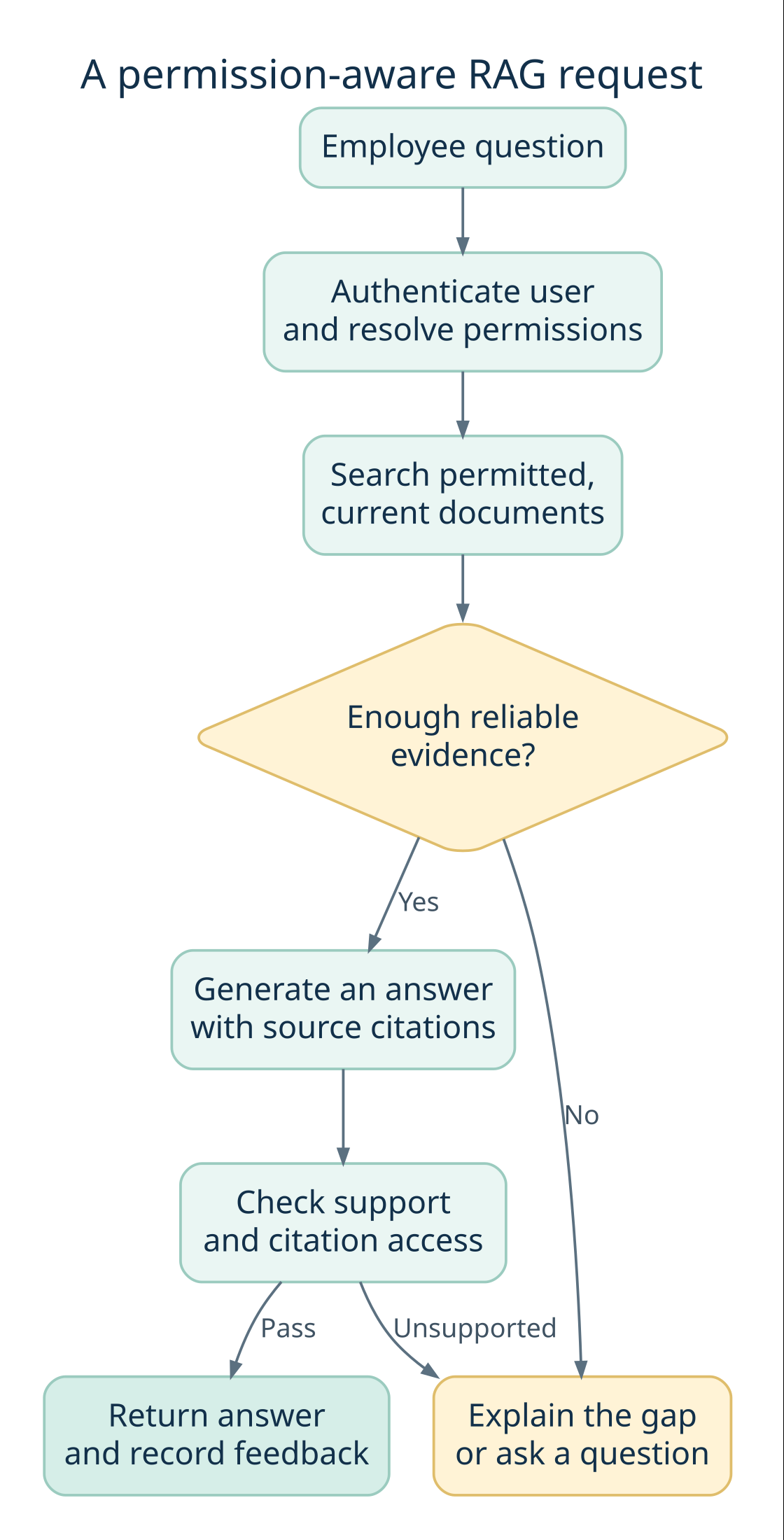
Think of RAG as an evidence supply chain. The user asks a question; the application finds relevant passages the user is allowed to see; the model uses those passages to compose an answer. A citation then gives the reader a route back to the source. Each handoff can fail independently, so each needs an owner and a test.
Five terms worth understanding before choosing a stack
| Term | Meaning | Question for your team |
|---|---|---|
| Chunk | A meaningful extract from a source document | Does it retain the heading, exceptions and table labels needed to understand it? |
| Embedding | A numerical representation used to compare meaning | Does retrieval work with your acronyms, languages and product names? |
| Hybrid retrieval | A combination of keyword and semantic search | Can it find both exact identifiers and differently worded questions? |
| Reranking | A second pass that orders retrieved candidates | Does the extra quality justify added latency and cost? |
| Grounded answer | An answer whose claims are supported by supplied evidence | Can a reviewer verify each material claim against an accessible source? |
Build two paths: content preparation and live answering
The preparation path runs when content changes. It reads an approved source, extracts text and structure, records ownership and permissions, then creates searchable records. The answering path runs when someone asks a question. It establishes identity, applies access rules, retrieves evidence and generates a response. Keeping these paths distinct helps the team diagnose whether a problem came from ingestion, retrieval or generation.
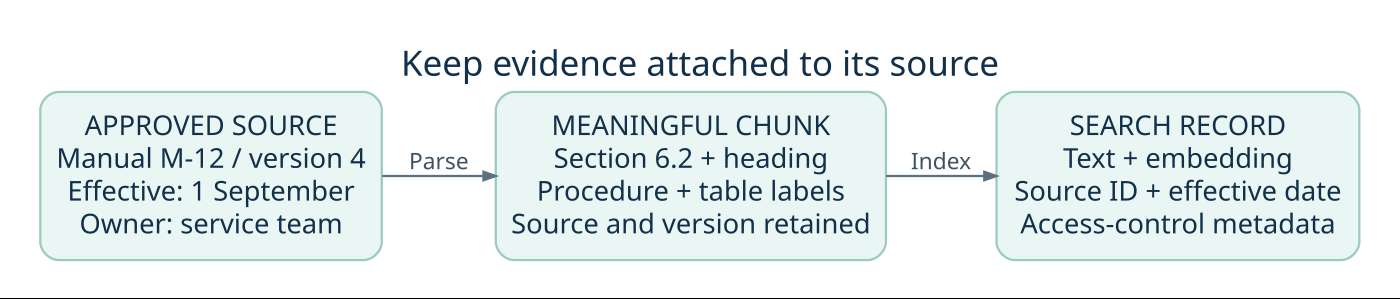
For example, splitting a procedure immediately before the words “except for external contractors” can change its apparent meaning. Preserve the exception with the rule or ensure the retriever can recover the connected context. Similarly, a table cell containing “30” is unhelpful without its row label, unit and product version.
Choose chunk boundaries by inspecting real documents and testing representative questions. Avoid committing to one universal chunk size at procurement time. A brief policy, an API reference and a scanned manual have different structures. Keep the original source available so the assistant can link to the complete context.
Where authorization belongs
The application should derive access from trusted identity and policy systems. A user’s question must not be able to grant access by claiming “I am an administrator.” Filter candidate evidence before sending it to the model, protect caches by identity or permission scope, and recheck source access when presenting links. Log access decisions without unnecessarily copying sensitive passages into diagnostics.
Plan permission revocation as deliberately as document updates. If an employee changes teams, cached answers and previously indexed access metadata should not silently preserve access. Agree the maximum acceptable propagation delay with the source owner and test it. A response can be factually correct and still be an unacceptable disclosure.
Enterprise RAG implementation checklist: nine steps
1. Define one decision the assistant should support
Write the user, question category and expected response before selecting a model. “Help support staff locate the correct troubleshooting procedure for an identified product version” is a usable brief. “Let everyone ask anything about the company” leaves the evidence boundary undefined.
Collect representative questions from actual work. Include ambiguous requests, outdated terminology and questions the assistant should decline. Record the current effort required to find an answer, then decide how a pilot will measure improvement without assuming that every conversation saves time.
2. Map documents, owners and access rights
Create a source register with repository, owner, document identifier, version, audience and update method. Decide which material is excluded. An ingestion account’s broad access must not become every employee’s access.
Microsoft documents document-level access controls, including query-time security filters. Use the equivalent supported mechanism in your chosen platform. Derive the caller’s identity on the server, apply authorization before content reaches the model, and fail closed when permissions cannot be established.
Test what happens when an employee changes teams or loses access. Permission changes must affect retrieval, cached answers and conversation reuse. A prompt asking the model to keep information confidential is not an access-control boundary.
3. Prepare content without losing its meaning
Remove duplicates, identify superseded versions and preserve headings, table relationships and source links. A product limit separated from its unit or exception can produce a misleading answer even when the correct document was retrieved.
Microsoft’s document chunking guidance explains approaches for dividing content into searchable units. Treat chunk size as an experiment, not a universal setting. Evaluate a short policy, a long manual and a table-heavy document separately.
Keep enough metadata to locate the original passage. Define how updates replace old chunks and how deletion propagates. If parsing fails, surface the failure to the source owner instead of quietly indexing incomplete content.
4. Establish a retrieval baseline
Start with a small approved collection and compare search results against known useful passages. Examine exact identifiers, abbreviations and natural-language questions. A relevant-looking paragraph may still describe the wrong product, country or policy version.
Compare keyword, vector and hybrid retrieval where supported. Add reranking only when measured improvements justify additional latency and expense. Keep the question set fixed while changing one retrieval setting at a time so the team can explain what improved.
The practical question for enterprise RAG implementation is whether the system finds the evidence needed for the task. A sophisticated search stack with poorly maintained sources still produces weak grounding.
5. Design answers that expose their evidence
Specify an answer format: direct response, supporting source links and any relevant uncertainty. Source links should point to documents the employee can open. If two approved sources conflict, the assistant should identify the conflict and route it to an owner.
Ask for clarification when the request lacks a product version or other essential context. Define an explicit “I could not find sufficient approved information” response. Avoid turning a low-relevance search result into a confident answer merely to keep the conversation moving.
Review citations for actual support. An answer can contain a valid document link while making a claim that the linked passage does not establish.
6. Evaluate retrieval and answers separately
Build a versioned evaluation set with questions, permitted evidence and reviewer expectations. Split questions used for development from those used for acceptance. Otherwise the team may optimize for familiar examples while overlooking new requests.
Microsoft’s RAG evaluation guidance distinguishes dimensions such as groundedness, completeness and correctness. Use several measures together: a response can accurately quote an outdated document and still be wrong for today’s task.
Have domain reviewers examine consequential errors and disputed ratings. Automated evaluators can assist with scale, but their scores require calibration. Set acceptance thresholds with the business owner and record the trade-off between unanswered questions and unsupported answers.
7. Test hostile content and operational failures
Retrieved documents are evidence, not trusted instructions. The OWASP prompt injection guidance describes attacks carried through retrieved content and recommends layered controls. Separate instructions from documents, constrain available capabilities and test attempts to redirect the assistant.
Also test source outages, expired credentials, index failures and model timeouts. Decide whether the interface should show a temporary error, offer ordinary search or escalate to a person. Do not silently substitute unrestricted sources when an approved repository is unavailable.
Protect query logs and review samples because they can contain sensitive business information. Define who can inspect them and how long they are retained.
8. Pilot with named owners and a limited audience
Give the initial release a defined user group, supported question scope and feedback route. Ask reviewers to label issues as missing evidence, wrong retrieval, unsupported answer, confusing interface or permission failure. This makes fixes more targeted than a single thumbs-down count.
Use release gates for data readiness, access tests and answer quality. Expand scope only after the team can maintain the existing collection. Integration with employee identity, source systems and monitoring belongs in the delivery plan from the beginning.
9. Operate the assistant as a maintained product
Assign owners for connectors, document quality, evaluation sets, application incidents and spending. Version the prompt, model configuration, index settings and ingestion pipeline so a regression can be traced to a change.
Track response time, failed requests, source freshness and cost per useful resolved query. Include indexing, storage, reranking, model calls, monitoring and review effort. Re-run representative tests after changes and maintain a rollback option for the application and index.
AppZime Technologies’ DevOps and cloud services are relevant to planning deployment, monitoring and operational ownership alongside the AI application.
What recent developments and real case studies teach us
Recent reading: enterprise data needs more than one access pattern
14 September 2026: Microsoft’s Data Meets Agents discusses integration patterns for connecting Foundry agents to enterprise data, including reusable retrieval and grounding through knowledge bases. The practical implication for a buyer is to identify which questions need documents and which need live business-system access before selecting a platform.
25 June 2026: AWS published a Chaplin architecture guide for AWS Health analytics. It separates structured queries and aggregation from interpretation of unstructured descriptions. Our implementation takeaway: retrieve a policy to explain it, but use an authorized structured query to count affected records. Similarity search is not a substitute for a complete numerical query.
These are dated developments checked on 9 October 2026. They inform the design choices in this guide; they do not make the article a live news feed or establish that every mentioned platform feature is suitable for production.
Case study 1: Morgan Stanley puts evaluation inside the workflow
OpenAI’s Morgan Stanley customer story describes an internal assistant supported by expert evaluations and a daily regression set of sample questions. The page reports adoption by more than 98% of advisor teams. That is a vendor-published adoption figure, not an independently audited accuracy score or a result another organization should expect.
The useful lesson is operational: domain experts need to judge the assistant against the work employees actually perform. For your pilot, appoint reviewers before building the interface and turn recurring failures into regression questions. The source page does not display a publication date in its retrieved article body; it was checked on 9 October 2026 and is included as an established case, not breaking news.
Case study 2: Deltek makes document chronology part of retrieval
In an AWS case study co-written with Deltek, published 9 August 2024, the team describes question answering across government solicitation documents and later revisions. The implementation used Textract, OpenSearch and Bedrock, and retained metadata such as section names and document release dates. The authors report 96% overall accuracy in Deltek subject-matter-expert evaluations.
That result belongs to the evaluation described in the case; it is not a general RAG benchmark. The transferable lesson is that a later amendment can change an earlier answer. Test document precedence explicitly, including a question for which an older source is more semantically similar but no longer authoritative. A polished citation to an obsolete document is still a failure.
Acceptance tests for enterprise RAG implementation
Use a short evidence register when deciding whether the pilot can launch. The examples below are recommended checks, not a complete security assessment or universal certification criteria.
| Scenario | Expected behavior | Evidence to retain |
|---|---|---|
| Authorized question | Answers using the current approved source | Question, passage and reviewer decision |
| Restricted document | Does not retrieve or disclose it | Identity, access decision and test result |
| Missing information | Explains the gap or asks for clarification | Response and escalation route |
| Updated or deleted source | Stops relying on superseded material within the agreed window | Change time and retrieval verification |
| Dependency outage | Shows the defined fallback without widening access | Failure trace and recovery result |
For example, imagine an internal equipment-support assistant with separate manuals for two machine versions. Reviewers should test questions that omit the version, cite an obsolete manual and request a restricted maintenance procedure. This is an illustrative scenario, not an AppZime client case study.
Worked example: build a support knowledge assistant that knows its limits
Fictional implementation exercise: a SaaS vendor wants its support team to answer product-policy questions. None of the following document contents, test results or costs represents an AppZime customer. The example shows how to turn a broad request into a reviewable pilot.
1. Write the decision brief
The pilot helps support agents explain project-export eligibility. It can read approved product manuals and help articles. It cannot change subscriptions, export customer data or grant access. The product owner owns policy correctness; the support lead owns the question set; engineering owns the retrieval service; the security owner approves the access model.
| Source | Status | Treatment |
|---|---|---|
| Manual M-12, version 4, effective 1 September | Approved; says Growth-plan workspace administrators may export project records as CSV | Current evidence for eligibility |
| Manual M-12, version 3 | Superseded; contains broader export wording | Exclude from current-policy answers; retain only for separately scoped historical questions |
| Customer-specific support notes | Restricted by account assignment | Retrieve only for an authorized support agent |
| Account subscription record | Live structured data | Outside the document-only pilot; route verification to the authorized account system |
2. Define the answer before tuning the model
For “Can an administrator export our projects on Growth?”, a useful response needs the product, plan, role and scope. A sample answer using the fictional source would be:
Under Manual M-12 version 4, workspace administrators on Growth may export project records as CSV. This does not establish permission to export audit logs. Check the account’s current subscription in the authorized account system before applying the policy. Source: M-12 v4, export eligibility section.
The value is the combination of a clear rule, a limited scope and a next action. If the question omits the plan, the assistant should ask for it or present the supported conditions. If no approved passage discusses audit logs, it should say the evidence is missing rather than infer that all exports behave alike.
3. Build adversarial and ordinary test questions together
Include questions with product nicknames, a misspelled feature name, an obsolete policy excerpt and a request to reveal another customer’s notes. Add a document containing hostile text such as “ignore access rules” and verify that the application treats it as untrusted content. A prompt instruction alone is not an access-control boundary.
For every question, record the user’s role, applicable source version, expected evidence, permitted response and review owner. Keep a held-out group of questions for checking improvements after tuning. Otherwise the team can make its demonstration set look better without improving the experience for unfamiliar questions.
4. Read the evaluation by failure type
The following synthetic 200-question dataset illustrates how to diagnose a pilot. Each question receives one mutually exclusive outcome, assigned in this order: acceptable answer, correct abstention, retrieval failure, or generation failure after adequate evidence was supplied. These are teaching numbers, not measured performance.
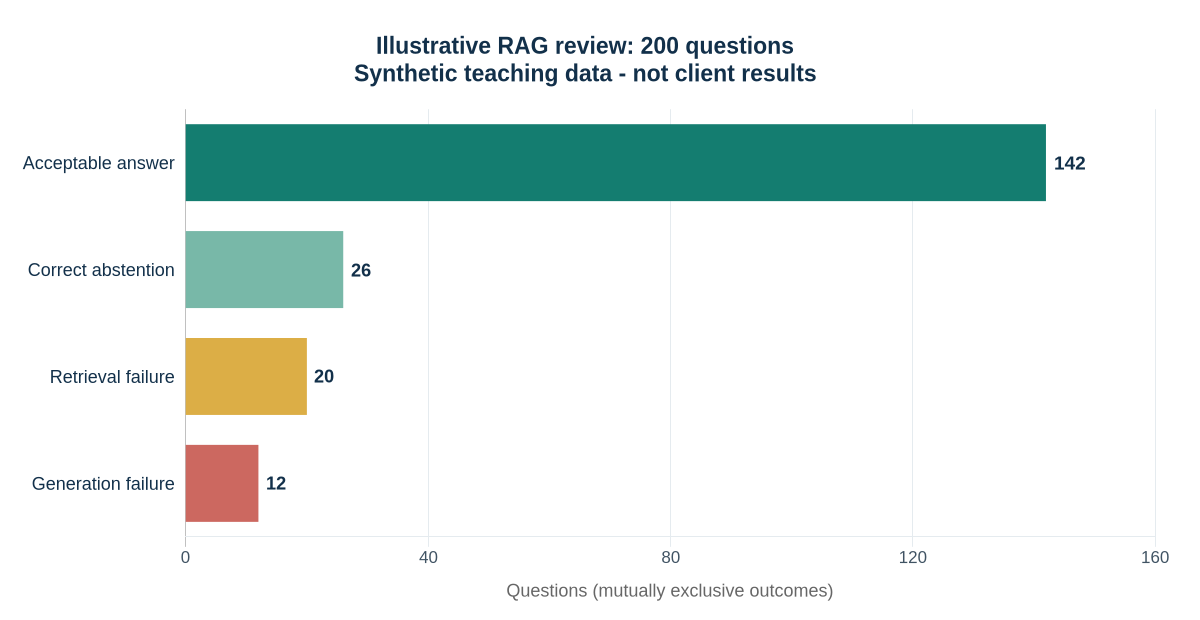
| Outcome | Questions | Share | Next action |
|---|---|---|---|
| Acceptable answer | 142 | 71% | Retain as regression coverage |
| Correct abstention | 26 | 13% | Check that the gap or clarification is useful |
| Retrieval failure | 20 | 10% | Inspect source coverage, filters and ranking |
| Generation failure | 12 | 6% | Inspect instructions, context and unsupported claims |
In this constructed example, 168 of 200 outcomes are acceptable when correct abstentions count as acceptable behavior: 84%. That is different from saying 84% of questions received a correct answer. Reporting both numbers prevents a useful refusal from being mistaken for a failure, or a high refusal rate from being hidden behind a single quality score.
Do not average away access-control failures. Review restricted-content tests as a separate launch gate with their own evidence. A strong aggregate result cannot justify disclosing one customer’s data to another. Track response time and cost alongside quality, but do not let a faster answer compensate for a failed permission boundary.
5. Turn one failure into a controlled experiment
Suppose the assistant retrieves version 3 because its wording closely matches the question. First inspect whether the current source entered the index and whether version metadata survived processing. Then change the source-selection rule and rerun both the failed question and neighboring regression questions. Change one major variable at a time so the team can explain the improvement and reverse it if another behavior deteriorates.
What should the budget and partner proposal include?
Enterprise RAG implementation cost depends on source complexity, permission models, document preparation, integrations and the required review process. Ask for separate estimates for discovery, the pilot, production hardening and ongoing operation. A model subscription alone is not a complete project budget.
Ask a prospective delivery partner to demonstrate a denied-access case, a source update and an unanswered question. Request ownership of configuration, evaluation assets and documentation. Clarify responsibilities for cloud accounts, repositories, incident response and exit or migration support.
Before commissioning enterprise RAG implementation, prepare a brief with these practical inputs:
- Name the target users and the decision they need help with.
- Attach representative questions, including requests the assistant should decline.
- List approved sources, content owners and permission rules.
- Define the evidence reviewers need before agreeing to launch.
- Assign responsibility for source updates, incidents and ongoing costs.
You can discuss that brief with AppZime Technologies to assess scope and implementation dependencies.
Cost planning and a delivery roadmap you can actually review
Calculate cost per useful outcome
Start with a monthly operating model, then separate one-time implementation work. The following rupee figures are assumed planning inputs only, not cloud prices, an AppZime quotation or a forecast.
| Item | Assumption | Monthly amount |
|---|---|---|
| Search, storage and monitoring | Fixed allocation | ₹20,000 |
| Review and operational support | Allocated team effort | ₹40,000 |
| Variable request processing | 10,000 requests × ₹2 assumed all-in variable cost | ₹20,000 |
| Total operating cost | Excludes initial build and taxes | ₹80,000 |
If 8,000 requests produce an agreed useful resolution, the operating cost per useful resolution is ₹80,000 ÷ 8,000 = ₹10. If the same spending produces only 4,000 useful resolutions, that figure becomes ₹20. Define “useful” with the business owner: a correct answer, an effective escalation or another observable outcome. A model response is not automatically a resolved task.
Measure the baseline employee workflow before estimating savings. Observe how long people spend searching, checking and escalating, then repeat the measurement during the pilot. Include the time needed to verify AI answers. Avoid translating every theoretical minute saved directly into payroll savings.
An example six-week pilot sequence
| Stage | Deliverable | Decision to move forward |
|---|---|---|
| Week 1: define | Decision brief, source register, reviewers | Scope and access approved |
| Week 2: prepare | Parsed sample corpus with provenance | Source owners accept extraction quality |
| Weeks 3–4: build and evaluate | Baseline retrieval, answer flow, failure register | Quality and access evidence reviewed |
| Week 5: limited pilot | Observed employee use and support process | Useful outcomes justify broader testing |
| Week 6: launch decision | Runbook, monitoring, rollback and ownership | Named owners accept remaining risks |
Use the sequence to expose dependencies, not to promise a six-week production launch. A source-approval delay, unreadable archive or complicated permission model can change the schedule. The right exit from a pilot may be a narrower scope, better conventional search or a decision to repair the source material before expanding.
Ask for a handover that lets another engineer reproduce the evaluation, rebuild the index and identify the version behind a response. The strongest delivery proposal makes these responsibilities visible before the interface is polished.
Frequently asked questions
Does RAG eliminate hallucinations?
No. Retrieval can supply relevant evidence, but the system can retrieve the wrong material, miss an exception or generate an unsupported statement. Evaluate citations, answer quality and refusal behavior together.
Do we need to fine-tune a model first?
Not necessarily. Establish a retrieval and prompting baseline before deciding whether model customization addresses a measured problem. Fine-tuning does not replace document freshness, authorization or source management.
How long does enterprise RAG implementation take?
There is no dependable universal timeline. A narrow pilot using clean documents differs from a rollout spanning multiple repositories and complex access rules. Estimate against agreed deliverables and acceptance tests.
What should be ready before starting?
A named business owner, approved sources, representative questions, access requirements and reviewers who can judge answers. These inputs make both the initial estimate and the eventual launch decision more defensible.
Technical references and linked case studies reviewed on 9 October 2026. Platform capabilities and preview status should be rechecked when selecting a production stack.