Transform your ideas into powerful digital solutions with
AppZime.
Our expert developers and consultants help you design, build, and
scale high-performing websites, mobile apps, and IT systems that
move your business forward.
A customer hears about your furniture shop and searches for it on their phone. They want to see a few products, check your location and ask whether you deliver.
You could build an app for that. But would someone download it just to find your opening hours?
If you are choosing between a website or mobile app, start with the task your customer needs to finish. A useful first step is often much simpler than the product you initially imagined.
What is the difference in everyday terms?
A website opens through a link in a browser, such as Chrome or Safari. Customers can reach it from a search result, a social post or a message without first installing your business’s app.
A mobile app is software people usually install on their phone. It can be designed around regular activities, such as checking deliveries, recording work or managing an account.
A website can also do more than display information. When people log in, make bookings or manage orders in a browser, they are using features often described as a web application.
That matters because “we need online booking” does not automatically mean “we need a downloadable app.” Booking can work on the web too.
Start with the visit your customer is making
Imagine that furniture shop is yours. Most new visitors want to browse your range, understand the price level and arrange a showroom visit.
A clear website could handle those needs with product photos, useful descriptions, delivery information and an enquiry form. Making it comfortable to use on a phone would be part of that job.
Now picture a different business: a company whose delivery drivers need to scan parcels and record delivery attempts throughout the day. That repeated working routine gives the team a stronger reason to investigate a dedicated app.
The important difference is how people use the service. The number of smartphones in your market does not settle the decision.
When a website is a sensible first move
A website is worth considering first when people mainly need to discover your business, understand your offer and contact you. It also gives you a link you can share wherever a customer asks for more information.
Think about a local consultancy. Its next useful improvement might be a page that clearly explains its services and lets visitors request a meeting.
An app would add another step before that first conversation. Unless it offers an ongoing service customers value, there may be little reason for them to keep it installed.
Before commissioning something new, try your current website on a phone. If visitors cannot read the service details or complete the enquiry form, fixing that experience may address the immediate problem.
When a mobile app deserves a closer look
An app becomes more interesting when people return regularly and need a convenient way to complete a specific job. Examples include staff carrying out daily field inspections or customers managing a service they use repeatedly.
Device features can matter too. A project may need scanning, location information or work that continues when connectivity drops.
Write down the exact behaviour you need and ask a developer to demonstrate it on the devices your users actually have. Installing an app does not automatically make every feature work offline.
Also consider the invitation you are making to customers. “Download our app” is a bigger request than “open this link,” so be clear about the value they receive in return.
There may be a useful middle option
You may hear a developer mention a progressive web app, or PWA. This uses web technology and can offer app-like features, including installation and, when built for it, some offline behaviour.
It can be an option when you want access through a web link alongside selected app features. Support and behaviour vary across browsers and devices, so the details need checking.
Mozilla’s introduction to progressive web apps explains how this overlaps with traditional websites and apps. You do not need to choose the technology yourself; you need to explain the customer task clearly enough for your team to compare the options.
Compare the work after launch as well
The first development quote is only part of the commitment. Your product will need someone to update information, respond to problems and check that important features still work.
Ask each potential partner to explain what their proposal includes after launch. For an app, that conversation should cover supported devices and operating-system updates; for a website, it should cover the browser experience and the services it depends on.
A simple website and a complex web application are very different projects. Broad claims that one platform is always cheaper will not tell you what your business needs.
Before your first development call, finish this sentence: “Our customers need to ___, and today they struggle because ___.”
Then explain how often that happens, which devices people use and what a successful result would look like. Those details give a developer something useful to assess.
For the furniture shop, that might lead to a better mobile website. For the delivery team, it might lead to an app trial with a small group of drivers.
You can add another channel later. For now, build the one that makes the customer’s next step easier.
The developer is ready to start. The repository invitation has been sent. Then the first morning disappears into a missing VPN approval, an outdated setup guide, and a question nobody seems to own: “What should I work on first?”
That is the problem contract developer onboarding needs to solve. A new engineer needs enough context, access, and support to make a useful contribution—and enough clarity to know where their responsibility ends.
A good first month gives both sides a workable path: understand the product, get the environment running, complete a reviewed change, and leave the work maintainable. The six checkpoints below follow that path without assuming every engagement needs the same pace or permissions.
1. Agree the first outcome before the start date
A contract tells you that an engagement exists. It rarely tells a developer which part of the application to open on Monday morning. Translate the agreed scope into a short delivery brief.
For this guide, imagine a product team bringing in a backend developer to add a filtered activity-export endpoint. This is a fictional planning example. The internal technical lead owns API design and release approval; the product owner decides whether the feature meets the user need.
The first outcome might be: “An authorised user can export the permitted activity records for a selected date range, using an agreed format and result limit.” That sentence gives the developer something to build and the reviewer something to check.
Now add what is not decided yet. Does the export run immediately or as a background job? Agree how empty results should behave and which dates and time zone apply, so the developer can work from a clear brief.
Give the brief one receiving owner. That person can bring in product, engineering, or security colleagues, but the new developer should not have to discover who can make a decision by messaging half the company.
Keep engagement administration clear as well: working hours, overlap time, equipment arrangements, reporting, and the agreed process for scope or commercial changes. A developer can settle into the work more easily when everyday expectations are explicit.
2. Prepare a usable starting point
The most useful welcome pack is usually a short route through the work, not a folder containing every document the company has ever written. Explain what the product does, which repository matters, and how to get help.
Include the setup instructions, test commands, a simple architecture map, the first-task brief, and the review process. Check that these instructions still work. If they depend on a step only one long-serving engineer knows, write that step down before the new person arrives.
Assign a technical buddy who has time to help. The buddy can explain the codebase and everyday conventions; they should also know when to bring in the person who owns an access or product decision.
GitLab’s remote-onboarding handbook is useful because it treats onboarding as an ongoing process with written guidance and human support. A short contract may need a different timetable, but those two ingredients still matter.
Make the support easy to use. “Ask if you need anything” leaves the newcomer to judge whether a question is important enough. “I’ll walk through setup with you this morning, and we’ll check blockers at 4:00” gives them a dependable opening.
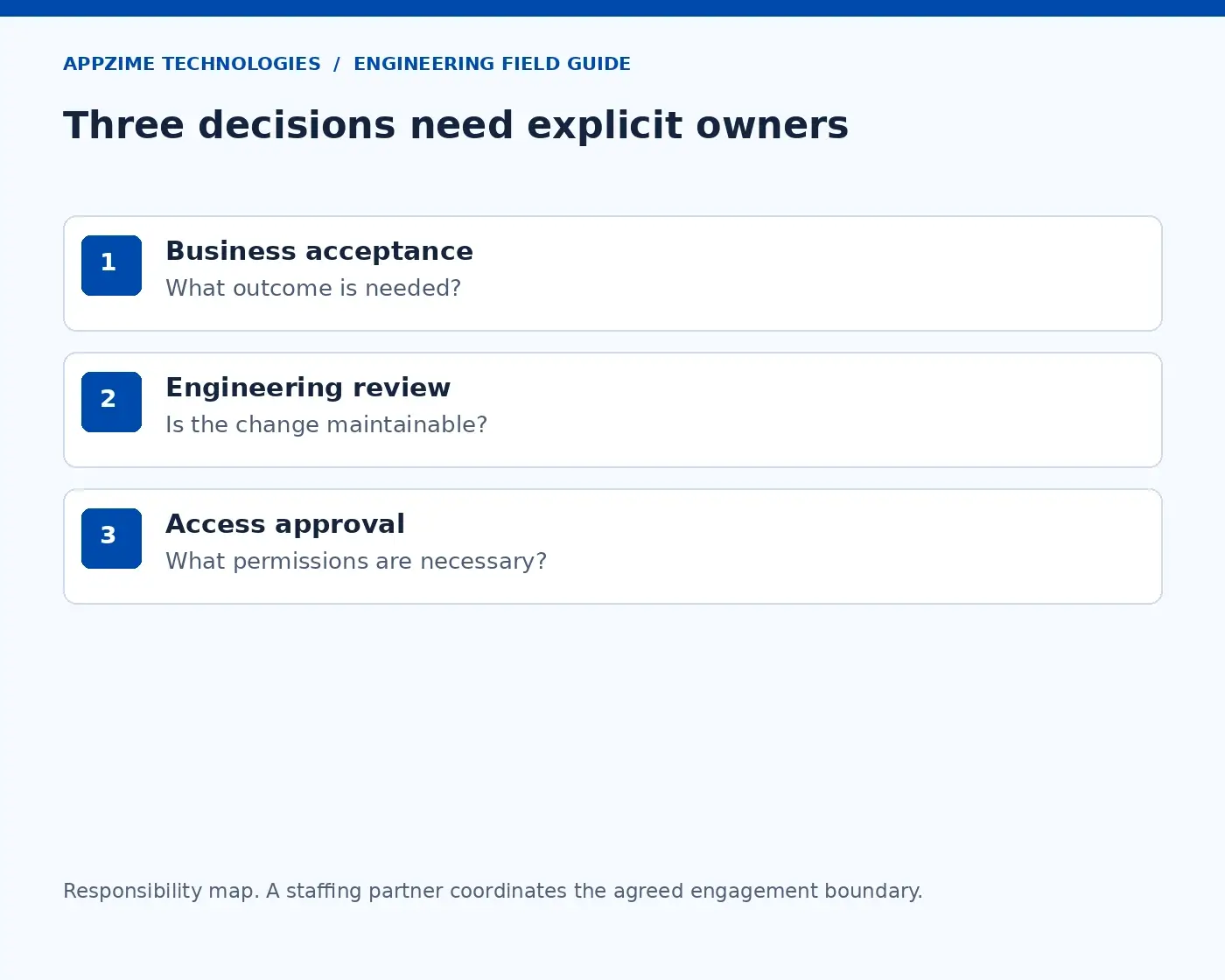
Name the people responsible for business acceptance, engineering review, and access decisions. Open full-size visual.
The ownership map separates three decisions: what work is accepted, how code is reviewed, and what access is approved. They can involve the same people in a small team, but they should not become assumptions.
Prepare accounts through the organisation’s usual process before the start where possible. If something is delayed, name the approver and the work that can continue meanwhile. Sharing someone else’s login only moves the problem into a more difficult place.
3. Use the first days to understand the product and prove setup
Start with the user’s journey. For our export feature, explain who needs the file, what they use it for, and which records they may receive. Then show how an API request reaches the relevant services and data.
This is where a short architecture conversation can save confusion later. A developer needs to know which component owns authorisation, where dates are interpreted, and which service already creates similar exports. Otherwise, they may build a technically tidy solution in the wrong place.
Next, have the developer run the documented build and selected tests in the approved environment. Use synthetic data for the initial task. A successful setup means the new person can reproduce the result, not just watch a buddy demonstrate it.
When a step fails, treat that as information about the path. Check for a missing dependency, an incorrect version, or access the guide assumes but the person has not received. Fix the step and update the instructions while the problem is fresh.
Access should follow the task. GitHub’s repository roles distinguish different levels of permission. Someone contributing a feature may need to push a branch and open a pull request without needing administrator control or direct production deployment access.
Keep a simple record of the person, system, role, purpose, approver, and removal owner. Record the access decision, not passwords or token values. This same record will make the end of the engagement easier to manage.
By the end of this checkpoint, the developer should be able to explain the feature in user terms, run the relevant tests, and identify who can answer a product or technical question. Those are practical signs that the first task is ready.
4. Make the first change small enough to learn from
The first pull request is a chance to learn how the team works. Choose a change that exercises the normal development path without handing over a large, poorly defined feature immediately.
For the export example, the first change might cover validation of the date range with focused tests. The developer learns where that logic belongs, how tests run, and what reviewers expect before implementing the rest of the endpoint.
A documentation edit can be helpful, but it may not prove that the application builds or its test suite runs. Choose the first task according to what you want both sides to learn, rather than only how fast it can be merged.
Name a reviewer and a backup before the work starts. Explain where to ask for review and how to flag a blocked change. If the developer waits three days for feedback, record that delay separately from time spent implementing the feature.
Google’s published code-review practices offer a useful starting point for discussing what review should cover. Make the expectations concrete for your repository: behaviour, design, tests, readability, and the documentation needed to maintain the change.
The reviewer should explain the reasons behind local conventions. “We use this helper because it applies workspace permissions consistently” teaches more than an unexplained request to change the code. It also helps the new developer make the next decision independently.
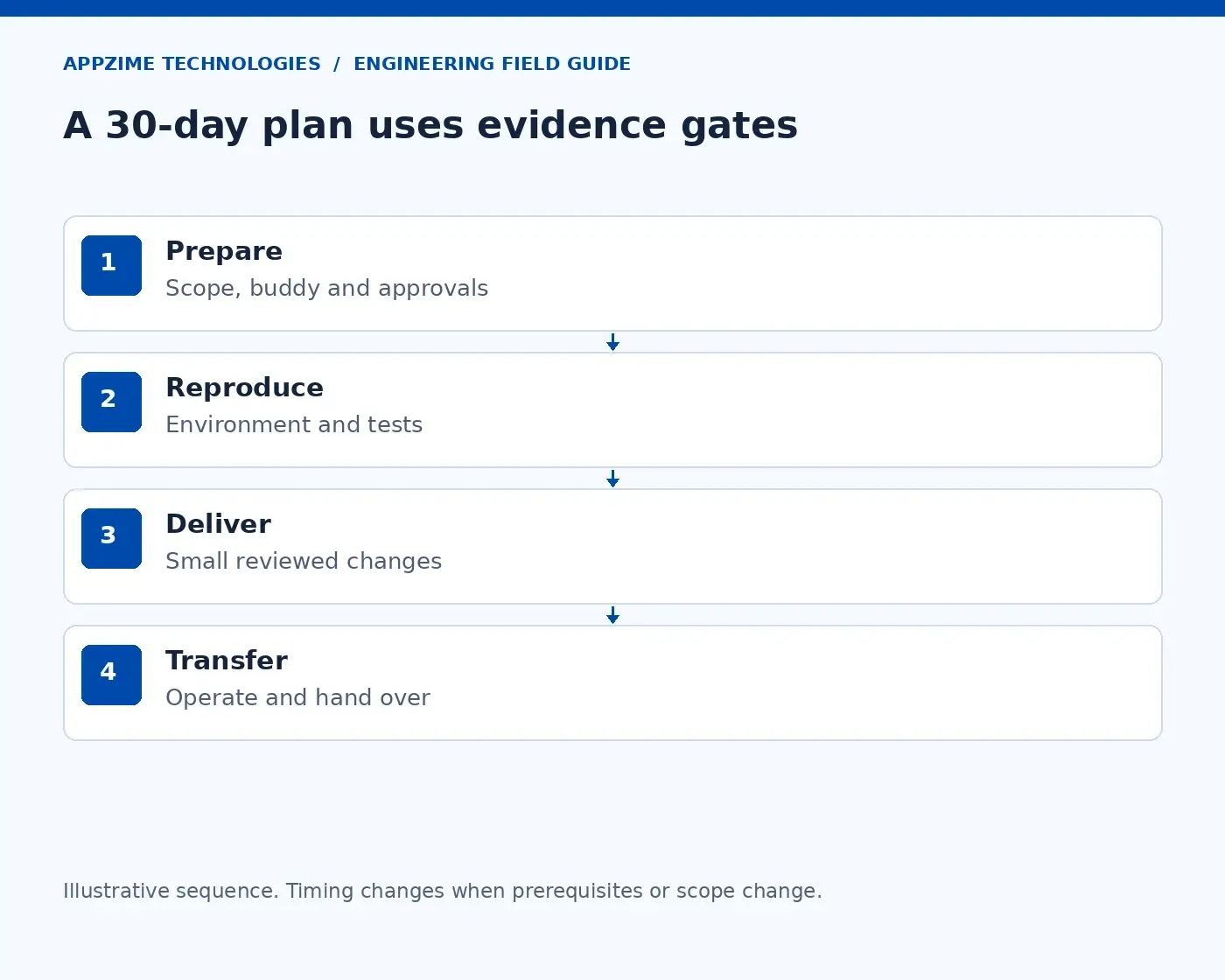
Help the developer move from product context and setup to a reviewed, accepted change. Open full-size visual.
The workflow shows why the first merge is only one checkpoint. Context, setup, implementation, review, and acceptance all contribute to a useful result. Rushing one step usually leaves another person to resolve it later.
When the first change is accepted, ask what was unclear or missing. A small correction to the setup guide or review notes can improve the rest of this engagement and the next person’s first week.
5. Build the first month around accepted work
Once the development path works, widen the task carefully. The aim is a sequence of reviewed outcomes, with room to adjust when the team learns something new.
The following plan uses our activity-export example. The dates are planning checkpoints, not a promise that every feature or developer will follow the same timetable.
When
What moves forward
What confirms it is ready?
Before joining
Scope, access requests, buddy, and reviewer
The receiving owner confirms the starting path
Days 1–3
Product context and working environment
The developer runs the build and agreed tests
Rest of week 1
Small first change
Tests and review establish the team’s working process
Week 2
Export behaviour and implementation
Permissions, filters, and output format are agreed and reviewed
Week 3
Failure paths and limits
The team demonstrates agreed behaviour in the test environment
Week 4
Release readiness and handover
The internal owner accepts the change and another engineer can follow its notes
For this feature, the definition of done should include what happens with an empty result, an invalid date range, an unauthorised request, and an export that exceeds the agreed limit. These details are part of the product, not cleanup work after the happy path.
If the result limit reveals that the export needs a background-job design, revisit the scope. That change affects delivery, storage, notifications, and permissions. It deserves a decision rather than an informal expansion of the original task.
Keep check-ins short and useful. Discuss the next accepted outcome, any blocker, the person who can remove it, and the next decision date. The developer should leave knowing what to do next, rather than spending the meeting proving they have been busy.
Plan for the receiving team’s time too. Architecture discussion, code review, QA, and access administration need capacity. A staffing arrangement cannot make those responsibilities disappear.
Deployment access needs separate thought. The developer’s login, the build workflow, and the running application have different purposes. GitHub’s OIDC guidance describes one way workflows can obtain short-lived cloud access through configured trust; the person writing code does not automatically need the same permission.
Review the arrangement as the work changes. A new operational responsibility may justify new access, but the justification should be explicit and approved by the relevant system owner.
6. Make handover part of the work from the beginning
A short engagement can end just as a developer becomes comfortable with the codebase. If the only person who understands the change leaves without a usable handover, the team inherits a new dependency instead of a finished feature.
Keep decisions and operating notes alongside the work as it develops. For our export endpoint, another engineer should be able to find its permission rules, test commands, result limits, known issues, and release or recovery instructions.
Before the final week, ask that engineer to use the notes in a test environment. Can they run the feature, diagnose a failed export, and explain the remaining limitations? This is a better check than asking whether a handover document exists.
Then transfer the unfinished work honestly. List open issues, decisions still needed, and the person accepting ownership. A task does not become complete because the engagement is ending.
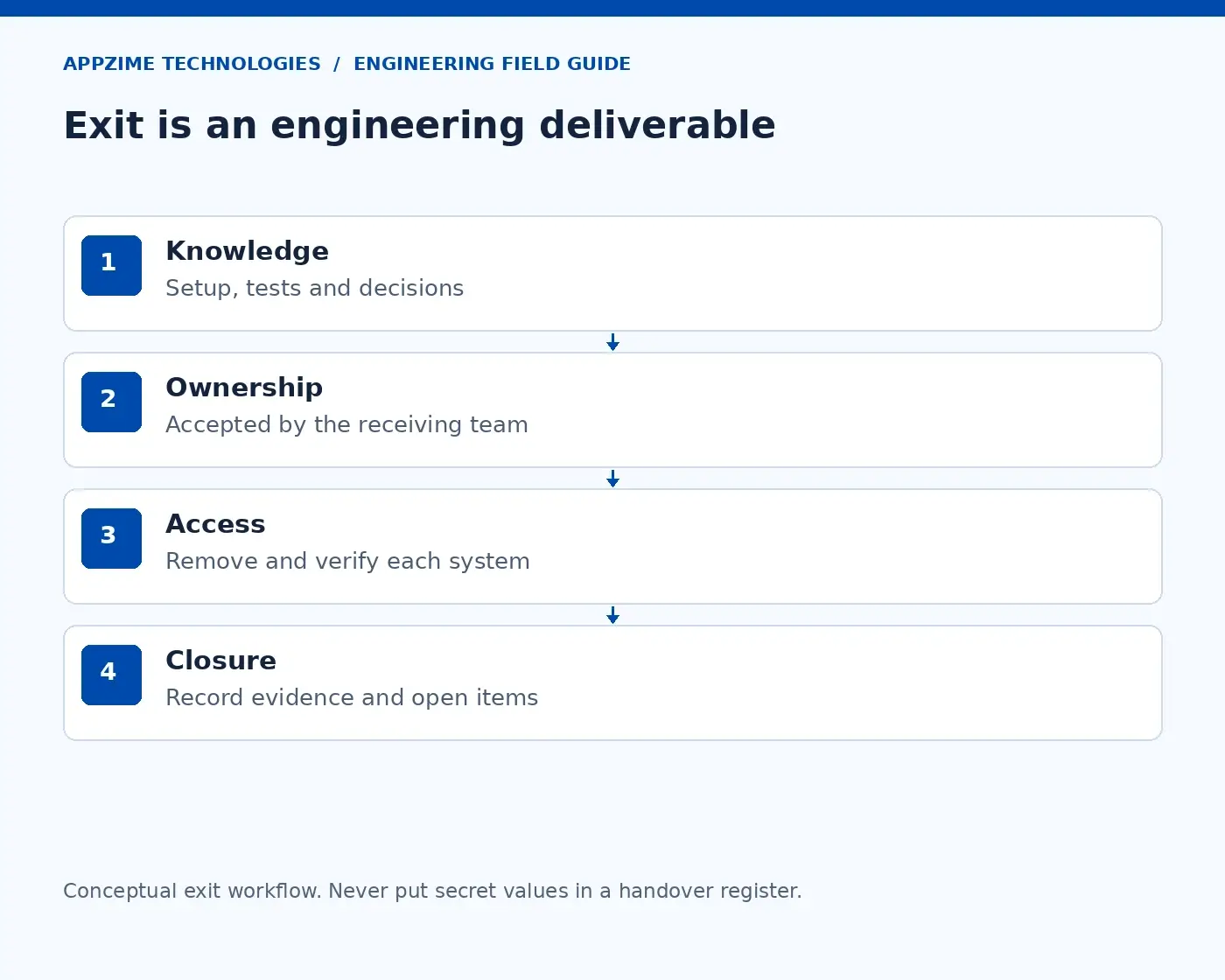
Leave useful knowledge, an accepted owner, and verified access removal at the end of the engagement. Open full-size visual.
The exit sequence covers knowledge, ownership, and access. Finish all three. A receiving manager should know who maintains the work and which system owners have confirmed access removal.
Review secondary tools as well as source control: package registries, cloud accounts, monitoring, documentation, and integrations. GitHub’s repository-role documentation notes that a person holding a deploy key may retain repository access even after leaving an organisation. Removing membership alone may therefore leave another access path to address.
Have the responsible administrators handle keys, shared secrets, and integration ownership under your normal policies. Keep completion evidence in the engagement record without copying secret values into it.
Notice whether the process is helping the person contribute
Good onboarding should make it easier to identify what is working and what is blocking progress. Track time to a reproducible environment, time waiting for access, review turnaround, and work reopened because acceptance was unclear.
Interpret those numbers with context. A delayed merge could reflect an overloaded reviewer, while repeated changes to the export format could reflect an unsettled requirement. Neither should quietly become a judgment that the new developer is too slow.
You can also ask the developer a simple question at the end of each week: “What do you still need to know to finish the next piece of work?” The answer often points to a smaller and more useful fix than another status meeting.
For a short engagement, scale the process to the work. You may not need a separate onboarding platform, but you still need a clear brief, an available reviewer, appropriate access, and an accepted handover.
Give the engagement a clear beginning and a maintainable end
If you are still deciding how to bring someone into the team, AppZime’s remote-developer hiring guide covers the earlier selection stage. Once a developer is joining, the receiving team’s preparation becomes just as important.
For IT staff augmentation, bring the first-deliverable brief, review capacity, and access requirements into the discussion. If you need a partner to take on a broader workstream, explore the scope through AppZime’s software development services.
You can discuss the engagement with AppZime using two practical questions: what should the developer be able to deliver first, and who should be able to maintain that work afterwards? Clear answers give the new person a fair start and the team something useful to keep.
Sources reviewed on 18 October 2026. The export feature and first-month sequence are illustrative and should be adapted to the engagement.
A DevOps candidate may know the commands for a deployment and still make the wrong call when that deployment starts failing. A useful DevOps engineer interview needs to show how they think when the next action could affect customers.
You are looking for someone who can connect a symptom to evidence, choose a sensible response, and explain what happens next. Tool knowledge matters, but it makes more sense inside that conversation than in a long round of definitions.
Here is a practical way to run the interview. Start with one troubled release, follow the candidate’s decisions, and use five areas of evidence to assess whether they are ready for the responsibility your team needs.
Be clear about what the person will own
“We need a DevOps engineer” can mean several different jobs. One team needs help making deployments repeatable; another needs someone to maintain cloud infrastructure. A third needs an engineer who will investigate incidents and help service owners recover.
Before writing questions, describe the first responsibility in plain language. For example: “Own the deployment path for our API, including release checks, recovery instructions, and support for the engineers using it.” Now you have something concrete to assess.
Also make clear who approves production changes, owns database migrations, and joins an incident. Agree who provides cover when the engineer is away. These decisions shape the job as much as the technology stack does.
GitLab’s overview of the DevOps engineer role brings together automation, infrastructure, and collaboration. That breadth is a reason to narrow your interview to the actual assignment, rather than expect equal depth in every possible tool.
A contractor repairing a release pipeline and a permanent engineer building an internal platform may face the same technical scenario. Their expected ownership, follow-through, and longer-term design decisions will differ.
Begin with a release that has gone wrong
Use this fictional scenario in a safe interview environment. A subscription product runs its API and background worker on Kubernetes, with PostgreSQL and a queue supporting the application. After a release, customers begin receiving errors and queued work starts taking longer.
Give the candidate a short timeline: the release begins at 10:00, request errors rise at 10:03, and queue age increases at 10:06. Supply sanitised logs, a few graphs, and the relevant configuration. Explain that the release includes a database migration.
Do not ask them to fix your production system. Ask what they would investigate, what action they might take, and what evidence would tell them whether it helped. Let them ask questions and make the information available consistently to each candidate.
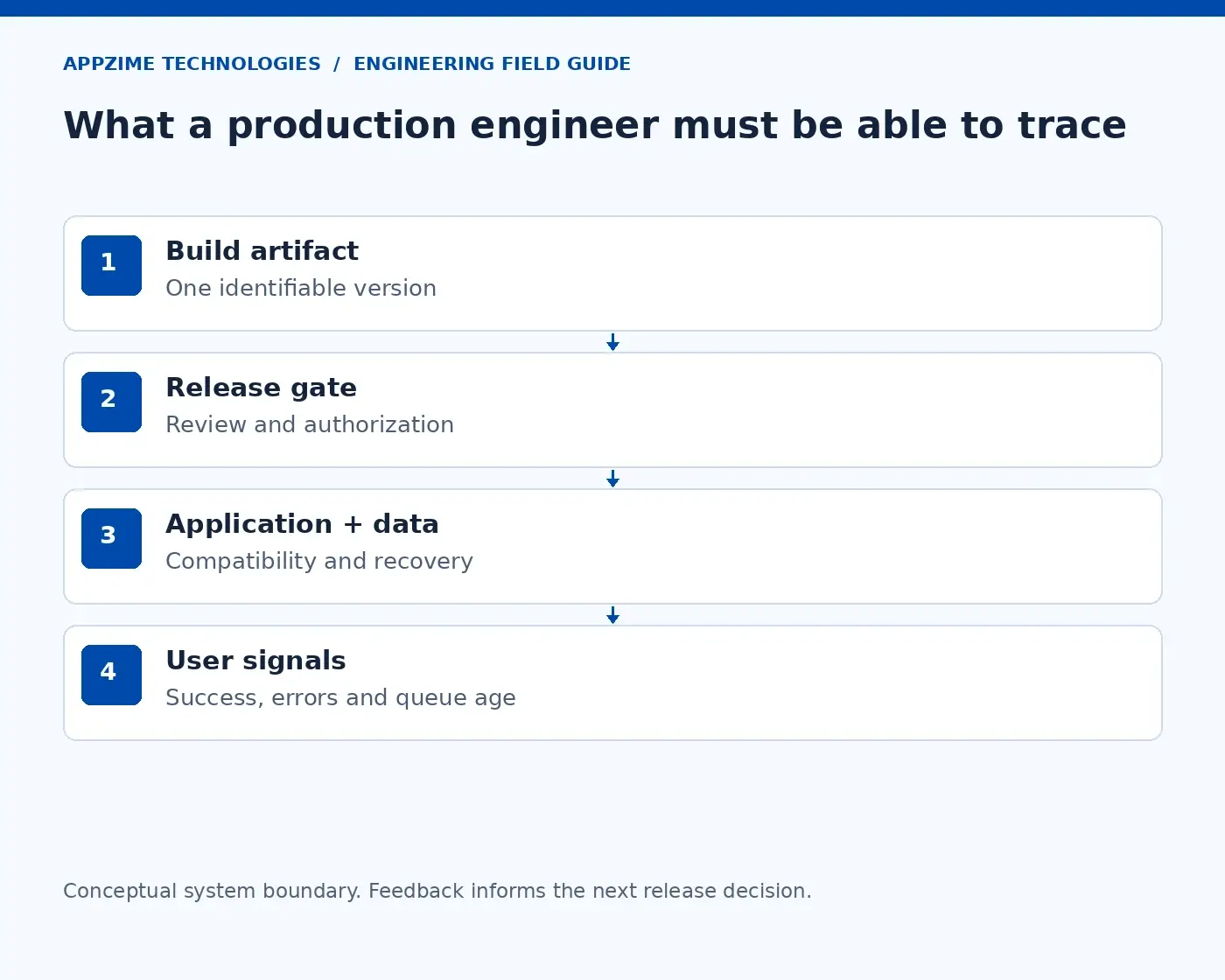
Use one system map to trace a release, a customer request, and the signals that show whether service has recovered. Open full-size visual.
The system diagram gives the conversation a shared reference. A candidate can trace a request, a release, or a queued task through it. When they suggest a change, ask which part of that path it affects.
An 80-minute session could leave 15 minutes for the system and ownership, 25 for the incident, 20 for a change review, and the rest for access and handover. Adjust the format to the role; the times are a suggested structure, not a benchmark.
Explain the policy on documentation and AI tools beforehand. If the candidate uses either, they should still be able to explain the proposed action, its risks, and how they would verify the result.
Listen to the first few questions
A useful first response is to establish the impact. Ask which requests are failing and whether the problem affects all customers or only those on the new version. Check who is coordinating the incident and what changed besides the application code.
These questions help the engineer avoid making an uncertain situation harder to understand. If several people change configuration independently, the team can lose track of what caused the original problem and what caused the next one.
Ask the candidate to name a hypothesis and the observation that would test it. For example, a rise in errors after deployment makes the release worth investigating. Comparing failures across versions could strengthen or weaken that explanation.
The queue is useful evidence too. Its age might rise because workers are failing, a database operation is slower, or the system is receiving more work than it can finish. Adding workers without examining the bottleneck could increase pressure on the database.
Notice how the candidate handles uncertainty. A reasoned next step with a clear verification condition gives you something to assess. Immediate certainty based on one graph gives you less.
GitLab’s account of changing its technical interviews argues for work that resembles the real job and makes a candidate’s reasoning visible. In this session, that means discussing evidence together rather than hiding the important facts to create a trick question.
Ask for a mitigation, then challenge the rollback plan
The candidate does not need to find the root cause before taking every useful action. Pausing further rollout may limit the problem while the team investigates. But the action should have a purpose and an owner.
Now ask about rollback. The database migration is the important detail: can the previous application version still work with the new schema? Rolling back code without knowing that can replace one failure with another.
A strong answer checks compatibility and identifies the smallest justified change. If an application rollback is safe, what will confirm recovery? If it is unsafe, can the team disable the affected feature, restore a compatible path, or prepare a reviewed fix?
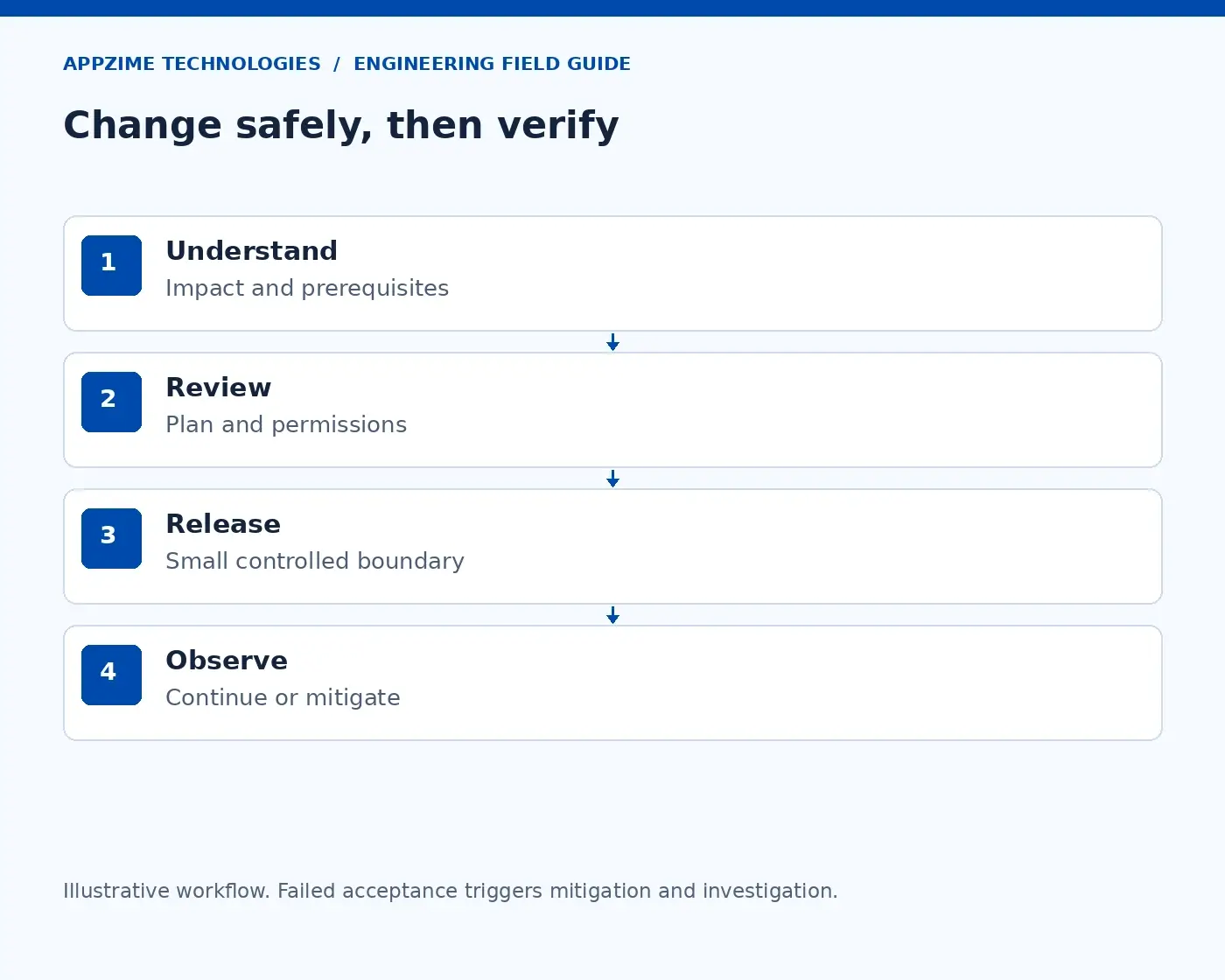
A release needs review, a controlled change, and evidence of what happened afterwards. Open full-size visual.
The workflow is useful because it includes the step after deployment. Agree what success should look like, observe it, and decide whether to continue or mitigate. A green pipeline alone does not establish that customers can complete their tasks.
For our scenario, a recovery check might include successful API requests and a queue that is beginning to drain. The team would also look for work that failed or was processed twice during the incident. Restoring service and reconciling the aftermath are connected responsibilities.
Ask the candidate to leave a short decision note: what they changed, why, what they observed, and what still needs investigation. That tests whether another engineer could take over the incident without starting again.
Use one broken health check to explore practical understanding
Show a liveness check that fails whenever an external dependency becomes slow. What happens if Kubernetes keeps restarting an otherwise functioning container while that dependency remains unavailable?
The restart may add disruption without repairing the dependency. The candidate should discuss what the application can recover from itself and which check is meant to represent which condition.
The Kubernetes probe documentation distinguishes these roles. Readiness influences whether a Pod receives traffic through Services; liveness can trigger a container restart; a startup probe can give a slow-starting application time before the other probes take over.
Ask the candidate to connect that behaviour to the fictional API. Discuss whether an instance should accept traffic during warm-up and how it should handle requests already in progress during shutdown. For the worker, ask when a message should be acknowledged so that failed processing does not silently lose work.
You do not need exact configuration thresholds from memory. You do need an explanation of what the checks mean, what a failure causes, and how the team would test the behaviour.
Review a change before asking someone to apply it
Next, provide a small infrastructure plan that replaces a stateful resource and broadens a cloud permission. Ask the candidate to review it as if a colleague had proposed it for tomorrow’s release.
They should notice the replacement and ask why it is required. They should also ask what data or availability might be affected, who approves the change, and whether the recovery path has been exercised. “We have a backup” is a starting point, not proof that the service can be restored.
If Terraform is part of the role, ask who can read its state and plan files. HashiCorp’s guidance explains that these files can contain sensitive values. Marking a value sensitive hides it in certain displays; that label alone does not keep it out of stored state.
Bring the same question to deployment credentials. The developer, the build workflow, and the application are different identities with different jobs. Ask which one needs production access and how tightly that access can be scoped.
GitHub Actions’ OIDC documentation describes obtaining short-lived cloud tokens through a configured trust relationship. In an interview, follow up on the allowed repository, branch or environment, and cloud role. Naming OIDC is less useful than explaining which workflow may use which permission.
Keep all artifacts synthetic. The candidate can demonstrate sound access judgment without seeing a real secret or receiving a privileged account.
Connect monitoring to the customer’s problem
Return to the incident timeline. The API’s CPU is high, but the most urgent question is whether people can use the product. Ask which signal should wake an engineer and what that engineer could do in response.
CPU can help diagnose a problem. A sustained fall in successful customer requests describes the impact more directly. A useful alert connects the symptom to an owner, relevant context, and a response path.
The Google SRE Workbook’s alerting chapter explains how service objectives and error-budget burn can inform alerts, including the complications of low-traffic services. You can discuss that reasoning without expecting a candidate to memorise its example thresholds.
For instance, if an example objective allows a 0.1% error fraction and the observed fraction is 1%, the error budget is being consumed at ten times the allowed rate, using the same event definition. Whether that should page someone depends on duration, traffic, and the team’s response policy.
Then ask who maintains the dashboard and the runbook after the interview scenario ends. Monitoring becomes useful operational knowledge only when someone keeps its definitions and instructions aligned with the service.
Score five areas of evidence
By now, you have seen how the candidate investigates, changes a system, checks access, and communicates. Record those observations using the same criteria for every candidate.
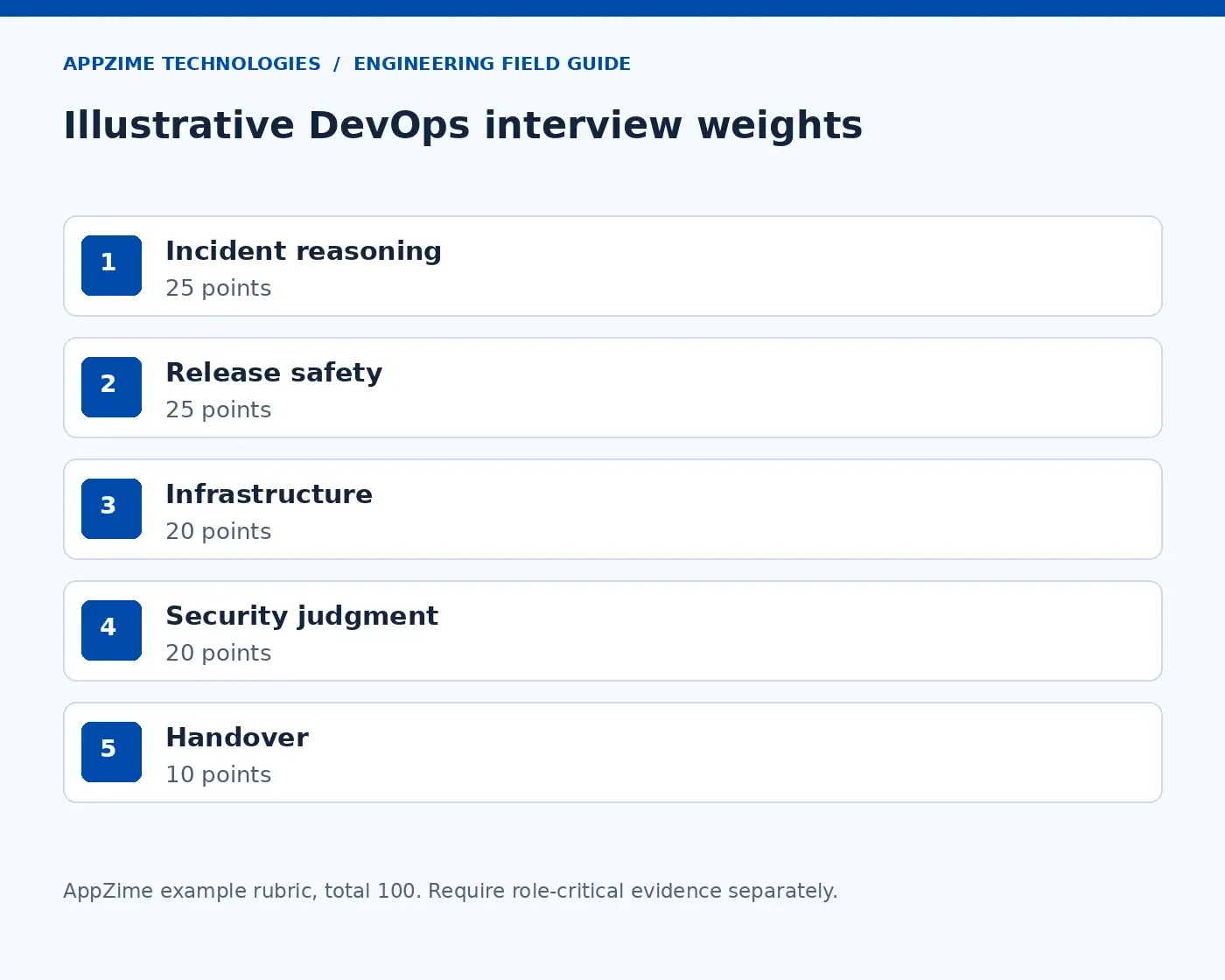
The following weights are illustrative. Give each area a zero-to-four rating, then scale it by the weight. A three-out-of-four rating in a 20-point area contributes 15 points.
Area
Example weight
What to look for
Incident reasoning
25
Starts with impact, tests hypotheses, and explains uncertainty
Release safety
25
Checks compatibility and defines recovery evidence
Infrastructure ownership
20
Reviews the change and accounts for state and restore
Security judgment
20
Understands identities, trust, and scoped access
Communication and handover
10
Leaves decisions and next steps another person can follow
Example interview weights, totalling 100 points. Discuss role-critical gaps separately from the total. Open full-size visual.
Write notes independently before the panel compares scores. Discuss an observation such as “checked schema compatibility before proposing rollback.” That is easier to evaluate fairly than an impression that someone sounded confident.
Use the total to organise the discussion, not make the decision automatically. If the role owns releases, a serious gap in release judgment needs its own discussion even when the candidate is strong elsewhere. A junior automation role may have a narrower boundary and a named senior reviewer.
Carry the interview into a clear first assignment
The interview should leave you with a clearer picture of both the candidate and the job. If your team could not answer who approves a release or who covers an incident, resolve that before expecting a new hire to own it.
A useful first assignment could be one reviewed deployment path with a known build artifact, scoped workflow identity, explicit rollback conditions, and a rehearsed failure in a test environment. Another engineer should be able to follow the resulting instructions.
If you need a person to join an existing team, AppZime’s IT staffing services provide a starting point for discussing that responsibility. If the requirement is a broader implementation, explore DevOps and cloud services with the same ownership questions in view.
Bring your release path, one representative incident, and the gaps you want the role to close to a scoping conversation with AppZime. You will have a clearer brief—and a much better interview—than a tool checklist can provide.
Sources reviewed on 18 October 2026. The incident, interview timings, and scoring weights are illustrative.
A customer signs in to your SaaS product, opens a project, and downloads a file. Everything looks normal. The question behind SaaS tenant isolation is whether your system can keep that customer’s data separate throughout the journey—even if someone requests another customer’s project directly.
A login screen cannot answer that on its own. Neither can a separate database if a background worker later exports the wrong records. Isolation is the boundary that needs to hold wherever customer data goes.
Let’s make that less abstract. We’ll follow a fictional project-management product with two customer workspaces, then use it to compare architecture choices and decide what the team needs to test before release.
First, agree what a tenant actually is
In this example, a tenant is a customer workspace. Each workspace owns projects, files, and export history. A person can belong to more than one workspace, so “user” and “tenant” are different things.
That distinction matters as soon as someone switches workspaces. The application needs to know which workspace they are acting in, whether they still belong to it, and what they are allowed to do there. Knowing who logged in is only the beginning.
Imagine Maya belongs to workspace A. She asks the API for a project that belongs to workspace B. Even if she knows the project’s exact identifier, the application must reject the request unless a deliberate sharing rule gives her access.
That is the core promise to write down: ordinary workspace operations can only reach resources authorised for that workspace and person. If your product supports partners, shared projects, or customer-support access, describe those permissions explicitly too.
AWS’s explanation of tenant isolation is useful here because it separates identifying a user from keeping tenant resources apart. It also explains why a consistent enforcement mechanism matters: one forgotten check should not decide whether another customer’s records become visible.
Choose the boundary you need before choosing the database
Architecture discussions often jump straight to “one database or many?” A better opening question is: what do we need to separate, and why?
Keeping records confidential is one requirement. Protecting shared resources from an unusually heavy workload and restoring one customer’s data independently are two others. A design can handle one well and still need work on the others.
For our project-management product, suppose many small customers use the same features. Sharing application servers and database tables could make provisioning and updates simpler. But if a customer requires a dedicated database, the team needs to explain exactly which boundary that adds and what remains shared.
Approach
What it means
What the team takes on
Pool
Customers share resources, such as tables containing tenant-labelled rows
Consistent controls on every access path, plus attention to shared-resource pressure
Bridge
Some layers are shared and others are separated
Routing and maintaining the different boundaries deliberately
Silo
A chosen resource stack is dedicated to one tenant
Provisioning, upgrades, monitoring, and recovery across that fleet
These names describe an approach, not a universal security rating. Say which layer you mean. “Dedicated database, shared application servers” tells a reviewer more than “we use a silo model.”
The AWS PostgreSQL decision matrix compares more specific storage choices, including separate clusters, databases, schemas, and shared tables. It highlights the operating work around deployment, connections, and recovery as well as infrastructure cost.
Use those trade-offs to ask what your team can maintain. A fleet of separate databases still needs reliable permissions and upgrades. A shared database still needs a credible answer when a customer asks for an export, deletion, or restore.
Follow one request from the browser to the database
Maya opens a project in workspace A. The browser sends the project ID and the selected workspace. Treat both as a request for access, rather than evidence that access is allowed.
The server verifies Maya’s identity, confirms her current membership in A, and checks whether her role permits the requested action. It then looks up the project within that authorised context. If the project belongs to B, the request must not succeed.
This is object-level authorisation: permission to call an API does not automatically mean permission to access every object behind it. OWASP’s API security guidance explains this failure pattern and why checks belong wherever an endpoint accepts an object identifier.
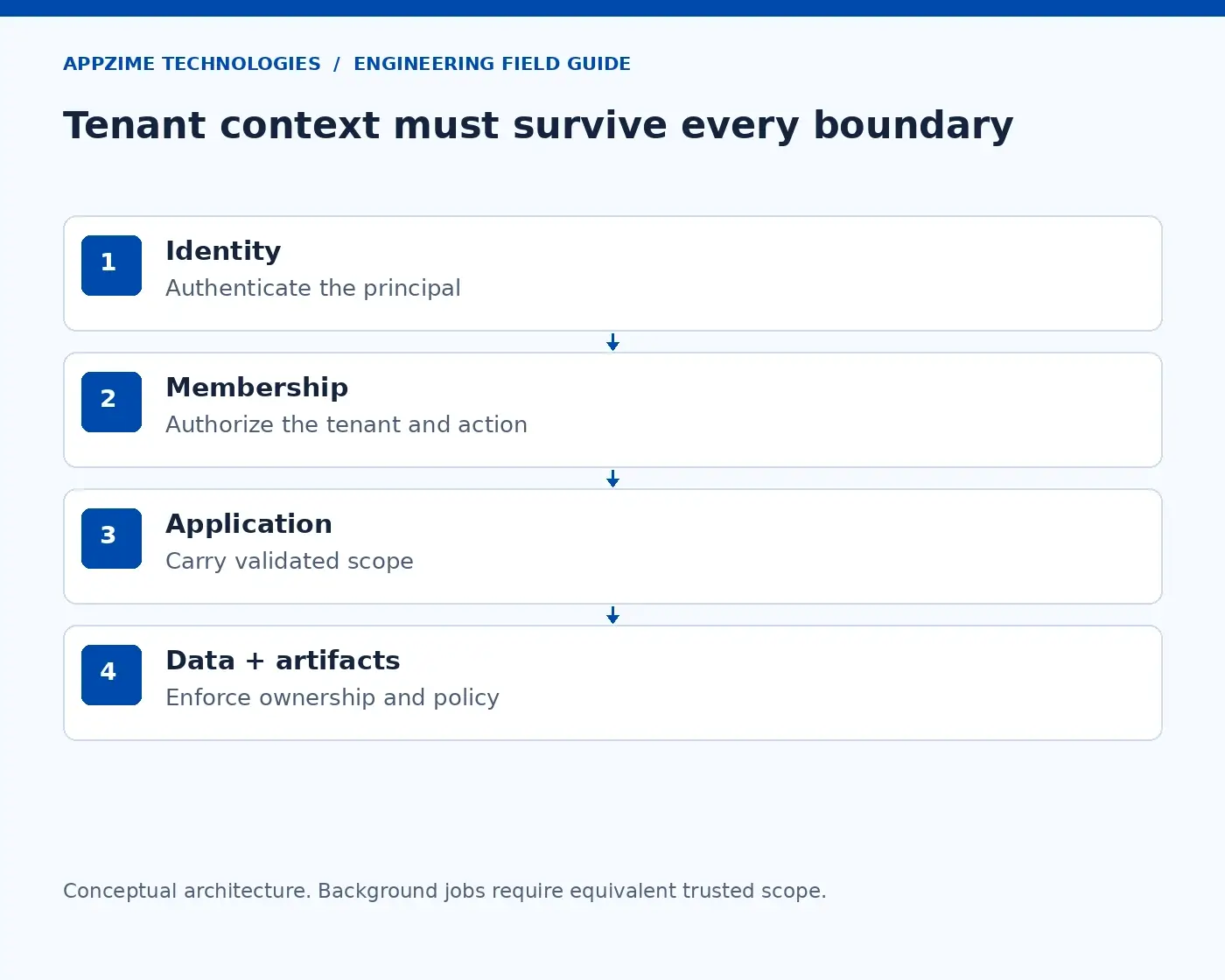
Follow trusted tenant context through the application and its data access. Background jobs need the same attention. Open full-size visual.
The diagram follows that context through the system. The important part is the handoff: each service needs a trustworthy way to know which tenant is in scope and what the caller may do. A tenant ID copied from an untrusted header does not establish either.
Apply the same reasoning when creating or updating a project. The server should not accept a different tenant ID hidden in the request body simply because the person was allowed to edit a project. Both the existing resource and the proposed change need to stay within the authorised boundary.
Then consider a legitimate workspace switch. Maya might belong to both A and B, with different permissions in each. Selecting B should trigger the appropriate membership and role checks; it should not reuse A’s permissions because the person has stayed logged in.
Use row-level security carefully in a shared database
When customers share PostgreSQL tables, row-level security, or RLS, can help limit which rows a database role may read or change. Think of it as an additional rule at the data layer, closer to where a missing application filter could cause harm.
For the projects table, a policy can be designed around the trusted tenant context. The application still has to establish that context correctly. A database policy cannot tell whether an arbitrary workspace value supplied by a caller is legitimate.
There is also an important testing detail in the PostgreSQL row-security documentation: superusers and roles with BYPASSRLS bypass these policies, and table owners normally do as well. Test with the role the application actually uses, including the policy settings that apply to it.
A demo run under an administrator account can therefore give you the wrong impression. The useful question is whether the deployed application role receives the expected allowed and denied results.
Connection reuse deserves its own test. Database pools reuse connections across requests; tenant context must not leak from one request into the next. Review how your driver and pooler handle that context, including when a transaction fails.
RLS also does not give each customer independent compute or a separate recovery process. It solves a particular access-control problem. Keep the rest of the architecture decision visible rather than treating one feature as the whole isolation plan.
Keep the boundary intact when the request becomes a job or file
Now Maya clicks “Export projects.” The API queues work and responds before the file is ready. The original browser request is over, but the responsibility to keep customer data separate continues.
The worker needs a validated tenant scope and an authorised reason to produce that export. It should read only the intended records, store the output under the correct ownership, and deliver it through an access-controlled path. A global worker account should not turn an unchecked message field into authority.
File downloads raise a similar question. A tenant name in a storage path helps organise objects, but it is not proof that the requester may receive them. Check access to the file before issuing a download link, and choose the link’s scope and lifetime deliberately.
Next, look at the product’s shortcuts. Ask whether a cached response could reach the wrong person, or search could reveal a document title from B even when opening the document is blocked. The boundary includes metadata and exports as well as the main project page.
Path in our example
Question to answer
Project API
Are user, workspace, action, and project ownership checked together?
Background export
Does validated workspace scope survive the queue and worker?
File download
Is the requester authorised before a download capability is issued?
Cache and search
Can results or metadata escape the access rules?
Support tooling
Is exceptional access limited, approved, and recorded?
This walkthrough often exposes a more useful design question than the database diagram alone: who owns each handoff? If the API team assumes the worker validates scope and the worker team assumes the API already did everything, write down the missing contract before release.
Test the design with two customers, not just one happy path
Create synthetic workspaces A and B, each with known projects and files. Add a member of A, a member of B, a person who belongs to both, and someone whose membership has been removed.
Known identifiers make the test stronger. Ask for B’s project while signed in as A’s member; submit B’s tenant ID in a write request; try the equivalent export and download paths. The goal is to establish whether the access rules hold, not whether identifiers are difficult to guess.
Then exercise the parts that share state: concurrent requests through the connection pool, repeated requests through the cache, and queued work that runs after a permission change. Decide what revocation should mean for outstanding jobs and previously issued download links.
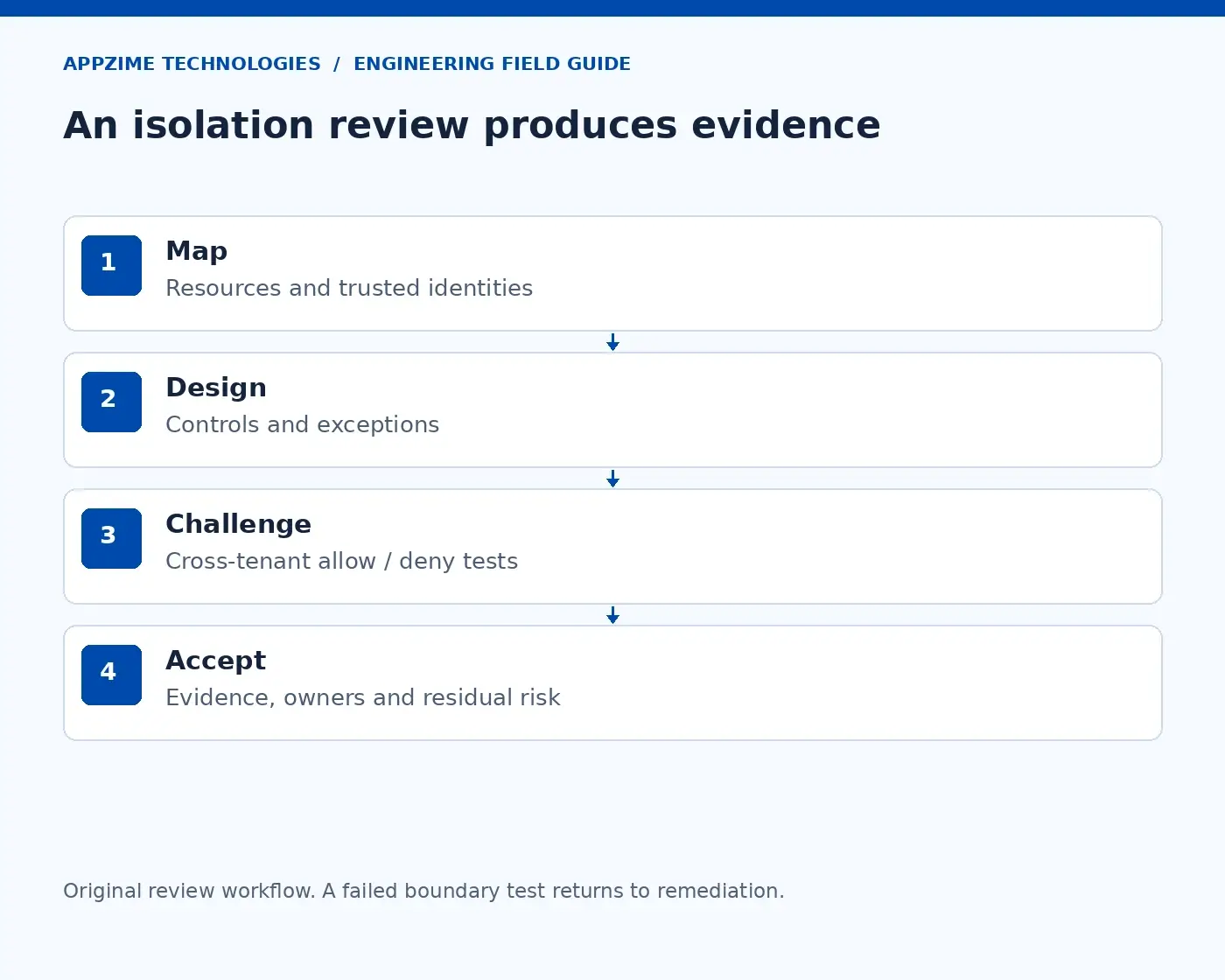
Map the boundary, test the controls, and take unexpected results back to the responsible owner. Open full-size visual.
The review workflow is a loop. Map a resource, identify the control, test it, and take any unexpected result back to the responsible owner. A failed check should change the design or implementation rather than disappear into a list of accepted assumptions.
Record successful access too. A system that blocks everyone has not met the product requirement. Your evidence should show that the right person can complete the right task while another tenant cannot.
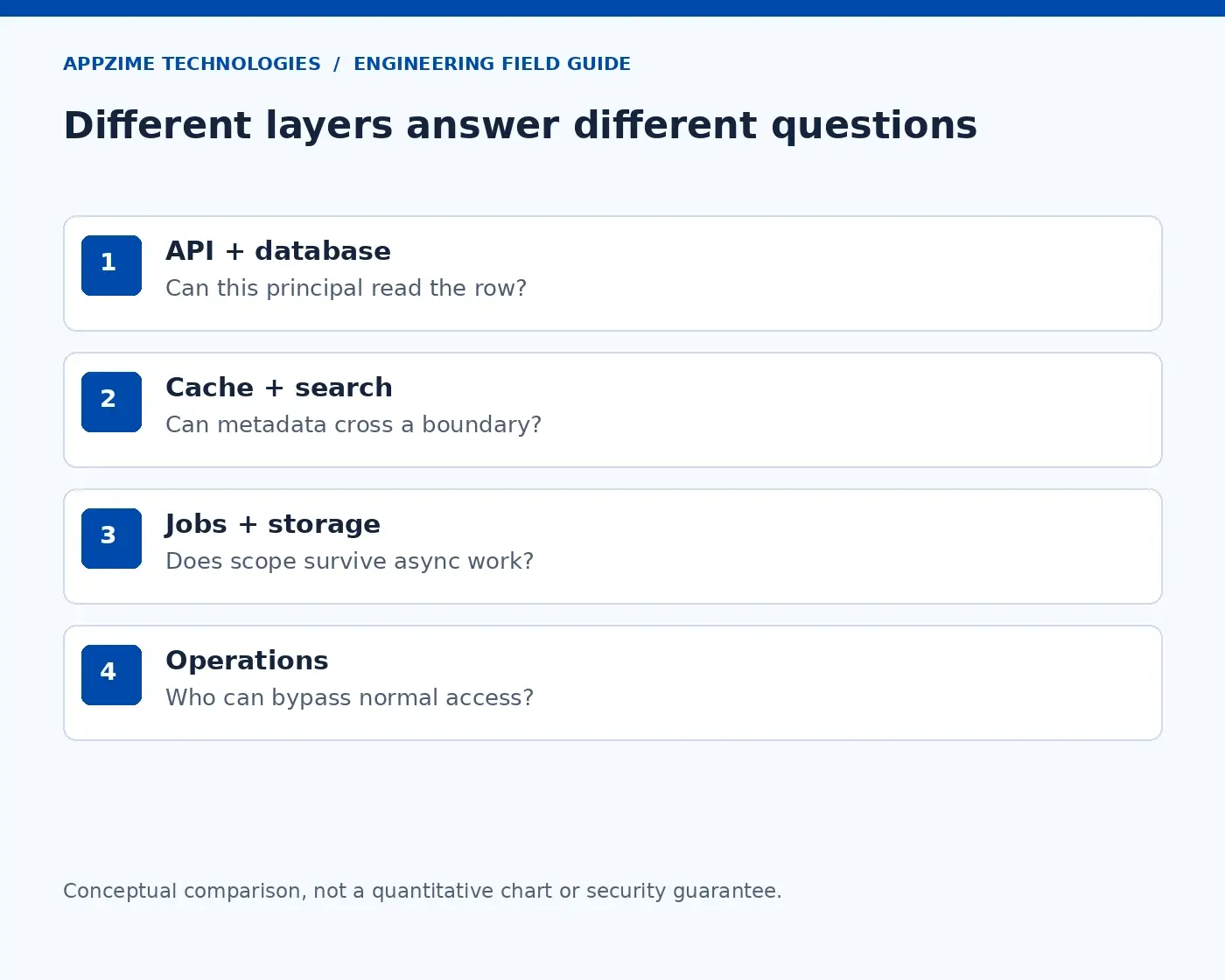
Application, database, and operational controls address different parts of the customer-data boundary. Open full-size visual.
The layers in this visual answer different questions. Application rules understand the action, database rules constrain data access, and operational processes govern the people and services with exceptional privileges. Review them together.
Bring nine clear answers to the architecture review
By this point, the team should be able to explain its choices without relying on “the framework handles it.” Use these questions to turn the discussion into something another engineer can inspect:
What is a tenant, and what sharing is intentional?
Which records, files, indexes, and exports belong to it?
Who establishes trusted user and tenant context?
Where is each read and write permission enforced?
Which database role runs the application?
What happens when connections and cached results are reused?
How do jobs and downloads preserve scope?
Who may cross the normal boundary for support or operations?
How are provisioning, revocation, and recovery tested?
Each answer needs an owner and evidence. That might be a policy review, a reproducible test, or a restore exercise. The exact artifact matters less than whether someone can check the claim.
If you are also building the wider quality plan, AppZime’s SaaS test-automation guide covers that related work. Keep isolation checks tied to the architecture instead of treating them as a final security test after the product is finished.
Choose a model your team can keep operating
The right design needs to work during a normal release, an incident, and a customer’s departure. Include tenant deletion, backup handling, and recovery in the decision—not only the cost of creating the first workspace.
A small team may have one person covering several responsibilities, but application logic, database policy, and access tests still need explicit ownership. When extra expertise is needed, define the gap: a backend engineer to carry context, a database specialist to review policies, or a QA engineer to maintain cross-tenant tests.
The result you want is straightforward: your team can follow a customer’s data through the product, explain the boundary at every step, and demonstrate that the boundary holds. That is a much stronger answer than the name of the database model alone.
Technical sources reviewed on 18 October 2026. The workspace example is fictional; implementation details depend on the selected platform and access model.
A candidate can write a neat SQL query and still struggle when yesterday’s numbers change, a job fails halfway through, or finance asks where a total came from. That is the gap a data engineer assessment needs to explore: can this person build data that other people can trust?
You do not need an enormous take-home project to find out. A small, realistic task can lead to a much better conversation—provided you explain the business problem, leave room for questions, and look beyond the final answer.
This guide follows one example from an order feed to a reporting table. Along the way, we’ll look at the SQL, the recovery plan, and the evidence that helps a hiring team make a fair decision.
Start with the job, before you design the test
Before choosing questions, finish this sentence: “The person we hire will be responsible for…” Be specific enough that another engineer could recognise the work.
For example: “Keep the daily orders dataset accurate, including cancellations and late corrections, and help finance investigate differences.” That tells you far more about the assessment you need than a long list of technologies.
A role like this needs careful SQL, an understanding of how records change, and a sensible response when processing fails. A role building a streaming platform needs additional evidence about event timing, state, and replay. One exercise should not pretend to establish both.
Write down the essential skills and the ones someone can learn after joining. If your team uses Airflow, familiarity helps. But a candidate who understands safe retries in another scheduler may be better prepared than someone who knows every Airflow term but cannot explain why a report doubles after a rerun.
There is a useful lesson in Monzo’s published analytics-engineering interview guide. It explains the work first, then describes how candidates can show their reasoning and discuss trade-offs. Analytics engineering is not identical to every data-engineering role, but that connection between the actual job and the assessment is worth applying.
Give the candidate a problem they can understand
Imagine a retailer whose reporting team needs the current value of confirmed orders. The source system sends updates rather than a tidy final table. An order can appear more than once, and its status or amount can change.
This is a fictional assessment example. Use synthetic records and state the rules upfront: keep the highest valid version of each order; count a confirmed order’s latest amount; give a cancelled order a value of zero. All amounts below are in paise, in one currency, for the same business date.
Ask the candidate to produce two things: a current-state orders table with one row per order, and a summary with the order count, confirmed-order count, and total confirmed value. This introduces an important idea without hiding it behind jargon: what does one row represent? Data teams call this the table’s grain.
Share the format, time allowance, and evaluation criteria before the session. A 75-minute discussion could give ten minutes to clarify the brief, 25 to work through the SQL, and the remaining time to explore recovery, checks, and decisions. Treat that as a starting format, and adapt it to the role and the candidate’s access needs.
Also explain whether documentation and AI tools are allowed. If they are, ask the person to explain the result and handle a changed requirement. You are looking for understanding and ownership, not a contest in producing polished code quickly.
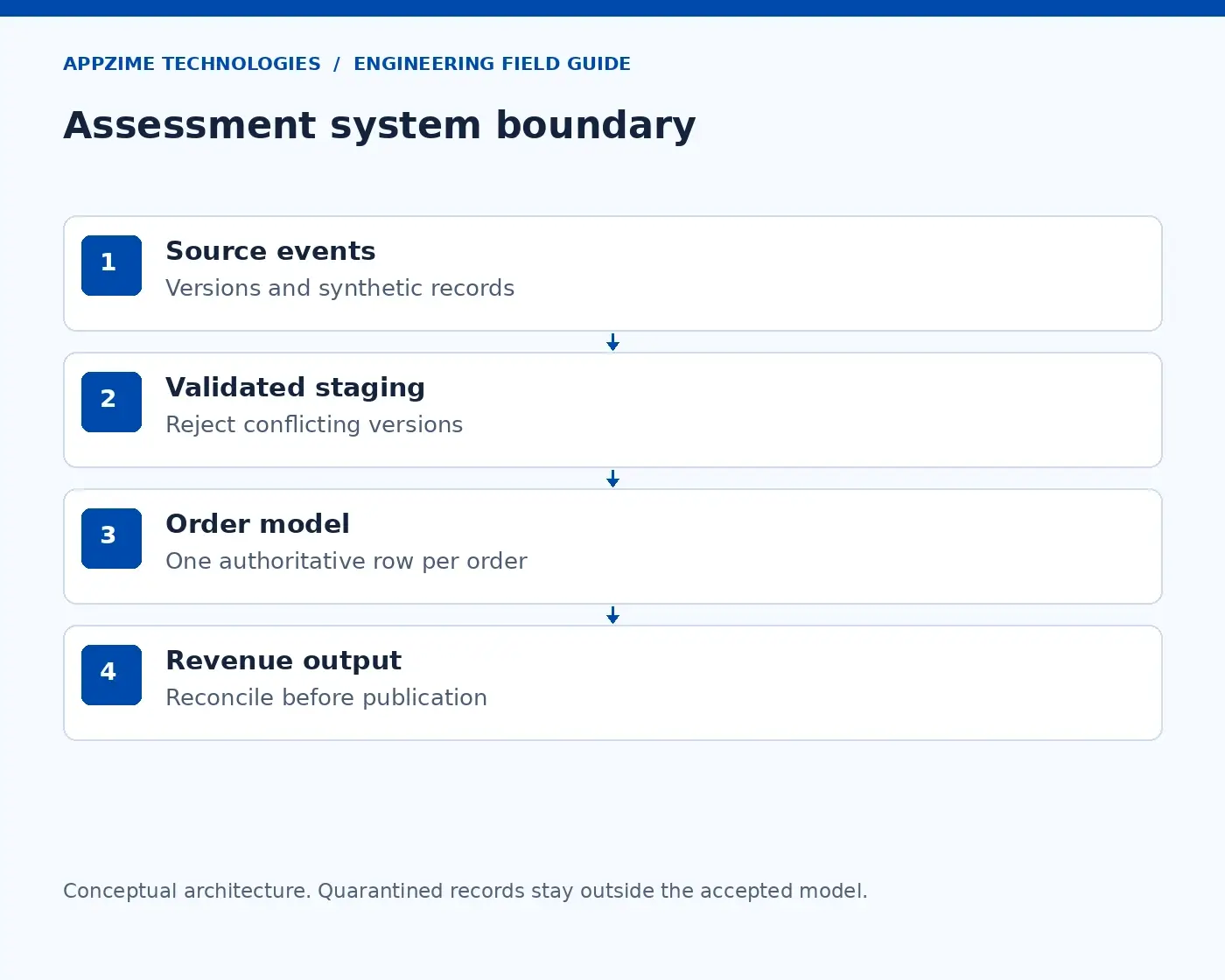
Follow the records from the source to the published dataset. Set conflicting records aside for investigation. Open full-size visual.
The path in the diagram is deliberately short. Source records arrive, questionable records are set aside for investigation, and accepted records become a useful business dataset. Each step gives you a different part of the candidate’s reasoning to discuss.
Use six records to uncover the important decisions
Here is the complete input. The version number comes from the source and increases whenever that order changes.
Order
Version
Status
Amount in paise
What happened?
A
1
Confirmed
10,000
Original order
A
2
Cancelled
10,000
Later cancellation
B
1
Confirmed
25,000
Original order
B
1
Confirmed
25,000
Exact duplicate
C
1
Confirmed
7,500
Original order
C
2
Confirmed
9,000
Corrected amount
The final table should contain three orders. A contributes zero because its latest version is cancelled. B contributes 25,000 paise once, and C contributes its corrected value of 9,000 paise.
The summary is therefore three orders, two confirmed orders, and 34,000 paise—₹340—in confirmed order value. It is a simplified reporting measure, not a complete accounting definition of revenue.
Now ask why a simple sum of confirmed input rows is wrong. It includes A before its cancellation, counts B twice, and includes both amounts for C. The arithmetic is easy; recognising which records belong in the answer is the useful engineering work.
Then ask what happens if an old event arrives after a newer one. Arrival time alone should not overrule the source version in this example. And if two records have the same order and version but different amounts, the rules no longer identify a trustworthy winner: the candidate should raise that conflict rather than quietly pick one.
Read the SQL together, rather than grading it in isolation
Once exact duplicates have been removed and conflicting versions have been handled, a window function can rank the remaining versions for each order. The following PostgreSQL example keeps the latest one and calculates the summary.
-- Input assumption: duplicate/conflict validation is complete.
WITH ranked AS (
  SELECT order_id, event_version, status, amount_paise,
         ROW_NUMBER() OVER (
           PARTITION BY order_id
           ORDER BY event_version DESC
         ) AS version_rank
  FROM validated_distinct_events
)
SELECT COUNT(*) AS order_count,
       COUNT(*) FILTER (WHERE status = 'confirmed') AS confirmed_count,
       COALESCE(SUM(CASE WHEN status = 'confirmed'
                         THEN amount_paise ELSE 0 END), 0) AS confirmed_paise
FROM ranked
WHERE version_rank = 1;
In plain language, PARTITION BY puts each order’s versions together, and ORDER BY puts the newest version first. The outer query counts and sums only the first row in each group. The PostgreSQL window-function tutorial explains this behaviour in more detail.
The query is only one part of the solution. Ask the candidate to walk from each input record to its effect on the final total. Someone who explains why C’s earlier amount disappears has shown more than someone who merely recognises ROW_NUMBER().
Keep the business assumptions visible too. If the next requirement introduces refunds, multiple currencies, or reporting across dates, the brief needs new rules. Recognising that the question has changed is a strength, not an excuse for failing to finish.
Next, make the pipeline fail
The total is correct. Now introduce a realistic interruption: the job writes its result, but the scheduler loses the success message and runs it again. Would the same order value appear twice?
This is where idempotency becomes useful. It means repeating the same operation does not keep changing the intended result. The candidate might propose replacing a defined reporting partition or updating records by a stable key, depending on the storage system.
Airflow’s best-practice guidance makes the same practical point: retries should produce a consistent result, and inputs should refer to a specific slice of data. If a retry reads whatever happens to be “latest,” it may no longer be repeating the same job.
Ask the candidate to describe what readers see while the new output is being built. Ideally, there is a clear boundary between the last accepted result and the next accepted result. A half-written table should not quietly become the finance team’s morning report.
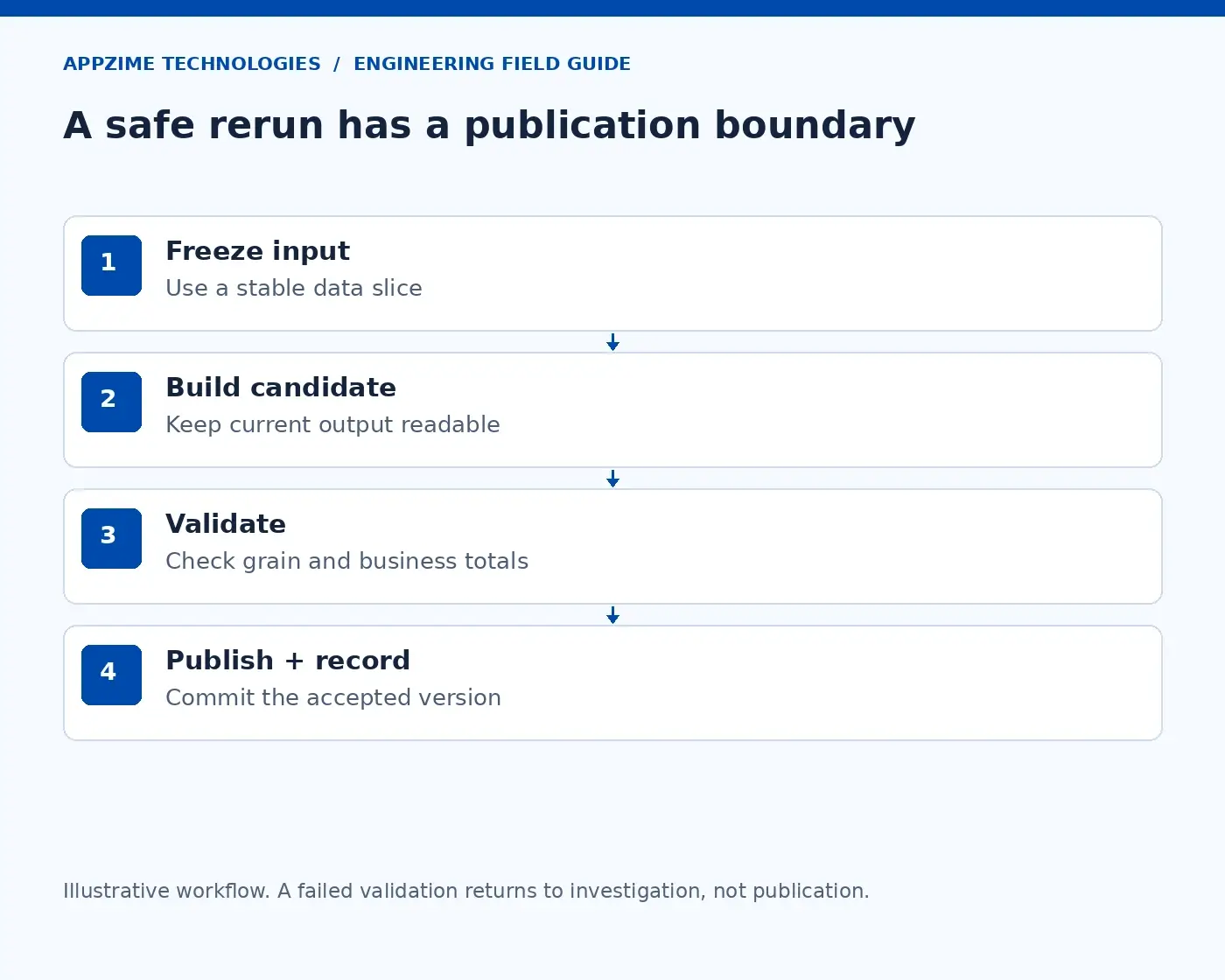
Build and check a candidate result before publishing it. A retry needs to preserve the agreed output. Open full-size visual.
Use the recovery diagram to slow the conversation down. Ask which input version is being processed, what is checked before publication, and what confirms the result was committed. The implementation can differ, but those questions should have clear answers.
Finally, add a correction for yesterday’s orders. Ask how the team will revisit affected data without accidentally rebuilding unrelated periods or hiding the change from its users. A good answer connects the technical reprocessing plan to the person who relies on the report.
Ask how the team will know when the numbers are wrong
A green job status tells you that code ran. It does not tell you that the numbers make sense. For this example, the candidate should propose checks tied to the promised output.
Useful checks include one row per order, a valid order ID, an allowed status, and agreement between the accepted input and the published summary. Freshness matters as well: a technically correct report that is two days late may still be unusable.
dbt’s data-test documentation describes tests as assertions about data, including uniqueness, missing values, allowed values, and relationships. The hiring question is what the engineer would do when one of those assertions fails.
Would they stop publication, isolate affected records, or alert an owner while allowing the rest through? There is no helpful answer without considering the impact. A conflicting order value and a missing optional comment deserve different treatment.
Ask for the alert message they would send. “Pipeline failed” leaves the next person guessing. “Orders for 17 October were not published because two versions conflict; the previous accepted report is still available” gives the recipient a starting point.
Turn the discussion into a fair hiring decision
Without shared criteria, interviewers can leave the same session with very different impressions. A scorecard helps them discuss what the candidate demonstrated, especially when one person values quick coding and another values careful questions.
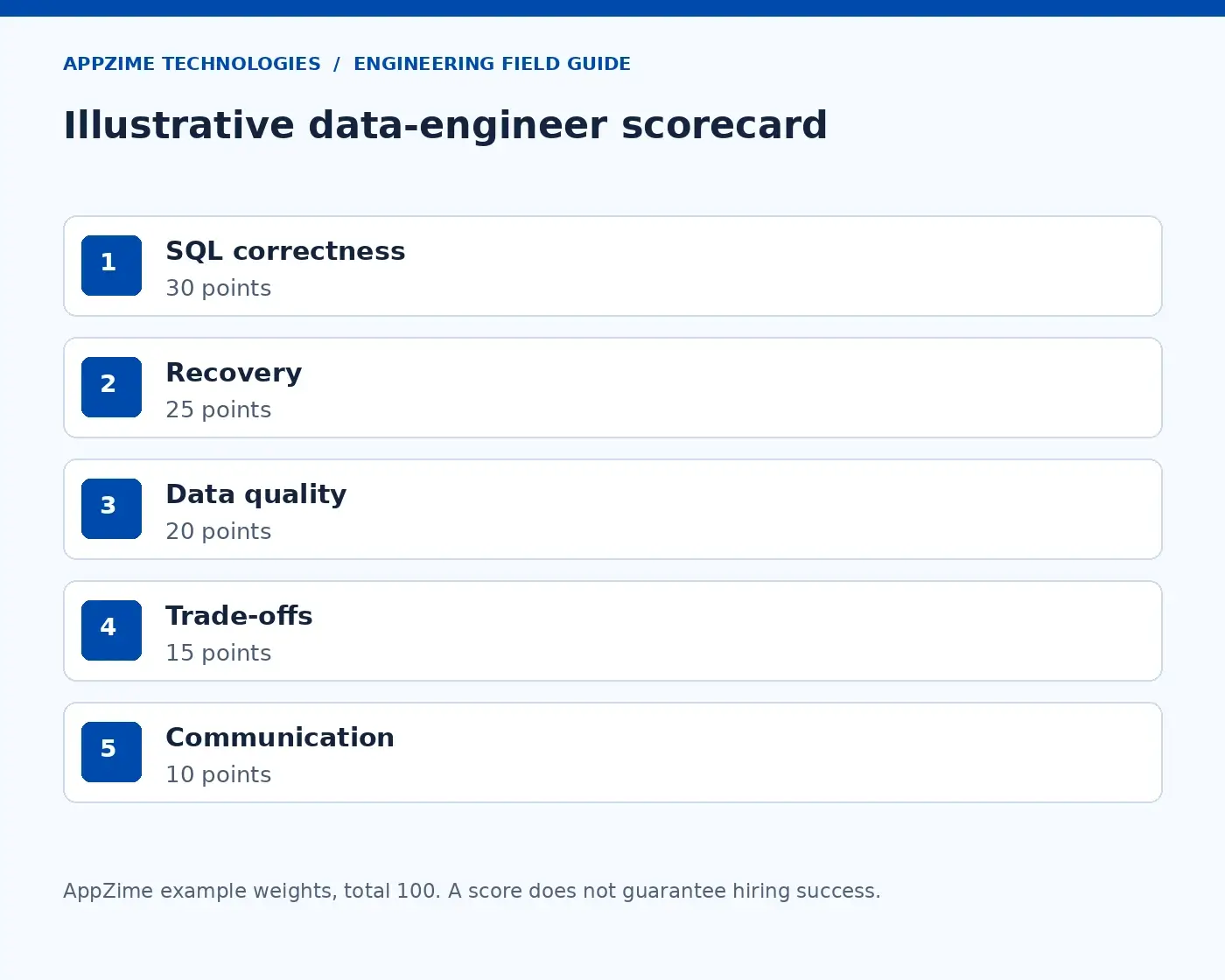
The weights below are an example you can adapt. Score each area from zero to four, then multiply that fraction by its weight; three out of four in a 20-point area gives 15 points. They are a discussion aid, not a hiring-performance benchmark.
Area
Example weight
Evidence to record
SQL and data correctness
30
Explains the current state of every order and gets the agreed total
Reruns and recovery
25
Explains duplicate prevention and what readers see after a failure
Quality and monitoring
20
Chooses meaningful checks and names the response owner
Architecture and cost
15
Chooses a proportionate design and explains its limits
Communication and handover
10
Makes assumptions and recovery steps understandable
Example interview weights, totalling 100 points. Adapt the criteria to the responsibility you are hiring for. Open full-size visual.
Have interviewers write their notes before comparing scores. “Identified the conflicting source versions and proposed an investigation path” is useful evidence. “Seemed senior” is much harder for a hiring panel to evaluate.
Agree the essential requirements before interviewing. A high overall total should not hide a gap in a responsibility the person will own immediately. Equally, do not reject someone for needing a reference page for syntax when their reasoning and result are sound.
Match the result to the responsibility you can offer
A junior engineer may need a clear task and a reviewer. A senior engineer may need to resolve ownership, challenge an unclear data definition, and plan a migration without disrupting consumers. Assess the responsibility you are actually hiring for.
For a contractor, carry the assessment into a first-deliverable brief: reproduce the orders dataset, demonstrate a safe rerun, add an agreed validation, and leave recovery notes another engineer can follow. This gives the engagement a practical starting point.
If you are considering IT staff augmentation, share that brief alongside the job description. If you need a team to own the wider implementation, AppZime’s software development services are a separate scoping conversation.
The next step is small: choose one dataset your business depends on and create a synthetic version of its awkward edge cases. If you need help defining the role around that work, talk to AppZime about the responsibility and expected outcome. That is a more useful place to start than another list of interview questions.
Sources reviewed on 18 October 2026. The dataset, session format, and scoring weights are illustrative.
Test automation for SaaS applications should protect the workflows customers depend on: account access, tenant boundaries, subscriptions and core product actions. Start with business risk, cover rules and APIs before adding a focused browser suite, and make failures useful to the release team. A valuable test programme provides credible evidence for shipping decisions rather than simply increasing the number of automated checks.
This guide is for SaaS founders, engineering managers and QA leads building or improving a regression suite. Picture a release that passes its browser checks but lets a member download another customer’s export. The screen works; the customer boundary does not. Your automation plan needs to prove both the intended workflow and the behavior that must never be allowed.
The nine-step plan is AppZime Technologies’ recommended approach. The guide also includes release and billing diagrams, documented customer stories, an October 2026 tooling update and a fictional implementation exercise. Tool choices, test volumes and release thresholds should follow the product’s architecture and risk.
What makes SaaS testing different?
A SaaS product often serves several customer organizations through shared application infrastructure. Those organizations can have different roles, subscription entitlements, feature settings and data. A change that works for one account may break another, even when the visible screen looks identical.
Automation is useful when important behavior repeats and the team can state the expected outcome. It is less useful to automate unstable screens without clear requirements or to translate every manual test into a browser script. Exploratory review remains valuable for unfamiliar workflows and confusing user experiences.
The starting point should be the product model. AppZime Technologies’ custom software development services include SaaS and API work, which are closely related to designing a testable application and its delivery process.
Choose test coverage by the behavior being protected
Behavior
Useful test layer
Example evidence
Business rules
Unit or component tests
Correct entitlement calculation
Data access and state changes
API and integration tests
Allowed update persists; forbidden update fails
Service compatibility
Contract tests
Consumer expectations match provider responses
Critical user journeys
Browser tests
Customer completes the core workflow
Shared-resource behavior
Performance and resilience tests
Defined service behavior under a representative load
Design the release flow before adding more tests
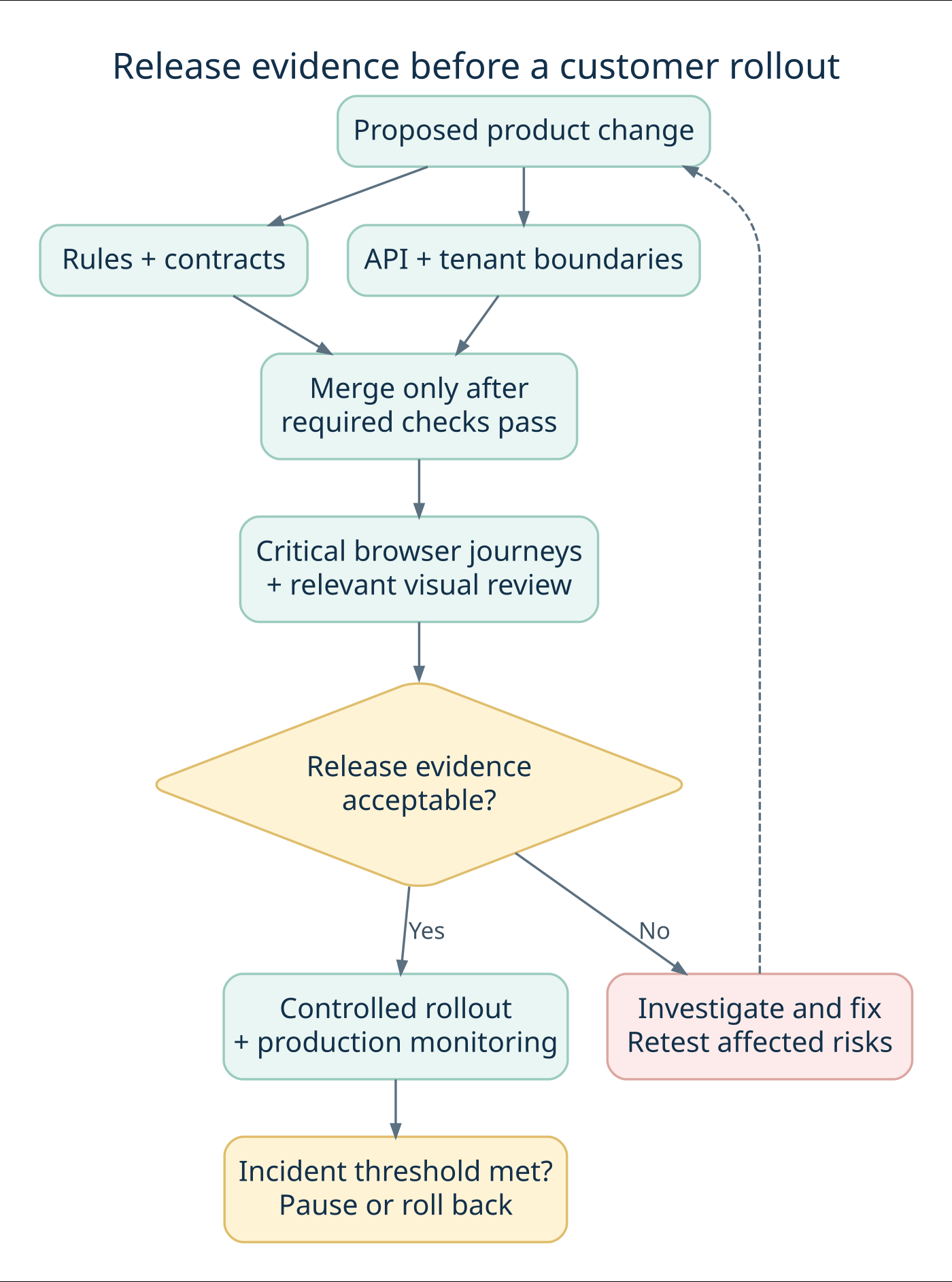
A release pipeline should answer a sequence of questions: are the business rules correct, do services respect their contracts, can users complete the important journeys, and is the evidence good enough to roll out? Different checks answer different questions. Running every check at every stage can slow feedback without making the release decision clearer.
Figure 1. An illustrative release flow. Required checks and exception rules must be defined for the product; a successful test run does not remove the need for rollout monitoring.
Give each test layer a clear job
A unit test checks a small piece of logic in isolation, such as deciding whether a role may request an export. An integration test checks cooperating components, such as the authorization service and database. A contract test checks agreed expectations at a service boundary. An end-to-end test checks a complete journey through the deployed system. A visual test compares rendered appearance against a reviewed baseline.
These categories overlap in some toolchains. What matters is the failure each test can detect and the assumptions it makes. A mocked billing provider can make a test fast and deterministic, but it cannot establish that your deployed webhook endpoint accepts the provider’s real signature format. Keep a controlled integration check for that boundary.
A practical starting allocation of release evidence
Stage
Example checks
Purpose
Proposed change
Business rules, relevant contracts, critical API permissions
Find actionable defects while the change is small
Integrated build
Database behavior, queues, service integration
Verify that deployed components work together
Release candidate
Critical browser journeys, selected visual and accessibility review
Confirm customer-facing behavior in the supported matrix
Run critical security-boundary checks as often as the risk requires, including after changes to shared authorization code. The table is a planning pattern, not a rule that security testing waits for one particular stage. Assign an owner to every blocking failure so a red pipeline produces a decision rather than an unattended notification.
Define what “green” means
A green result should identify the build, environment, fixtures, enabled features and checks that actually ran. A test job that skips all tests because a filter matches nothing must not be presented as successful coverage. Similarly, a browser smoke suite passing with a mocked identity service is not evidence that production single sign-on is healthy.
Choose a small number of release-critical journeys and write down what makes their evidence insufficient: an unavailable dependency, an unexpected skip, missing artifacts or an unexplained retry. This makes the gate understandable to product managers as well as test engineers.
Test automation for SaaS applications: the nine-step plan
1. Rank journeys by customer and business impact
Start with a risk workshop involving product, engineering, support and QA. Identify what would prevent a customer from using the product, expose another customer’s information or create an incorrect charge. Map each risk to a concrete expected behavior.
For an illustrative team-management product, the first priorities might be sign-in, invitation acceptance, permission changes, subscription renewal and saving a shared project. That example is a planning exercise, not an AppZime client implementation.
Give every prioritized journey an owner. Record which parts are already tested and which depend on manual review. This exposes coverage gaps more clearly than a percentage of automated test cases.
2. Place each check at the right layer
Keep calculations and branching business rules close to the code that implements them. Test persistence, authentication and state transitions through APIs or integration tests. Reserve browser journeys for behavior that requires the rendered application and its components to work together.
There is no universal test-layer ratio for every SaaS product. A calculation-heavy service and a collaborative editor have different risks. Repeating the same rule across many browser journeys can increase maintenance without improving confidence.
For service boundaries, Pact’s contract-testing documentation describes verifying consumer and provider expectations independently. Use this where separately deployed systems need compatibility checks, while retaining integration tests for real infrastructure and end-to-end outcomes.
3. Make tenant isolation and authorization explicit
Use at least two synthetic customer organizations and several roles in the test environment. Confirm that a user from one organization cannot retrieve, change or export another organization’s resources by changing an identifier.
The OWASP multi-tenant security guidance covers isolation across data access, storage, caches and asynchronous processing. Use these boundaries to build a product-specific test inventory. A hidden button does not establish that the underlying request is denied.
Include ordinary members, customer administrators and separately authorized platform operators. The OWASP authorization guidance recommends denying access by default and validating permissions on requests. Verify allowed operations as well as denied ones so restrictive changes do not silently break legitimate customer work.
4. Control test data and environment state
Create synthetic data with known ownership and predictable lifecycle rules. Each test should establish the state it requires and clean up what it creates, without depending on a previous test having run. Give parallel workers separate accounts or data namespaces when they change shared state.
Seed a small set of meaningful account conditions: an active subscription, an expired trial, a restricted user and a disabled organization. Make the relevant time controllable where the application supports it, rather than waiting for a real renewal date.
Document differences between staging and production. A staging system with simplified permissions or disabled queues can make a passing suite less informative. Test data should not require copying customer records into an uncontrolled environment.
5. Test billing and background events as state transitions
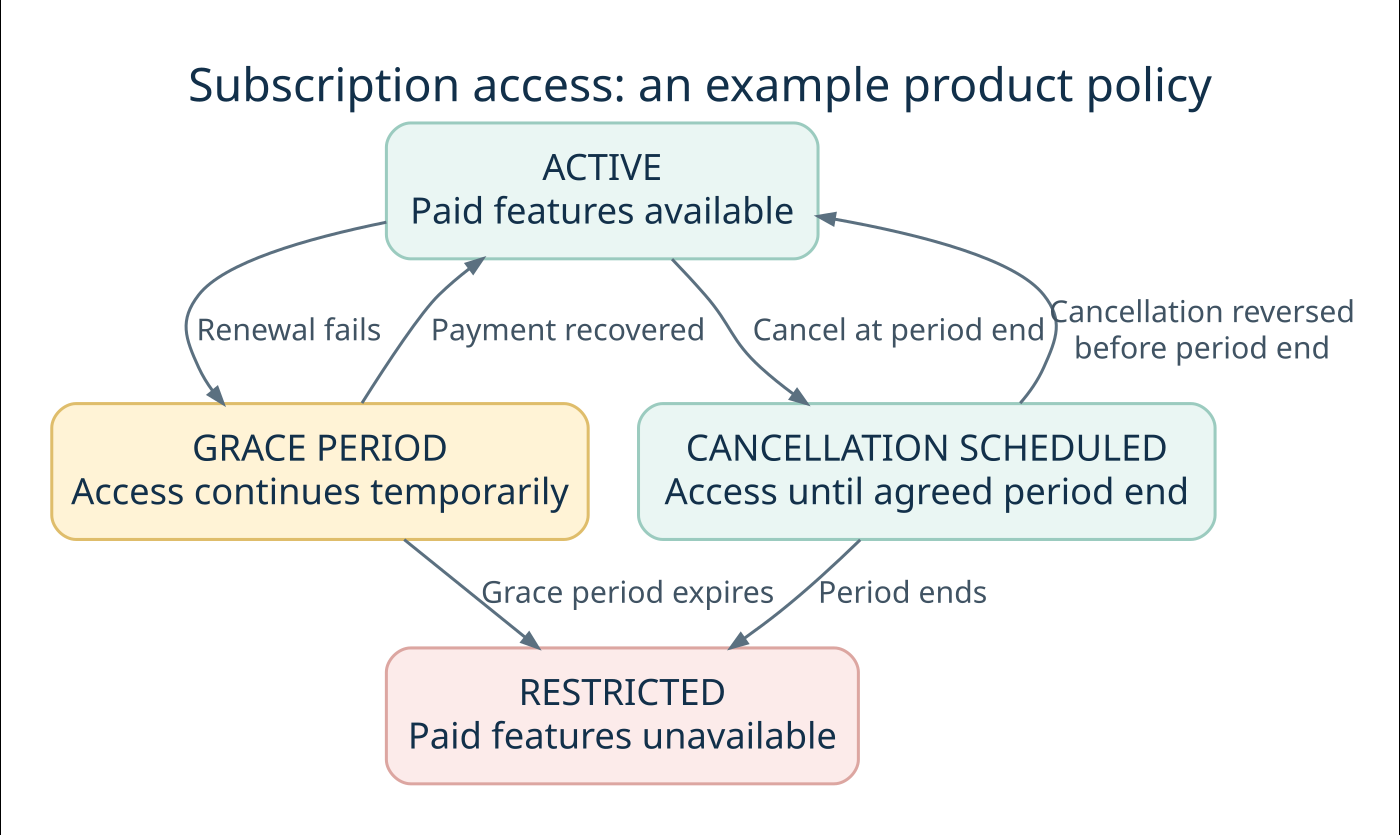
A subscription workflow extends beyond a successful checkout screen. Test the intended outcomes of renewal, payment failure, cancellation, plan change and entitlement updates. Separate your product’s rules from the payment provider’s own interface.
Stripe’s webhook documentation explains that event delivery can be retried, duplicates can occur and ordering should not be assumed. For a Stripe integration, test those behaviors in your handler; for another provider, verify its documented delivery contract.
Use sandbox or controlled test events. Check that repeated delivery does not grant duplicate credits or trigger a repeated side effect. When events arrive out of order, verify the application reaches the correct authoritative state. Also exercise timeout and recovery paths instead of checking only successful requests.
6. Keep browser tests focused and diagnosable
A small browser suite should show that a customer can complete the most valuable journeys in supported environments. Select browsers and device sizes using your support commitments and usage evidence. Do not expand the matrix simply because a tool can run it.
Playwright’s best practices recommend isolated tests, resilient locators and assertions that wait for expected conditions. Prefer meaningful accessible roles or deliberate test identifiers over fragile selectors tied to page layout. Avoid fixed delays that assume every environment responds at the same speed.
Capture enough information to understand failures: the request, relevant application logs, a trace or screenshot and the tested version. Restrict access to these artifacts because they may include session information. A test that fails without usable evidence creates investigation work instead of useful feedback.
7. Set release gates that the team can trust
Define which checks run on a proposed code change, after merge and before release. Keep the first stage small enough to provide useful feedback; run broader suites at points that match their cost and risk. Avoid declaring success when the environment never became ready to execute the tests.
Write down who can approve a release with a known failure and what evidence they need. An exception should identify the affected behavior, customer impact, owner and follow-up action. Security or tenant-boundary failures need an explicitly defined escalation route.
Connect these checks to the delivery pipeline. AppZime Technologies’ DevOps and cloud services are relevant to CI/CD integration, environment management and release operation.
8. Treat flaky tests as maintenance work
A flaky test passes and fails without a relevant product change. Investigate shared data, asynchronous work, unstable selectors and environment availability before adding more retries. A passing retry can hide a problem the customer still experiences.
Playwright’s retry documentation distinguishes passed, flaky and failed outcomes. Preserve that distinction in reporting. If a test must be temporarily removed from a blocking gate, keep an owner, reason and review date, plus another way to cover the affected risk.
Measure time spent diagnosing failures and the recurring causes. Test automation for SaaS applications becomes harder to trust when the team learns to dismiss red results as routine noise.
9. Review coverage after incidents and product changes
Use escaped defects to ask what evidence was missing. Was the requirement unclear, the scenario absent, the test ineffective or the production configuration different? Add the smallest meaningful regression check at the appropriate layer.
Retire redundant checks when the product changes. Track protected journeys, high-impact gaps, flaky outcomes, execution time and investigation effort. Code coverage can reveal untested paths, but it does not establish that tenant permissions or business outcomes are correct.
Keep exploratory testing, accessibility review and performance evaluation in the overall quality plan. Functional automation is one source of release evidence, not a replacement for every other review.
Recent tooling news and documented SaaS testing case studies
7 October 2026: Playwright adds another way to expose hidden test dependencies
The Playwright 1.64 release notes introduce a --shuffle option with a reproducible seed. The release also adds project defaults that can keep configured projects out of the default run. For teams sharing test accounts or mutable data, shuffled execution can help reveal a suite that passes only in its usual order.
Our practical recommendation is to try randomized ordering in a diagnostic job, retain the seed when something fails, and check that the intended browser projects still run in CI. Review the release’s breaking changes before upgrading. A new runner option does not fix shared-state dependencies by itself. This update was checked on 9 October 2026; pin and review the version your project actually uses.
Case study 1: Canva makes visual changes reviewable
BrowserStack’s Canva case study describes using Percy with React and Storybook components alongside a Buildkite pipeline. Visual changes become visible in pull requests, giving engineers a way to review intended and unintended differences. The article describes a reduction in manual UI-testing effort but does not provide a reliable percentage to use here.
The lesson for a SaaS team is to add visual evidence where appearance affects product usability, such as an editor, dashboard or pricing screen. Assign a human baseline reviewer. Automatically approving every changed screenshot removes the very comparison the test was meant to provide.
Case study 2: Logikcull improves testing throughput
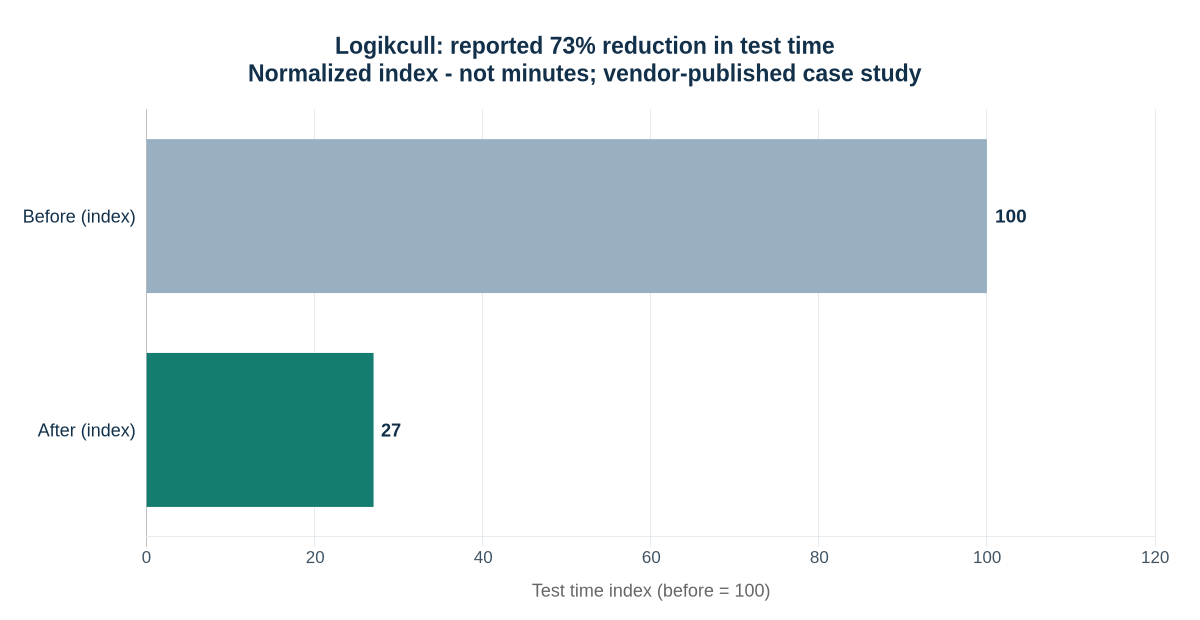
BrowserStack’s Logikcull customer story reports a 73% reduction in test time and describes a small QA function supporting a larger engineering team. It also discusses the usefulness of cross-browser execution and diagnostic artifacts. These are vendor-published results from one implementation, not a promised benefit from adopting the same tool.
Figure 2. Source: BrowserStack’s Logikcull case study. The reported 73% reduction is shown as a normalized index: 100 before and 27 after. These are not minutes or independently verified measurements.
Accessible data table for Figure 2
Measure
Index
Basis
Before
100
Normalized baseline
After
27
100 × (1 − 0.73)
The practical lesson is to locate the bottleneck first: execution capacity, test design and failure investigation are different problems. Both customer-story pages were checked on 9 October 2026; their retrieved article bodies do not display publication dates. They are established examples, not presented as new announcements.
A release evidence matrix for a SaaS team
The following matrix illustrates how to connect risks to decisions. Replace the example roles and timing with the responsibilities in your own team. Critical boundaries may need checks at more than one stage.
Illustrative release evidence matrix
Risk
Required evidence
Typical reviewer
Cross-customer data exposure
API denial and storage-isolation checks pass
Engineering and security owner
Incorrect subscription access
Billing-state and repeated-event tests pass
Billing feature owner
Broken core workflow
Selected browser journey completes
Product and QA owner
Integration incompatibility
Relevant contracts and integration checks pass
Consumer and provider teams
Unexplained regression failure
Failure is resolved or explicitly reviewed
Release owner
For each release, retain the tested commit or build, environment configuration, results and unresolved exceptions. This makes later investigation possible without implying that a passing suite guarantees a defect-free release.
Worked example: protect a multi-tenant project-management product
Fictional implementation exercise: assume a SaaS product offers shared projects, CSV exports and paid collaboration features. The following accounts, policies and test outcomes are invented for teaching. They are not AppZime customer records or results.
1. Set up fixtures that make a boundary visible
Create two organizations, Cedar and Maple. Give each a workspace administrator and an ordinary member. Add one export owned by Cedar and one owned by Maple. Use unique resource identifiers and separate fixture namespaces for parallel workers. A test that checks only one organization cannot show whether another organization’s identifier is improperly accepted.
For this example, administrators may download their own organization’s exports; members may not. The application deliberately returns 404 for requests to another organization’s export to avoid confirming its existence. That is an example contract, not a requirement that every API must use the same status code.
Example authorization matrix for export downloads
Identity
Requested resource
Expected result
Additional assertion
Cedar administrator
Cedar export
200, permitted download
Only Cedar records are present
Cedar member
Cedar export
403, denied by role
No file content or signed download URL returned
Cedar administrator
Maple export
404, cross-tenant request denied
No Maple metadata disclosed
Cedar member
Maple export
404, cross-tenant request denied
No background export job created
Revoked Cedar session
Cedar export
401, authentication rejected
Old credentials cannot initiate a fresh download
Test the underlying request directly, then add one browser journey showing that an authorized administrator can find and download an export. The browser journey proves discoverability and integration; the API matrix exercises the permission combinations cheaply and explicitly. Also inspect object-storage delivery: denial at the application endpoint is insufficient if the file itself is exposed through another path.
2. Write assertions about state, not only response codes
An HTTP denial can still leave an unintended side effect. After a forbidden export request, check that no job was queued and no downloadable file was created. After a permitted request, check the owner recorded on the job and the tenant filter used by the worker. Include cache keys and background jobs in the tenant model.
Scenario: Cedar cannot start Maple's export
Given a Cedar administrator and a Maple-owned project
When the administrator submits the Maple project ID to the export API
Then the request is denied according to the API contract
And no export job or file is created
And the response reveals no Maple project details
This scenario is a specification template, not runnable code. Implement it using the application’s actual authentication, fixtures, queue inspection and cleanup facilities. Avoid test-only shortcuts that bypass the very authorization behavior under review.
3. Model billing as the customer’s access policy
Assume this fictional product gives customers a short grace period after renewal failure. Recovery restores active access; expiry restricts paid features. Cancellation at the end of the paid period preserves access until that period ends. These are product decisions that need explicit tests, not universal rules for every subscription business.
Figure 3. A fictional product-access policy. This is not Stripe’s official subscription state machine. Test the mapping between provider events and your application’s own access rules.
Now walk through a complete scenario. Begin with an active account and confirm that a paid collaboration action succeeds. Send a signed sandbox renewal-failure event and verify the product enters its configured grace state. Advance a controllable application clock past the grace deadline and verify that the paid action is denied while the account still receives the intended recovery information.
Repeat the scenario with payment recovery before expiry. The account should return to active access without creating duplicate credits or notifications. Send the same event twice, deliver an older event after a newer one, and simulate a lost acknowledgement followed by redelivery. Check the final stored state and side-effect count after processing finishes.
For an asynchronous implementation, persist the event or enqueue it durably before acknowledging receipt. Keep event deduplication and state changes consistent with the transaction model; use a durable mechanism for effects that occur outside the database. The precise design depends on the provider and infrastructure. Have the integration owner review recovery after worker crashes, not only normal delivery.
4. Add one realistic browser journey
Choose the smallest browser story that joins the important parts: an administrator signs in, opens the billing page, sees the correct entitlement and successfully uses a paid feature. Add an appropriate negative state, such as the same action after grace expiry. Seed the state through controlled fixtures so the test does not wait for a real billing cycle.
Capture a trace and application correlation ID on failure. A screenshot of an error page may show the symptom, while the request and worker logs show that the entitlement update never completed. Keep credentials and sensitive customer-like data out of published test reports.
What should an automation engagement deliver?
For test automation for SaaS applications, ask for outcomes and maintainable assets. Use this checklist when reviewing a delivery proposal:
Agree which customer journeys and failure scenarios the first release must protect.
Request the test architecture, data fixtures and environment setup instructions.
Define pipeline stages, failure reports and release decision responsibilities.
Include the work needed to improve application testability.
Require a handover guide and named owners for ongoing maintenance.
The cost of test automation for SaaS applications depends on product complexity, integration count, environment maturity and ongoing change. Separate initial implementation from routine maintenance and execution costs. A large browser suite on an unstable environment can require more upkeep than the proposal suggests.
Before choosing a partner, request a sample test failure and its diagnostic report. Ask how the team verifies tenant boundaries, controls test data and handles unreliable checks. AppZime Technologies can review the engineering and delivery requirements through a project scoping discussion.
Measure feedback quality, then plan a maintainable rollout
A small operating dashboard
Metrics that make test automation for SaaS applications easier to manage
Metric
Definition
Decision it supports
Critical-journey coverage
Named priority journeys with current, reviewed evidence
Where is meaningful protection missing?
First-run pass rate
Passing executions before retries ÷ executed tests
Is the suite becoming noisy?
Flaky outcome rate
Tests that fail and then pass on retry ÷ executed tests
Which checks need investigation?
Time to actionable feedback
Elapsed time from change submission to usable diagnosis
Are engineers waiting on execution or investigation?
Escaped high-impact defects
Customer-impacting defects missed by the release evidence
Which assumptions or scenarios need revision?
Keep metric definitions stable across reporting periods. If the number of tests changes, publish the denominator. If a failing check is quarantined, show that it is excluded from the blocking gate and name the owner. A prettier pass-rate chart created by hiding difficult checks is not evidence of improved quality.
Estimate execution capacity without promising impossible speedups
Consider a hypothetical suite of 300 tests averaging 30 seconds each. The serial workload is 9,000 seconds, or 150 minutes. With four workers and perfect distribution, the execution-only lower bound is 150 ÷ 4 = 37.5 minutes. That calculation excludes setup, retries, queues and contention; it is not a forecast of a real run.
Before buying more concurrency, identify tests that share accounts, lock the same records or wait for a slow external dependency. Extra workers can amplify these bottlenecks. Measure the actual critical path, split independent work and compare the result using the same environment and representative changes.
A staged first-month plan
Illustrative implementation sequence
Stage
Concrete output
Review question
Week 1: map risk
Priority journeys, tenant model and release responsibilities
Do product, engineering and QA agree what must be protected?
Week 2: establish foundations
Independent fixtures, API boundary tests and diagnostic artifacts
Can failures be reproduced and understood?
Week 3: join the workflow
Focused browser journeys and CI gates
Does the pipeline run the checks it claims to run?
Week 4: stabilize and hand over
Failure triage, ownership, documentation and coverage review
Can the team maintain the suite without its original author?
Use this as an ordering guide, not a promise that every product is ready in four weeks. Applications with weak fixtures, legacy authentication or unstable environments may need groundwork first. Reserve ongoing capacity for maintenance and exploratory testing; otherwise automation slowly becomes a second product with no team to maintain it.
A good handover includes commands to run each suite, fixture setup, supported versions, artifact locations, triage examples and the process for approving visual baselines. Ask a new team member to diagnose one deliberately introduced defect. Their ability to explain the failure is more useful evidence of maintainability than the number of scripts delivered.
Frequently asked questions
Should every manual test be automated?
No. Prioritize repeatable checks with clear expected results and meaningful customer impact. Exploratory work and subjective usability assessment still need human judgment.
Is Playwright enough for a SaaS testing strategy?
It can support browser and API testing, but the strategy also needs appropriate business-rule tests, integration coverage, security checks and operational evidence. Choose the combination that fits the application.
When should a SaaS team start automation?
Start when a critical workflow has sufficiently clear expected behavior and will be exercised repeatedly. Establish testable architecture and controlled data early, then expand coverage as requirements stabilize.
How do we know the programme is working?
Review whether releases receive timely, credible evidence and whether important regressions are caught. Combine incident review, maintenance effort and feedback speed with coverage of critical journeys; a raw test count is insufficient.
Technical references and linked case studies reviewed on 9 October 2026. Confirm tool capabilities and payment-provider behavior against the versions used by your product.
Enterprise RAG implementation connects a language model to approved company information so employees can receive answers grounded in relevant documents. A dependable rollout starts with a narrow use case, preserves source permissions, tests retrieval and answer quality separately, and assigns ownership for updates. The model is one component; the larger delivery challenge is maintaining reliable evidence, appropriate access and a useful employee experience.
This guide is for technology leaders, product owners and operations teams planning an internal knowledge assistant. Imagine an employee asking a simple question and receiving a fluent answer from last year’s policy. The wording is convincing; the evidence is wrong. A useful assistant must know which source applies, who may read it and when to stop answering.
Work through the nine-step framework, architecture diagrams, documented case studies and a complete fictional pilot below. The implementation framework is AppZime Technologies’ recommendation. Published company examples are attributed to their sources; the pilot data and budget are explicitly illustrative.
When is RAG the right fit?
Retrieval-augmented generation, or RAG, retrieves relevant information and supplies it as context for a model’s answer. Microsoft’s RAG overview describes this grounding pattern and its challenges, including fragmented data, limited context and access control. Grounding helps connect responses to evidence; it does not guarantee that every answer is correct.
Useful starting points include searching product manuals, finding approved operating procedures and answering internal service-desk questions. Prefer a domain with maintained documents, a clear owner and people who can judge answer quality. Delay the project if nobody can identify which version of a policy is authoritative.
Choose the simplest solution that meets the requirement
Requirement
Starting approach
Decision check
Find a known document
Conventional search
Does showing the source already solve the problem?
Explain information across approved documents
RAG assistant
Can the answer be checked against accessible evidence?
Calculate a live account balance
Authorized application or database query
Is a current structured record required?
Change records or trigger approvals
Controlled workflow integration
Who authorizes the action and handles failure?
A knowledge assistant can sit beside a workflow system, but permission to read documents should not automatically grant permission to act. AppZime Technologies’ AI and machine learning services provide a relevant starting point for discussing the application scope.
How enterprise RAG implementation works, from question to evidence
Think of RAG as an evidence supply chain. The user asks a question; the application finds relevant passages the user is allowed to see; the model uses those passages to compose an answer. A citation then gives the reader a route back to the source. Each handoff can fail independently, so each needs an owner and a test.
Figure 1. A recommended request flow. Access filtering happens before source text reaches the model. The application returns an explanation or clarification request when evidence is insufficient.
Five terms worth understanding before choosing a stack
RAG vocabulary in practical language
Term
Meaning
Question for your team
Chunk
A meaningful extract from a source document
Does it retain the heading, exceptions and table labels needed to understand it?
Embedding
A numerical representation used to compare meaning
Does retrieval work with your acronyms, languages and product names?
Hybrid retrieval
A combination of keyword and semantic search
Can it find both exact identifiers and differently worded questions?
Reranking
A second pass that orders retrieved candidates
Does the extra quality justify added latency and cost?
Grounded answer
An answer whose claims are supported by supplied evidence
Can a reviewer verify each material claim against an accessible source?
Build two paths: content preparation and live answering
The preparation path runs when content changes. It reads an approved source, extracts text and structure, records ownership and permissions, then creates searchable records. The answering path runs when someone asks a question. It establishes identity, applies access rules, retrieves evidence and generates a response. Keeping these paths distinct helps the team diagnose whether a problem came from ingestion, retrieval or generation.
Figure 2. Illustrative source records. Carry provenance and access metadata into each chunk; an embedding alone does not establish authority or permission.
For example, splitting a procedure immediately before the words “except for external contractors” can change its apparent meaning. Preserve the exception with the rule or ensure the retriever can recover the connected context. Similarly, a table cell containing “30” is unhelpful without its row label, unit and product version.
Choose chunk boundaries by inspecting real documents and testing representative questions. Avoid committing to one universal chunk size at procurement time. A brief policy, an API reference and a scanned manual have different structures. Keep the original source available so the assistant can link to the complete context.
Where authorization belongs
The application should derive access from trusted identity and policy systems. A user’s question must not be able to grant access by claiming “I am an administrator.” Filter candidate evidence before sending it to the model, protect caches by identity or permission scope, and recheck source access when presenting links. Log access decisions without unnecessarily copying sensitive passages into diagnostics.
Plan permission revocation as deliberately as document updates. If an employee changes teams, cached answers and previously indexed access metadata should not silently preserve access. Agree the maximum acceptable propagation delay with the source owner and test it. A response can be factually correct and still be an unacceptable disclosure.
Enterprise RAG implementation checklist: nine steps
1. Define one decision the assistant should support
Write the user, question category and expected response before selecting a model. “Help support staff locate the correct troubleshooting procedure for an identified product version” is a usable brief. “Let everyone ask anything about the company” leaves the evidence boundary undefined.
Collect representative questions from actual work. Include ambiguous requests, outdated terminology and questions the assistant should decline. Record the current effort required to find an answer, then decide how a pilot will measure improvement without assuming that every conversation saves time.
2. Map documents, owners and access rights
Create a source register with repository, owner, document identifier, version, audience and update method. Decide which material is excluded. An ingestion account’s broad access must not become every employee’s access.
Microsoft documents document-level access controls, including query-time security filters. Use the equivalent supported mechanism in your chosen platform. Derive the caller’s identity on the server, apply authorization before content reaches the model, and fail closed when permissions cannot be established.
Test what happens when an employee changes teams or loses access. Permission changes must affect retrieval, cached answers and conversation reuse. A prompt asking the model to keep information confidential is not an access-control boundary.
3. Prepare content without losing its meaning
Remove duplicates, identify superseded versions and preserve headings, table relationships and source links. A product limit separated from its unit or exception can produce a misleading answer even when the correct document was retrieved.
Microsoft’s document chunking guidance explains approaches for dividing content into searchable units. Treat chunk size as an experiment, not a universal setting. Evaluate a short policy, a long manual and a table-heavy document separately.
Keep enough metadata to locate the original passage. Define how updates replace old chunks and how deletion propagates. If parsing fails, surface the failure to the source owner instead of quietly indexing incomplete content.
4. Establish a retrieval baseline
Start with a small approved collection and compare search results against known useful passages. Examine exact identifiers, abbreviations and natural-language questions. A relevant-looking paragraph may still describe the wrong product, country or policy version.
Compare keyword, vector and hybrid retrieval where supported. Add reranking only when measured improvements justify additional latency and expense. Keep the question set fixed while changing one retrieval setting at a time so the team can explain what improved.
The practical question for enterprise RAG implementation is whether the system finds the evidence needed for the task. A sophisticated search stack with poorly maintained sources still produces weak grounding.
5. Design answers that expose their evidence
Specify an answer format: direct response, supporting source links and any relevant uncertainty. Source links should point to documents the employee can open. If two approved sources conflict, the assistant should identify the conflict and route it to an owner.
Ask for clarification when the request lacks a product version or other essential context. Define an explicit “I could not find sufficient approved information” response. Avoid turning a low-relevance search result into a confident answer merely to keep the conversation moving.
Review citations for actual support. An answer can contain a valid document link while making a claim that the linked passage does not establish.
6. Evaluate retrieval and answers separately
Build a versioned evaluation set with questions, permitted evidence and reviewer expectations. Split questions used for development from those used for acceptance. Otherwise the team may optimize for familiar examples while overlooking new requests.
Microsoft’s RAG evaluation guidance distinguishes dimensions such as groundedness, completeness and correctness. Use several measures together: a response can accurately quote an outdated document and still be wrong for today’s task.
Have domain reviewers examine consequential errors and disputed ratings. Automated evaluators can assist with scale, but their scores require calibration. Set acceptance thresholds with the business owner and record the trade-off between unanswered questions and unsupported answers.
7. Test hostile content and operational failures
Retrieved documents are evidence, not trusted instructions. The OWASP prompt injection guidance describes attacks carried through retrieved content and recommends layered controls. Separate instructions from documents, constrain available capabilities and test attempts to redirect the assistant.
Also test source outages, expired credentials, index failures and model timeouts. Decide whether the interface should show a temporary error, offer ordinary search or escalate to a person. Do not silently substitute unrestricted sources when an approved repository is unavailable.
Protect query logs and review samples because they can contain sensitive business information. Define who can inspect them and how long they are retained.
8. Pilot with named owners and a limited audience
Give the initial release a defined user group, supported question scope and feedback route. Ask reviewers to label issues as missing evidence, wrong retrieval, unsupported answer, confusing interface or permission failure. This makes fixes more targeted than a single thumbs-down count.
Use release gates for data readiness, access tests and answer quality. Expand scope only after the team can maintain the existing collection. Integration with employee identity, source systems and monitoring belongs in the delivery plan from the beginning.
9. Operate the assistant as a maintained product
Assign owners for connectors, document quality, evaluation sets, application incidents and spending. Version the prompt, model configuration, index settings and ingestion pipeline so a regression can be traced to a change.
Track response time, failed requests, source freshness and cost per useful resolved query. Include indexing, storage, reranking, model calls, monitoring and review effort. Re-run representative tests after changes and maintain a rollback option for the application and index.
AppZime Technologies’ DevOps and cloud services are relevant to planning deployment, monitoring and operational ownership alongside the AI application.
What recent developments and real case studies teach us
Recent reading: enterprise data needs more than one access pattern
14 September 2026: Microsoft’s Data Meets Agents discusses integration patterns for connecting Foundry agents to enterprise data, including reusable retrieval and grounding through knowledge bases. The practical implication for a buyer is to identify which questions need documents and which need live business-system access before selecting a platform.
25 June 2026: AWS published a Chaplin architecture guide for AWS Health analytics. It separates structured queries and aggregation from interpretation of unstructured descriptions. Our implementation takeaway: retrieve a policy to explain it, but use an authorized structured query to count affected records. Similarity search is not a substitute for a complete numerical query.
These are dated developments checked on 9 October 2026. They inform the design choices in this guide; they do not make the article a live news feed or establish that every mentioned platform feature is suitable for production.
Case study 1: Morgan Stanley puts evaluation inside the workflow
OpenAI’s Morgan Stanley customer story describes an internal assistant supported by expert evaluations and a daily regression set of sample questions. The page reports adoption by more than 98% of advisor teams. That is a vendor-published adoption figure, not an independently audited accuracy score or a result another organization should expect.
The useful lesson is operational: domain experts need to judge the assistant against the work employees actually perform. For your pilot, appoint reviewers before building the interface and turn recurring failures into regression questions. The source page does not display a publication date in its retrieved article body; it was checked on 9 October 2026 and is included as an established case, not breaking news.
Case study 2: Deltek makes document chronology part of retrieval
In an AWS case study co-written with Deltek, published 9 August 2024, the team describes question answering across government solicitation documents and later revisions. The implementation used Textract, OpenSearch and Bedrock, and retained metadata such as section names and document release dates. The authors report 96% overall accuracy in Deltek subject-matter-expert evaluations.
That result belongs to the evaluation described in the case; it is not a general RAG benchmark. The transferable lesson is that a later amendment can change an earlier answer. Test document precedence explicitly, including a question for which an older source is more semantically similar but no longer authoritative. A polished citation to an obsolete document is still a failure.
Acceptance tests for enterprise RAG implementation
Use a short evidence register when deciding whether the pilot can launch. The examples below are recommended checks, not a complete security assessment or universal certification criteria.
Sample launch evidence register
Scenario
Expected behavior
Evidence to retain
Authorized question
Answers using the current approved source
Question, passage and reviewer decision
Restricted document
Does not retrieve or disclose it
Identity, access decision and test result
Missing information
Explains the gap or asks for clarification
Response and escalation route
Updated or deleted source
Stops relying on superseded material within the agreed window
Change time and retrieval verification
Dependency outage
Shows the defined fallback without widening access
Failure trace and recovery result
For example, imagine an internal equipment-support assistant with separate manuals for two machine versions. Reviewers should test questions that omit the version, cite an obsolete manual and request a restricted maintenance procedure. This is an illustrative scenario, not an AppZime client case study.
Worked example: build a support knowledge assistant that knows its limits
Fictional implementation exercise: a SaaS vendor wants its support team to answer product-policy questions. None of the following document contents, test results or costs represents an AppZime customer. The example shows how to turn a broad request into a reviewable pilot.
1. Write the decision brief
The pilot helps support agents explain project-export eligibility. It can read approved product manuals and help articles. It cannot change subscriptions, export customer data or grant access. The product owner owns policy correctness; the support lead owns the question set; engineering owns the retrieval service; the security owner approves the access model.
A small source register for the fictional pilot
Source
Status
Treatment
Manual M-12, version 4, effective 1 September
Approved; says Growth-plan workspace administrators may export project records as CSV
Current evidence for eligibility
Manual M-12, version 3
Superseded; contains broader export wording
Exclude from current-policy answers; retain only for separately scoped historical questions
Customer-specific support notes
Restricted by account assignment
Retrieve only for an authorized support agent
Account subscription record
Live structured data
Outside the document-only pilot; route verification to the authorized account system
2. Define the answer before tuning the model
For “Can an administrator export our projects on Growth?”, a useful response needs the product, plan, role and scope. A sample answer using the fictional source would be:
Under Manual M-12 version 4, workspace administrators on Growth may export project records as CSV. This does not establish permission to export audit logs. Check the account’s current subscription in the authorized account system before applying the policy. Source: M-12 v4, export eligibility section.
The value is the combination of a clear rule, a limited scope and a next action. If the question omits the plan, the assistant should ask for it or present the supported conditions. If no approved passage discusses audit logs, it should say the evidence is missing rather than infer that all exports behave alike.
3. Build adversarial and ordinary test questions together
Include questions with product nicknames, a misspelled feature name, an obsolete policy excerpt and a request to reveal another customer’s notes. Add a document containing hostile text such as “ignore access rules” and verify that the application treats it as untrusted content. A prompt instruction alone is not an access-control boundary.
For every question, record the user’s role, applicable source version, expected evidence, permitted response and review owner. Keep a held-out group of questions for checking improvements after tuning. Otherwise the team can make its demonstration set look better without improving the experience for unfamiliar questions.
4. Read the evaluation by failure type
The following synthetic 200-question dataset illustrates how to diagnose a pilot. Each question receives one mutually exclusive outcome, assigned in this order: acceptable answer, correct abstention, retrieval failure, or generation failure after adequate evidence was supplied. These are teaching numbers, not measured performance.
Figure 3. Illustrative evaluation results created for this guide. Outcome counts total 200; the chart is not a client result or an industry benchmark.
Accessible data table for Figure 3
Outcome
Questions
Share
Next action
Acceptable answer
142
71%
Retain as regression coverage
Correct abstention
26
13%
Check that the gap or clarification is useful
Retrieval failure
20
10%
Inspect source coverage, filters and ranking
Generation failure
12
6%
Inspect instructions, context and unsupported claims
In this constructed example, 168 of 200 outcomes are acceptable when correct abstentions count as acceptable behavior: 84%. That is different from saying 84% of questions received a correct answer. Reporting both numbers prevents a useful refusal from being mistaken for a failure, or a high refusal rate from being hidden behind a single quality score.
Do not average away access-control failures. Review restricted-content tests as a separate launch gate with their own evidence. A strong aggregate result cannot justify disclosing one customer’s data to another. Track response time and cost alongside quality, but do not let a faster answer compensate for a failed permission boundary.
5. Turn one failure into a controlled experiment
Suppose the assistant retrieves version 3 because its wording closely matches the question. First inspect whether the current source entered the index and whether version metadata survived processing. Then change the source-selection rule and rerun both the failed question and neighboring regression questions. Change one major variable at a time so the team can explain the improvement and reverse it if another behavior deteriorates.
What should the budget and partner proposal include?
Enterprise RAG implementation cost depends on source complexity, permission models, document preparation, integrations and the required review process. Ask for separate estimates for discovery, the pilot, production hardening and ongoing operation. A model subscription alone is not a complete project budget.
Ask a prospective delivery partner to demonstrate a denied-access case, a source update and an unanswered question. Request ownership of configuration, evaluation assets and documentation. Clarify responsibilities for cloud accounts, repositories, incident response and exit or migration support.
Before commissioning enterprise RAG implementation, prepare a brief with these practical inputs:
Name the target users and the decision they need help with.
Attach representative questions, including requests the assistant should decline.
List approved sources, content owners and permission rules.
Define the evidence reviewers need before agreeing to launch.
Assign responsibility for source updates, incidents and ongoing costs.
Cost planning and a delivery roadmap you can actually review
Calculate cost per useful outcome
Start with a monthly operating model, then separate one-time implementation work. The following rupee figures are assumed planning inputs only, not cloud prices, an AppZime quotation or a forecast.
Illustrative monthly operating budget
Item
Assumption
Monthly amount
Search, storage and monitoring
Fixed allocation
₹20,000
Review and operational support
Allocated team effort
₹40,000
Variable request processing
10,000 requests × ₹2 assumed all-in variable cost
₹20,000
Total operating cost
Excludes initial build and taxes
₹80,000
If 8,000 requests produce an agreed useful resolution, the operating cost per useful resolution is ₹80,000 ÷ 8,000 = ₹10. If the same spending produces only 4,000 useful resolutions, that figure becomes ₹20. Define “useful” with the business owner: a correct answer, an effective escalation or another observable outcome. A model response is not automatically a resolved task.
Measure the baseline employee workflow before estimating savings. Observe how long people spend searching, checking and escalating, then repeat the measurement during the pilot. Include the time needed to verify AI answers. Avoid translating every theoretical minute saved directly into payroll savings.
An example six-week pilot sequence
Illustrative sequence; durations depend on access and source readiness
Stage
Deliverable
Decision to move forward
Week 1: define
Decision brief, source register, reviewers
Scope and access approved
Week 2: prepare
Parsed sample corpus with provenance
Source owners accept extraction quality
Weeks 3–4: build and evaluate
Baseline retrieval, answer flow, failure register
Quality and access evidence reviewed
Week 5: limited pilot
Observed employee use and support process
Useful outcomes justify broader testing
Week 6: launch decision
Runbook, monitoring, rollback and ownership
Named owners accept remaining risks
Use the sequence to expose dependencies, not to promise a six-week production launch. A source-approval delay, unreadable archive or complicated permission model can change the schedule. The right exit from a pilot may be a narrower scope, better conventional search or a decision to repair the source material before expanding.
Ask for a handover that lets another engineer reproduce the evaluation, rebuild the index and identify the version behind a response. The strongest delivery proposal makes these responsibilities visible before the interface is polished.
Frequently asked questions
Does RAG eliminate hallucinations?
No. Retrieval can supply relevant evidence, but the system can retrieve the wrong material, miss an exception or generate an unsupported statement. Evaluate citations, answer quality and refusal behavior together.
Do we need to fine-tune a model first?
Not necessarily. Establish a retrieval and prompting baseline before deciding whether model customization addresses a measured problem. Fine-tuning does not replace document freshness, authorization or source management.
How long does enterprise RAG implementation take?
There is no dependable universal timeline. A narrow pilot using clean documents differs from a rollout spanning multiple repositories and complex access rules. Estimate against agreed deliverables and acceptance tests.
What should be ready before starting?
A named business owner, approved sources, representative questions, access requirements and reviewers who can judge answers. These inputs make both the initial estimate and the eventual launch decision more defensible.
Technical references and linked case studies reviewed on 9 October 2026. Platform capabilities and preview status should be rechecked when selecting a production stack.
AI agents for business are moving beyond chatbots that simply answer questions. In 2026, enterprises are increasingly using AI agents to understand goals, use tools, work across business systems, complete multi-step tasks, and hand work back to people when human judgment is needed.
This shift is changing the way enterprises think about automation. AI agents for business can coordinate information, make bounded decisions, trigger approved actions, and continuously improve with feedback instead of automating only one fixed task at a time.
For businesses planning their next phase of digital transformation, the real question is no longer whether AI agents are possible. The important question is how to build them in a way that is reliable, secure, measurable, scalable, and useful in real operations.
An AI agent is a software system that can receive a goal, understand context, decide what steps are required, use connected tools or data sources, and take actions within defined limits.
A traditional chatbot may answer, “Here is how you can update a customer record.” An AI agent can potentially identify the correct customer, verify the required information, update the record through an approved system, document the action, and alert a person if something falls outside its permissions.
The difference is simple: chatbots mainly respond, while agents can work through a process.
Why AI Agents for Business Matter in 2026
Major technology providers are now building enterprise platforms around agent development, orchestration, governance, and production deployment. OpenAI describes its enterprise agent offering as a way to help organizations deploy agents that can answer questions, use company systems, take approved actions, and escalate when needed. Google Cloud is similarly positioning agent platforms around multi-step business processes, governance, and secure deployment, while Microsoft is adding managed runtimes, scheduling, memory, tool management, and governance capabilities for production agents.
These developments show that enterprise AI is moving from isolated experiments toward operational systems. For companies evaluating AI agents for business, the opportunity is significant, but production use requires much more than choosing a powerful model.
Agents need access to the right business data.
Actions must be permission-controlled.
Outputs need evaluation and monitoring.
Humans need clear escalation paths.
Security must be designed into every tool connection.
Costs and latency need to remain predictable.
Where Businesses Can Use AI Agents for Business
1. Customer Support
An AI support agent can do more than answer FAQs. With the right permissions, it can identify the customer, check order or service status, search internal documentation, suggest a resolution, update a support ticket, and escalate complex cases to the correct team.
2. Sales and Lead Operations
Sales teams can use agents to research accounts, organize lead information, summarize interactions, prepare personalized follow-ups, update CRM fields, identify missing information, and notify sales representatives when a lead reaches a defined threshold.
3. Recruitment and IT Staffing
Recruitment workflows contain many repetitive steps that can benefit from controlled agentic automation. An agent can extract skills from a job description, compare profiles against required criteria, summarize candidate fit, identify missing information, prepare interview questions, and support recruiters with faster shortlisting.
This approach is especially valuable for staffing businesses handling multiple roles, technologies, locations, and experience levels at the same time.
4. Finance and Operations
AI agents can assist operations teams with invoice review, document classification, exception handling, internal reporting, reconciliation support, approval routing, and policy-based checks. High-risk financial actions should still remain behind human approvals and strong access controls.
5. IT and Engineering Operations
Engineering teams can use agents to summarize incidents, inspect monitoring information, classify support requests, generate troubleshooting steps, prepare deployment reports, assist with code review, and coordinate repetitive operational tasks.
AI Agent vs Traditional Automation
Traditional Automation
AI Agent
Follows predefined rules
Can reason about a goal within defined boundaries
Works best with predictable inputs
Can handle more variation in language and context
Usually follows one fixed workflow
Can choose between approved tools or workflow paths
Changes require workflow updates
Can adapt decisions using context, policies, and feedback
Excellent for deterministic tasks
Useful for semi-structured, knowledge-heavy processes
The best enterprise systems often combine both approaches. Deterministic automation should continue handling tasks where exact rules are required, while agents can manage the parts of the process that need interpretation, reasoning, or flexible tool use.
How to Build Reliable AI Agents for Business
Step 1: Start With a Narrow Business Outcome
Do not begin with “we need an AI agent.” Begin with a measurable problem such as reducing support resolution time, improving candidate screening speed, automating a reporting workflow, or reducing manual CRM updates.
A narrow first use case makes testing easier and limits operational risk.
Step 2: Define What the Agent Can and Cannot Do
Every production agent needs explicit boundaries. Define which systems it can access, which actions it can perform automatically, which actions require approval, what information is restricted, and when it must escalate to a human.
Step 3: Connect Trusted Data Sources
An agent is only as useful as the information available to it. Depending on the use case, this can include CRM records, ticketing systems, internal knowledge bases, product documentation, ERP data, databases, cloud applications, or custom APIs.
Permissions should follow the principle of least privilege. The agent should only access the information and actions required for its specific role.
Step 4: Design the Workflow and Tool Layer
Most useful AI agents for business require tools. A tool can be an API for sending an email, checking an order, updating a CRM, searching company documentation, running a calculation, creating a support ticket, or interacting with another enterprise application.
Tool contracts should be simple and tightly scoped. The agent should receive only the capabilities it actually needs.
Step 5: Add Human Approval for High-Impact Actions
Not every action should be autonomous. Payments, contract changes, user deletion, major pricing decisions, sensitive HR actions, and production infrastructure changes are examples where human approval may be necessary.
Human-in-the-loop design is not a limitation. It is often what makes an AI agent safe enough to use in a real business environment.
Step 6: Test Real Scenarios, Not Just Perfect Examples
A demo can look impressive with clean inputs. Production systems face incomplete requests, conflicting information, unavailable tools, unexpected user behavior, permission problems, and unusual edge cases.
Before launch, test normal cases, difficult cases, unsafe requests, missing data, tool failures, permission errors, repeated attempts, and escalation scenarios.
Step 7: Monitor Quality, Cost, and Reliability
Once deployed, measure more than response accuracy. Track task completion rate, escalation rate, human correction rate, latency, tool failures, cost per completed workflow, user satisfaction, and incidents.
These metrics show whether the agent is creating real business value or simply generating more automated activity.
Security and Governance for AI Agents for Business
AI agents can access data and take actions, which means security must be treated as a core architecture requirement.
Identity: every agent should have a clear identity and access model.
Permissions: access should be limited by role and task.
Auditability: important actions should be logged.
Data protection: sensitive information must be handled according to organizational and regulatory requirements.
Guardrails: agents need clear limits around tools, data, and actions.
Escalation: uncertain or high-risk cases should move to a person.
Enterprise platforms from Google Cloud and Microsoft are increasingly emphasizing centralized agent governance, monitoring, identity, and runtime controls, showing how important these capabilities become as organizations move from prototypes to larger agent deployments.
Should You Build One Agent or a Multi-Agent System?
Many businesses do not need a complex multi-agent architecture on day one. A single well-designed agent with a small number of trusted tools is usually easier to secure, evaluate, maintain, and improve.
Multi-agent systems make sense when a workflow genuinely contains specialized responsibilities. For example, one agent may gather information, another may evaluate it against policy, and a third may prepare an approved action. The architecture should follow the business problem, not the trend.
A Practical AI Agent Architecture
User or business system submits a request.
The agent identifies the goal and required context.
Relevant enterprise data is retrieved through permission-controlled connections.
The agent selects an approved tool or workflow path.
Policy and safety checks are applied before important actions.
The action is completed or routed for human approval.
The outcome is logged and measured.
Evaluation data is used to improve the system over time.
How AppZime Can Help Build AI Agents for Business
Building an AI agent is not only a model-integration project. It requires product design, APIs, software engineering, cloud infrastructure, security, data integration, workflow design, monitoring, and continuous optimization.
AppZime provides AI & ML development services for businesses that want to integrate intelligent automation, language models, predictive systems, and AI-enabled workflows into existing or new digital products.
Our custom software development, cloud, DevOps, and product engineering capabilities can support the complete lifecycle, from proof of concept and workflow design to secure application integration and production deployment.
Questions to Ask Before Starting an AI Agent Project
Which business outcome are we trying to improve?
Is an AI agent actually better than normal automation for this workflow?
Which systems and data sources will the agent need?
Which actions can be automatic and which require approval?
How will we measure successful task completion?
What happens when the agent is uncertain?
How will actions be logged and audited?
What security and compliance rules apply?
How will we monitor cost, speed, and model quality?
Who owns the agent after launch?
Final Thoughts
AI agents are becoming an important part of enterprise software, but successful adoption will depend less on how autonomous an agent appears and more on how reliably it completes useful work.
The strongest approach is to start with one valuable workflow, give the agent carefully controlled access, keep people involved in high-impact decisions, measure real outcomes, and expand only when the system proves dependable.
If your organization is exploring AI agents, workflow automation, or AI integration, AppZime Technologies can help turn the idea into a secure, scalable production solution.
Mobile app development cost in India is one of the first questions businesses ask when they plan a new digital product. The useful answer is not a single fixed price. Cost depends on what the app must do, how many platforms it supports, the quality of its user experience, backend complexity, integrations, security, testing, and the team responsible for building and maintaining it.
This guide explains the main cost drivers in practical language so founders, product teams and enterprises can prepare a realistic budget before requesting quotations. Instead of relying on a generic price range, you can use the nine factors below to understand where development effort actually goes and where sensible product decisions can control spending.
What Determines Mobile App Development Cost in India?
The mobile app development cost in India should be estimated from scope and engineering effort rather than from the number of screens alone. Two applications can have the same number of screens but require very different work behind them. A simple catalogue application that reads public data is fundamentally different from a fintech application handling authentication, transactions, audit trails and third-party integrations.
A professional estimate normally breaks work into discovery, UI/UX, frontend development, backend engineering, APIs, quality assurance, deployment and post-launch support. This makes the estimate easier to challenge and helps prevent important work from being hidden inside a single headline figure.
1. Product Scope and Feature Complexity
The biggest cost driver is the number and complexity of features. Basic features such as onboarding, profiles, search, notifications and content display are relatively predictable. Complexity rises when the product needs real-time communication, payments, maps, live tracking, offline synchronization, video, AI, role-based permissions, complex workflows or integrations with existing enterprise systems.
Before development starts, divide requirements into must-have, should-have and later-stage features. A focused first release reduces development risk and gives the business a chance to validate real user behaviour before investing in every planned feature.
Useful scope questions
What is the single most important user outcome?
Which features are essential for launch?
Which features can wait until usage data exists?
Does the application need an admin portal?
Which external services must be integrated?
2. Android, iOS or Cross-Platform Development
Platform strategy changes both initial development and long-term maintenance. Native Android and iOS applications can provide deep platform-specific control, but separate codebases can require more engineering effort. Cross-platform frameworks can allow teams to share a meaningful portion of application code when the product requirements fit that approach.
The correct choice depends on product needs rather than a universal rule. Applications with highly specialized native functionality may justify separate native development. Many business applications can benefit from a shared approach if performance, device access and user-experience requirements are satisfied.
AppZime’s mobile app development services can support product discovery and architecture decisions before a business commits to a specific implementation path.
3. UI and UX Design Depth
Good design work is more than choosing colours and drawing screens. Product designers define navigation, information hierarchy, interaction states, empty states, errors, accessibility considerations and responsive behaviour. They also create prototypes that allow teams to find usability problems before those problems become expensive code changes.
A straightforward internal application may use a restrained component system. A consumer-facing product competing for attention may require deeper research, custom interactions, motion, extensive design systems and repeated usability testing. The more unique and interaction-heavy the experience, the more design and frontend effort it usually requires.
4. Backend, Database and API Requirements
Many mobile applications are only the visible layer of a larger software system. User accounts, permissions, content, orders, transactions and business rules typically live in backend services and databases. This infrastructure must be designed for reliability, security and future growth.
Backend effort increases with complex data relationships, high traffic, real-time processing, multiple user roles, audit requirements and connections to external platforms. If an organization already has reliable APIs, the mobile project may reuse them. If not, API design and backend engineering become part of the project.
For products that require a broader platform behind the mobile experience, AppZime also provides custom software development for backend systems, portals and business applications.
5. Third-Party Integrations
Integrations can save development time, but they still require engineering, testing and monitoring. Payment gateways, identity providers, maps, analytics, messaging, CRM systems, ERP platforms and cloud services each introduce external dependencies.
Teams should review API documentation, pricing, rate limits, authentication methods, data-handling rules and failure scenarios before treating an integration as a small task. An integration that works in a demonstration can still require substantial production work around retries, error handling and reconciliation.
6. Security and Compliance
Security should be planned from the beginning, especially for applications handling financial, healthcare, employee or other sensitive information. Common requirements include secure authentication, authorization, encrypted transport, secure storage, secrets management, logging and protection against common application vulnerabilities.
The OWASP Mobile Application Security project provides widely used guidance for mobile application security testing and controls. Teams can use resources from OWASP Mobile Application Security as a reference when defining security requirements.
Compliance-heavy applications may also need additional documentation, reviews, audit evidence and specialized controls. Those requirements should appear in the project estimate rather than being treated as an afterthought.
7. Testing and Quality Assurance
Testing effort grows with the number of devices, operating-system versions, user roles, integrations and workflows. Quality assurance should cover functional behaviour, error states, performance, permissions and regression risk. Automated tests can be valuable for stable, repeatable workflows, while exploratory testing remains important for discovering unexpected problems.
Skipping QA may make the initial quotation look cheaper, but defects found after launch can be significantly more disruptive because they affect users, reviews, support teams and release schedules.
8. Infrastructure, DevOps and Release Management
Production applications need environments, deployment processes, monitoring, backups and operational ownership. Teams may need development, testing and production environments with controlled configuration and access. Continuous integration and deployment can reduce manual release work and make frequent changes safer.
Cloud spending itself is only one part of operations. Engineering time for observability, incident response, scaling and maintenance should also be considered. AppZime’s DevOps services can help teams design repeatable delivery and infrastructure practices for software products.
9. Maintenance After Launch
A mobile application is not finished when it reaches an app store. Operating systems change, third-party APIs evolve, security issues are discovered and users request improvements. Businesses should reserve capacity for bug fixes, compatibility updates, monitoring, analytics and product iteration.
Google publishes ongoing Android developer guidance at Android Developers, while Apple maintains platform and submission documentation at Apple Developer. These ecosystems evolve continuously, which is one reason maintenance needs to be part of long-term planning.
Mobile App Development Cost in India: Practical Budgeting Framework
Planning area
Lower-complexity approach
Higher-complexity approach
Product scope
Focused MVP
Multiple workflows and advanced features
Platforms
One platform or suitable cross-platform build
Separate native experiences
Backend
Simple APIs and data model
Real-time, complex roles and integrations
Design
Standard design system
Custom interaction system and research
Security
Standard business controls
Regulated or highly sensitive workflows
QA
Focused device and workflow matrix
Large compatibility and automation matrix
This framework is more useful than choosing a vendor from a headline price. Ask every development partner to explain assumptions behind the estimate, what is excluded, how change requests are handled, who owns the source code and what happens after launch.
How to Reduce Cost Without Reducing Product Quality
Validate the problem before building. Interviews and prototypes are cheaper than rebuilding the wrong product.
Prioritize the first release. Launch the smallest version that can prove the core value.
Reuse proven components. Authentication, analytics and other commodity capabilities do not always need custom reinvention.
Design for maintainability. Shortcuts that make future changes difficult can increase total cost.
Measure after launch. Use real behaviour to decide which features deserve investment.
Questions to Ask a Mobile App Development Company
What assumptions are included in the estimate?
Who will own product discovery and technical architecture?
How are design changes and scope changes handled?
What testing is included?
How will security be reviewed?
Who owns the source code and cloud accounts?
What documentation will be delivered?
What support is available after launch?
FAQ About Mobile App Development Cost in India
Can an exact app cost be estimated from an idea alone?
Usually not responsibly. A useful estimate needs enough detail about users, features, platforms, integrations, security, backend requirements and expected quality. Early discovery can convert an idea into an estimateable scope.
Is cross-platform development always cheaper?
No. It can reduce duplicated work for suitable products, but the final economics depend on native integrations, performance needs, design requirements and long-term maintenance.
Should maintenance be included in the original budget?
Yes. Businesses should plan for monitoring, compatibility updates, bug fixes, security work and product improvements after launch.
What is the best way to compare development quotations?
Compare scope, assumptions, team composition, architecture, QA, security, ownership, support and exclusions. Two quotations with different scope are not directly comparable even when both describe the same app idea.
Final Takeaway
The mobile app development cost in India becomes easier to control when the product is clearly defined. Focus first on the business outcome, prioritize the launch scope, choose architecture based on actual requirements and insist on transparent estimates covering design, engineering, testing, deployment and maintenance.
If your organization is planning a new mobile product, AppZime can help with discovery, UI/UX, application engineering, backend development and production delivery. Start with a focused requirement rather than a fixed price target, and build the budget around the value and complexity of the product you actually need.
Hire remote developers in India 2026 is a common search for companies that need engineering capacity without opening a full local office. India offers a large technology talent market across Java, .NET, JavaScript, cloud, DevOps, data engineering, QA, mobile development and AI, but successful remote hiring depends on role clarity, evaluation quality, communication and delivery management.
The goal should not be to find the lowest-cost developer. The goal is to build a reliable team that can work inside your product process, communicate clearly and deliver maintainable software.
Why Companies Hire Remote Developers in India 2026
Remote hiring can give organizations access to specialized skills, flexible team size and extended delivery capacity. It can be useful for product companies, agencies, enterprises and startups that already have leadership but need additional execution bandwidth.
1. Define the Role Before Searching
Write down the expected outcomes, technology stack, seniority, working hours, communication responsibilities and ownership level. A generic requirement like “full-stack developer” produces weak matching.
2. Separate Must-Have Skills From Nice-to-Have Skills
Long skill lists reduce candidate quality because they encourage keyword matching. Focus on the core stack and the problems the developer must solve.
3. Choose the Right Engagement Model
Common models include direct employment, contract staffing, staff augmentation and project-based delivery. The best option depends on how much product ownership and management already exists internally.
Companies that want to add engineers to an existing team can explore AppZime’s IT staffing services.
4. Evaluate Real Engineering Ability
Use practical technical discussions or focused tasks related to the actual role. Avoid puzzle-heavy interviews that do not reflect day-to-day work.
5. Review Communication Skills
Remote engineers need to explain decisions, raise blockers and document work. Communication quality can be as important as raw coding speed.
6. Check Experience With Distributed Teams
Ask how candidates have worked with code reviews, issue trackers, asynchronous communication, release processes and remote stakeholders.
7. Define Time-Zone Overlap
Teams do not need to share every working hour, but they need predictable overlap for stand-ups, design discussions and urgent issues.
8. Set Up Secure Access
Use company-managed accounts, MFA, repository permissions, VPN or zero-trust access where appropriate. Contractors should not receive broader system access than their work requires.
9. Create a Strong Onboarding Plan
Provide architecture documents, development setup, coding standards, product context, deployment processes and named contacts. Good onboarding reduces unproductive weeks.
10. Measure Outcomes Instead of Online Time
Track completed work, quality, review feedback and delivery reliability. Remote engineering should be managed through clear goals, not constant activity monitoring.
11. Build Retention Into the Model
Stable teams usually outperform constantly rotating contractors. Give engineers product context, feedback and meaningful ownership.
Area
What to define
Why it matters
Role
Outcomes and stack
Improves candidate matching
Evaluation
Realistic technical assessment
Tests usable skills
Overlap
Shared working hours
Improves collaboration
Access
Least privilege
Reduces security risk
Success
Delivery and quality metrics
Keeps management objective
Staff Augmentation vs Project Outsourcing
Staff augmentation works well when the client already owns roadmap, architecture and delivery management. Project outsourcing can be better when a partner is expected to own the complete build. AppZime’s broader technology services can support project delivery when businesses need more than individual engineers.
Common Remote Hiring Mistakes
Hiring only on hourly rate.
Using unclear job descriptions.
Skipping technical validation.
Ignoring communication ability.
Providing weak onboarding.
Giving excessive system permissions.
Changing priorities without documentation.
FAQ
How fast can a remote developer become productive?
It depends on system complexity and onboarding quality. Clear documentation and accessible technical leadership usually reduce ramp-up time.
Should remote developers work the client’s exact hours?
Not always. Define enough overlap for collaboration while allowing the team to work effectively in its local time zone.
How should companies evaluate remote developers?
Use role-specific technical interviews, practical tasks, code discussions and communication assessment rather than relying only on resumes.
Final Takeaway
If you plan to hire remote developers in India 2026, start with role clarity and a delivery model that fits your organization. Strong evaluation, secure onboarding, predictable communication and outcome-based management matter more than chasing the lowest rate. A well-integrated remote engineer should operate like part of the product team, not like an external ticket processor.
Manage Consent
To provide the best experiences, we use technologies like cookies to store and/or access device information. Consenting to these technologies will allow us to process data such as browsing behavior or unique IDs on this site. Not consenting or withdrawing consent, may adversely affect certain features and functions.
Functional
Always active
The technical storage or access is strictly necessary for the legitimate purpose of enabling the use of a specific service explicitly requested by the subscriber or user, or for the sole purpose of carrying out the transmission of a communication over an electronic communications network.
Preferences
The technical storage or access is necessary for the legitimate purpose of storing preferences that are not requested by the subscriber or user.
Statistics
The technical storage or access that is used exclusively for statistical purposes.The technical storage or access that is used exclusively for anonymous statistical purposes. Without a subpoena, voluntary compliance on the part of your Internet Service Provider, or additional records from a third party, information stored or retrieved for this purpose alone cannot usually be used to identify you.
Marketing
The technical storage or access is required to create user profiles to send advertising, or to track the user on a website or across several websites for similar marketing purposes.



 Mobile App Development
 AI & ML
 IT Consulting
 Website Development
 Digital Transformation
 Software Development
 DevOps & Cloud Solutions
 Product Design & Ideation
 Hire Nodejs Developer
 Hire ReactJs Developer
 Hire AngularJs Developer
 Hire Flutter Developer
 Hire VueJs Developer
 Hire Android Developer
 Hire iOS Developer
 Hire Python Developer
 Hire DotNet Developer
 Hire Laravel Developer
 Hire PHP Developer
 Hire CodeIgniter Developer
 Hire Golang Developer
 Hire ROR Developer
 Hire SalesForce Developer