


 Mobile App Development
 AI & ML
 IT Consulting
 Website Development
 Digital Transformation
 Software Development
 DevOps & Cloud Solutions
 Product Design & Ideation
 Hire Nodejs Developer
 Hire ReactJs Developer
 Hire AngularJs Developer
 Hire Flutter Developer
 Hire VueJs Developer
 Hire Android Developer
 Hire iOS Developer
 Hire Python Developer
 Hire DotNet Developer
 Hire Laravel Developer
 Hire PHP Developer
 Hire CodeIgniter Developer
 Hire Golang Developer
 Hire ROR Developer
 Hire SalesForce Developer
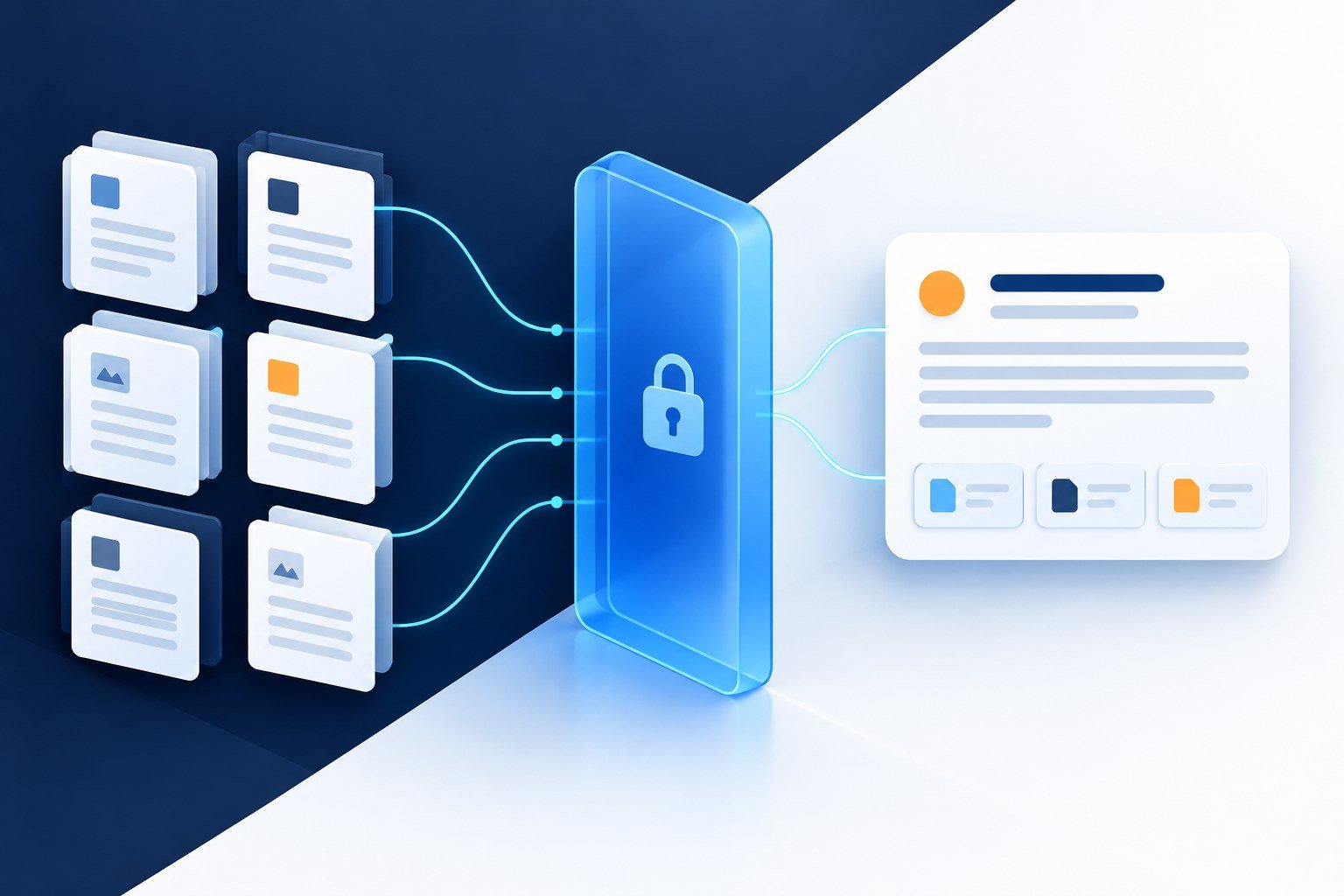


Test automation for SaaS applications should protect the workflows customers depend on: account access, tenant boundaries, subscriptions and core product actions. Start with business risk, cover rules and APIs before adding a focused browser suite, and make failures useful to the release team. A valuable test programme provides credible evidence for shipping decisions rather than simply increasing the number of automated checks.
This guide is for SaaS founders, engineering managers and QA leads building or improving a regression suite. Picture a release that passes its browser checks but lets a member download another customer’s export. The screen works; the customer boundary does not. Your automation plan needs to prove both the intended workflow and the behavior that must never be allowed.
The nine-step plan is AppZime Technologies’ recommended approach. The guide also includes release and billing diagrams, documented customer stories, an October 2026 tooling update and a fictional implementation exercise. Tool choices, test volumes and release thresholds should follow the product’s architecture and risk.
What makes SaaS testing different?
A SaaS product often serves several customer organizations through shared application infrastructure. Those organizations can have different roles, subscription entitlements, feature settings and data. A change that works for one account may break another, even when the visible screen looks identical.
Automation is useful when important behavior repeats and the team can state the expected outcome. It is less useful to automate unstable screens without clear requirements or to translate every manual test into a browser script. Exploratory review remains valuable for unfamiliar workflows and confusing user experiences.
The starting point should be the product model. AppZime Technologies’ custom software development services include SaaS and API work, which are closely related to designing a testable application and its delivery process.
| Behavior | Useful test layer | Example evidence |
|---|---|---|
| Business rules | Unit or component tests | Correct entitlement calculation |
| Data access and state changes | API and integration tests | Allowed update persists; forbidden update fails |
| Service compatibility | Contract tests | Consumer expectations match provider responses |
| Critical user journeys | Browser tests | Customer completes the core workflow |
| Shared-resource behavior | Performance and resilience tests | Defined service behavior under a representative load |
Design the release flow before adding more tests
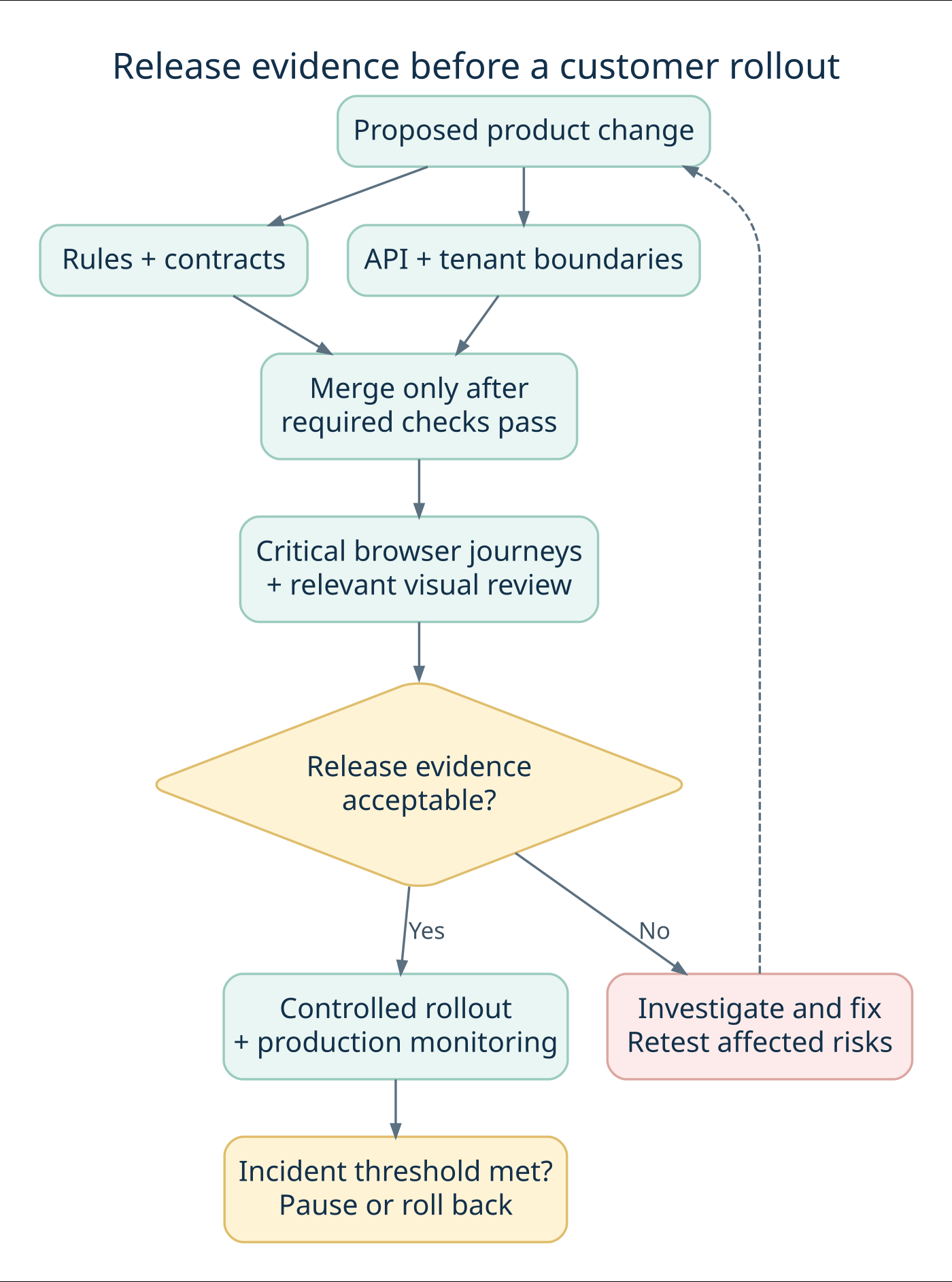
A release pipeline should answer a sequence of questions: are the business rules correct, do services respect their contracts, can users complete the important journeys, and is the evidence good enough to roll out? Different checks answer different questions. Running every check at every stage can slow feedback without making the release decision clearer.
Give each test layer a clear job
A unit test checks a small piece of logic in isolation, such as deciding whether a role may request an export. An integration test checks cooperating components, such as the authorization service and database. A contract test checks agreed expectations at a service boundary. An end-to-end test checks a complete journey through the deployed system. A visual test compares rendered appearance against a reviewed baseline.
These categories overlap in some toolchains. What matters is the failure each test can detect and the assumptions it makes. A mocked billing provider can make a test fast and deterministic, but it cannot establish that your deployed webhook endpoint accepts the provider’s real signature format. Keep a controlled integration check for that boundary.
| Stage | Example checks | Purpose |
|---|---|---|
| Proposed change | Business rules, relevant contracts, critical API permissions | Find actionable defects while the change is small |
| Integrated build | Database behavior, queues, service integration | Verify that deployed components work together |
| Release candidate | Critical browser journeys, selected visual and accessibility review | Confirm customer-facing behavior in the supported matrix |
| Controlled rollout | Operational health, error trends, selected safe smoke checks | Detect differences that staging did not reproduce |
Run critical security-boundary checks as often as the risk requires, including after changes to shared authorization code. The table is a planning pattern, not a rule that security testing waits for one particular stage. Assign an owner to every blocking failure so a red pipeline produces a decision rather than an unattended notification.
Define what “green” means
A green result should identify the build, environment, fixtures, enabled features and checks that actually ran. A test job that skips all tests because a filter matches nothing must not be presented as successful coverage. Similarly, a browser smoke suite passing with a mocked identity service is not evidence that production single sign-on is healthy.
Choose a small number of release-critical journeys and write down what makes their evidence insufficient: an unavailable dependency, an unexpected skip, missing artifacts or an unexplained retry. This makes the gate understandable to product managers as well as test engineers.
Test automation for SaaS applications: the nine-step plan
1. Rank journeys by customer and business impact
Start with a risk workshop involving product, engineering, support and QA. Identify what would prevent a customer from using the product, expose another customer’s information or create an incorrect charge. Map each risk to a concrete expected behavior.
For an illustrative team-management product, the first priorities might be sign-in, invitation acceptance, permission changes, subscription renewal and saving a shared project. That example is a planning exercise, not an AppZime client implementation.
Give every prioritized journey an owner. Record which parts are already tested and which depend on manual review. This exposes coverage gaps more clearly than a percentage of automated test cases.
2. Place each check at the right layer
Keep calculations and branching business rules close to the code that implements them. Test persistence, authentication and state transitions through APIs or integration tests. Reserve browser journeys for behavior that requires the rendered application and its components to work together.
There is no universal test-layer ratio for every SaaS product. A calculation-heavy service and a collaborative editor have different risks. Repeating the same rule across many browser journeys can increase maintenance without improving confidence.
For service boundaries, Pact’s contract-testing documentation describes verifying consumer and provider expectations independently. Use this where separately deployed systems need compatibility checks, while retaining integration tests for real infrastructure and end-to-end outcomes.
3. Make tenant isolation and authorization explicit
Use at least two synthetic customer organizations and several roles in the test environment. Confirm that a user from one organization cannot retrieve, change or export another organization’s resources by changing an identifier.
The OWASP multi-tenant security guidance covers isolation across data access, storage, caches and asynchronous processing. Use these boundaries to build a product-specific test inventory. A hidden button does not establish that the underlying request is denied.
Include ordinary members, customer administrators and separately authorized platform operators. The OWASP authorization guidance recommends denying access by default and validating permissions on requests. Verify allowed operations as well as denied ones so restrictive changes do not silently break legitimate customer work.
4. Control test data and environment state
Create synthetic data with known ownership and predictable lifecycle rules. Each test should establish the state it requires and clean up what it creates, without depending on a previous test having run. Give parallel workers separate accounts or data namespaces when they change shared state.
Seed a small set of meaningful account conditions: an active subscription, an expired trial, a restricted user and a disabled organization. Make the relevant time controllable where the application supports it, rather than waiting for a real renewal date.
Document differences between staging and production. A staging system with simplified permissions or disabled queues can make a passing suite less informative. Test data should not require copying customer records into an uncontrolled environment.
5. Test billing and background events as state transitions
A subscription workflow extends beyond a successful checkout screen. Test the intended outcomes of renewal, payment failure, cancellation, plan change and entitlement updates. Separate your product’s rules from the payment provider’s own interface.
Stripe’s webhook documentation explains that event delivery can be retried, duplicates can occur and ordering should not be assumed. For a Stripe integration, test those behaviors in your handler; for another provider, verify its documented delivery contract.
Use sandbox or controlled test events. Check that repeated delivery does not grant duplicate credits or trigger a repeated side effect. When events arrive out of order, verify the application reaches the correct authoritative state. Also exercise timeout and recovery paths instead of checking only successful requests.
6. Keep browser tests focused and diagnosable
A small browser suite should show that a customer can complete the most valuable journeys in supported environments. Select browsers and device sizes using your support commitments and usage evidence. Do not expand the matrix simply because a tool can run it.
Playwright’s best practices recommend isolated tests, resilient locators and assertions that wait for expected conditions. Prefer meaningful accessible roles or deliberate test identifiers over fragile selectors tied to page layout. Avoid fixed delays that assume every environment responds at the same speed.
Capture enough information to understand failures: the request, relevant application logs, a trace or screenshot and the tested version. Restrict access to these artifacts because they may include session information. A test that fails without usable evidence creates investigation work instead of useful feedback.
7. Set release gates that the team can trust
Define which checks run on a proposed code change, after merge and before release. Keep the first stage small enough to provide useful feedback; run broader suites at points that match their cost and risk. Avoid declaring success when the environment never became ready to execute the tests.
Write down who can approve a release with a known failure and what evidence they need. An exception should identify the affected behavior, customer impact, owner and follow-up action. Security or tenant-boundary failures need an explicitly defined escalation route.
Connect these checks to the delivery pipeline. AppZime Technologies’ DevOps and cloud services are relevant to CI/CD integration, environment management and release operation.
8. Treat flaky tests as maintenance work
A flaky test passes and fails without a relevant product change. Investigate shared data, asynchronous work, unstable selectors and environment availability before adding more retries. A passing retry can hide a problem the customer still experiences.
Playwright’s retry documentation distinguishes passed, flaky and failed outcomes. Preserve that distinction in reporting. If a test must be temporarily removed from a blocking gate, keep an owner, reason and review date, plus another way to cover the affected risk.
Measure time spent diagnosing failures and the recurring causes. Test automation for SaaS applications becomes harder to trust when the team learns to dismiss red results as routine noise.
9. Review coverage after incidents and product changes
Use escaped defects to ask what evidence was missing. Was the requirement unclear, the scenario absent, the test ineffective or the production configuration different? Add the smallest meaningful regression check at the appropriate layer.
Retire redundant checks when the product changes. Track protected journeys, high-impact gaps, flaky outcomes, execution time and investigation effort. Code coverage can reveal untested paths, but it does not establish that tenant permissions or business outcomes are correct.
Keep exploratory testing, accessibility review and performance evaluation in the overall quality plan. Functional automation is one source of release evidence, not a replacement for every other review.
Recent tooling news and documented SaaS testing case studies
7 October 2026: Playwright adds another way to expose hidden test dependencies
The Playwright 1.64 release notes introduce a --shuffle option with a reproducible seed. The release also adds project defaults that can keep configured projects out of the default run. For teams sharing test accounts or mutable data, shuffled execution can help reveal a suite that passes only in its usual order.
Our practical recommendation is to try randomized ordering in a diagnostic job, retain the seed when something fails, and check that the intended browser projects still run in CI. Review the release’s breaking changes before upgrading. A new runner option does not fix shared-state dependencies by itself. This update was checked on 9 October 2026; pin and review the version your project actually uses.
Case study 1: Canva makes visual changes reviewable
BrowserStack’s Canva case study describes using Percy with React and Storybook components alongside a Buildkite pipeline. Visual changes become visible in pull requests, giving engineers a way to review intended and unintended differences. The article describes a reduction in manual UI-testing effort but does not provide a reliable percentage to use here.
The lesson for a SaaS team is to add visual evidence where appearance affects product usability, such as an editor, dashboard or pricing screen. Assign a human baseline reviewer. Automatically approving every changed screenshot removes the very comparison the test was meant to provide.
Case study 2: Logikcull improves testing throughput
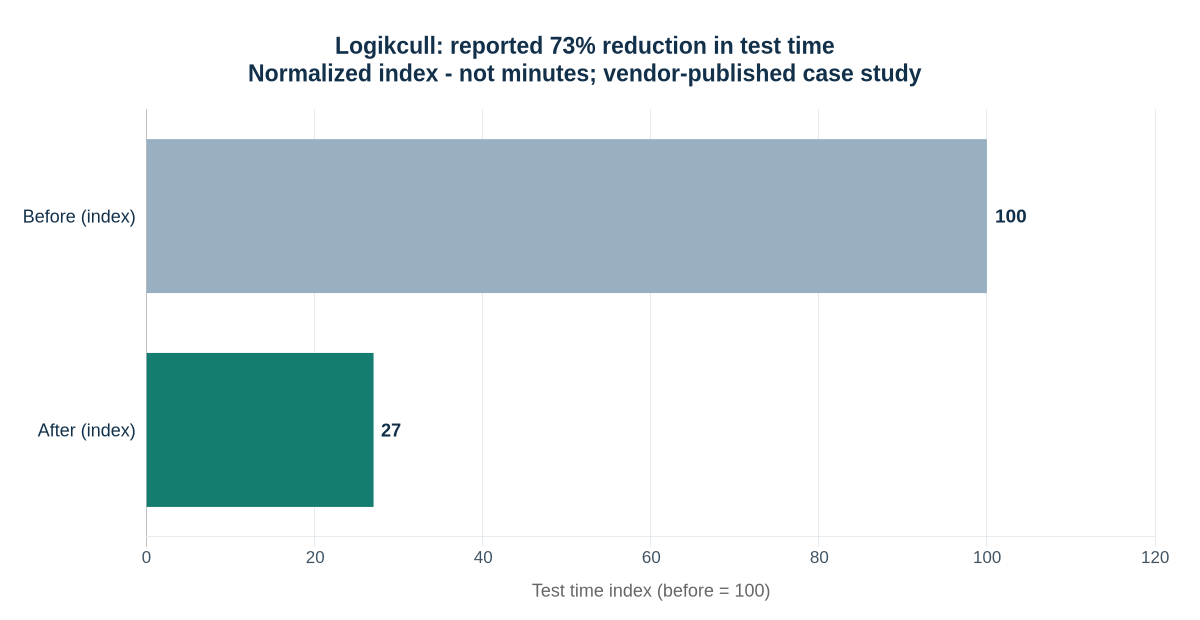
BrowserStack’s Logikcull customer story reports a 73% reduction in test time and describes a small QA function supporting a larger engineering team. It also discusses the usefulness of cross-browser execution and diagnostic artifacts. These are vendor-published results from one implementation, not a promised benefit from adopting the same tool.
| Measure | Index | Basis |
|---|---|---|
| Before | 100 | Normalized baseline |
| After | 27 | 100 × (1 − 0.73) |
The practical lesson is to locate the bottleneck first: execution capacity, test design and failure investigation are different problems. Both customer-story pages were checked on 9 October 2026; their retrieved article bodies do not display publication dates. They are established examples, not presented as new announcements.
A release evidence matrix for a SaaS team
The following matrix illustrates how to connect risks to decisions. Replace the example roles and timing with the responsibilities in your own team. Critical boundaries may need checks at more than one stage.
| Risk | Required evidence | Typical reviewer |
|---|---|---|
| Cross-customer data exposure | API denial and storage-isolation checks pass | Engineering and security owner |
| Incorrect subscription access | Billing-state and repeated-event tests pass | Billing feature owner |
| Broken core workflow | Selected browser journey completes | Product and QA owner |
| Integration incompatibility | Relevant contracts and integration checks pass | Consumer and provider teams |
| Unexplained regression failure | Failure is resolved or explicitly reviewed | Release owner |
For each release, retain the tested commit or build, environment configuration, results and unresolved exceptions. This makes later investigation possible without implying that a passing suite guarantees a defect-free release.
Worked example: protect a multi-tenant project-management product
Fictional implementation exercise: assume a SaaS product offers shared projects, CSV exports and paid collaboration features. The following accounts, policies and test outcomes are invented for teaching. They are not AppZime customer records or results.
1. Set up fixtures that make a boundary visible
Create two organizations, Cedar and Maple. Give each a workspace administrator and an ordinary member. Add one export owned by Cedar and one owned by Maple. Use unique resource identifiers and separate fixture namespaces for parallel workers. A test that checks only one organization cannot show whether another organization’s identifier is improperly accepted.
For this example, administrators may download their own organization’s exports; members may not. The application deliberately returns 404 for requests to another organization’s export to avoid confirming its existence. That is an example contract, not a requirement that every API must use the same status code.
| Identity | Requested resource | Expected result | Additional assertion |
|---|---|---|---|
| Cedar administrator | Cedar export | 200, permitted download | Only Cedar records are present |
| Cedar member | Cedar export | 403, denied by role | No file content or signed download URL returned |
| Cedar administrator | Maple export | 404, cross-tenant request denied | No Maple metadata disclosed |
| Cedar member | Maple export | 404, cross-tenant request denied | No background export job created |
| Revoked Cedar session | Cedar export | 401, authentication rejected | Old credentials cannot initiate a fresh download |
Test the underlying request directly, then add one browser journey showing that an authorized administrator can find and download an export. The browser journey proves discoverability and integration; the API matrix exercises the permission combinations cheaply and explicitly. Also inspect object-storage delivery: denial at the application endpoint is insufficient if the file itself is exposed through another path.
2. Write assertions about state, not only response codes
An HTTP denial can still leave an unintended side effect. After a forbidden export request, check that no job was queued and no downloadable file was created. After a permitted request, check the owner recorded on the job and the tenant filter used by the worker. Include cache keys and background jobs in the tenant model.
Scenario: Cedar cannot start Maple's export
Given a Cedar administrator and a Maple-owned project
When the administrator submits the Maple project ID to the export API
Then the request is denied according to the API contract
And no export job or file is created
And the response reveals no Maple project details
This scenario is a specification template, not runnable code. Implement it using the application’s actual authentication, fixtures, queue inspection and cleanup facilities. Avoid test-only shortcuts that bypass the very authorization behavior under review.
3. Model billing as the customer’s access policy
Assume this fictional product gives customers a short grace period after renewal failure. Recovery restores active access; expiry restricts paid features. Cancellation at the end of the paid period preserves access until that period ends. These are product decisions that need explicit tests, not universal rules for every subscription business.
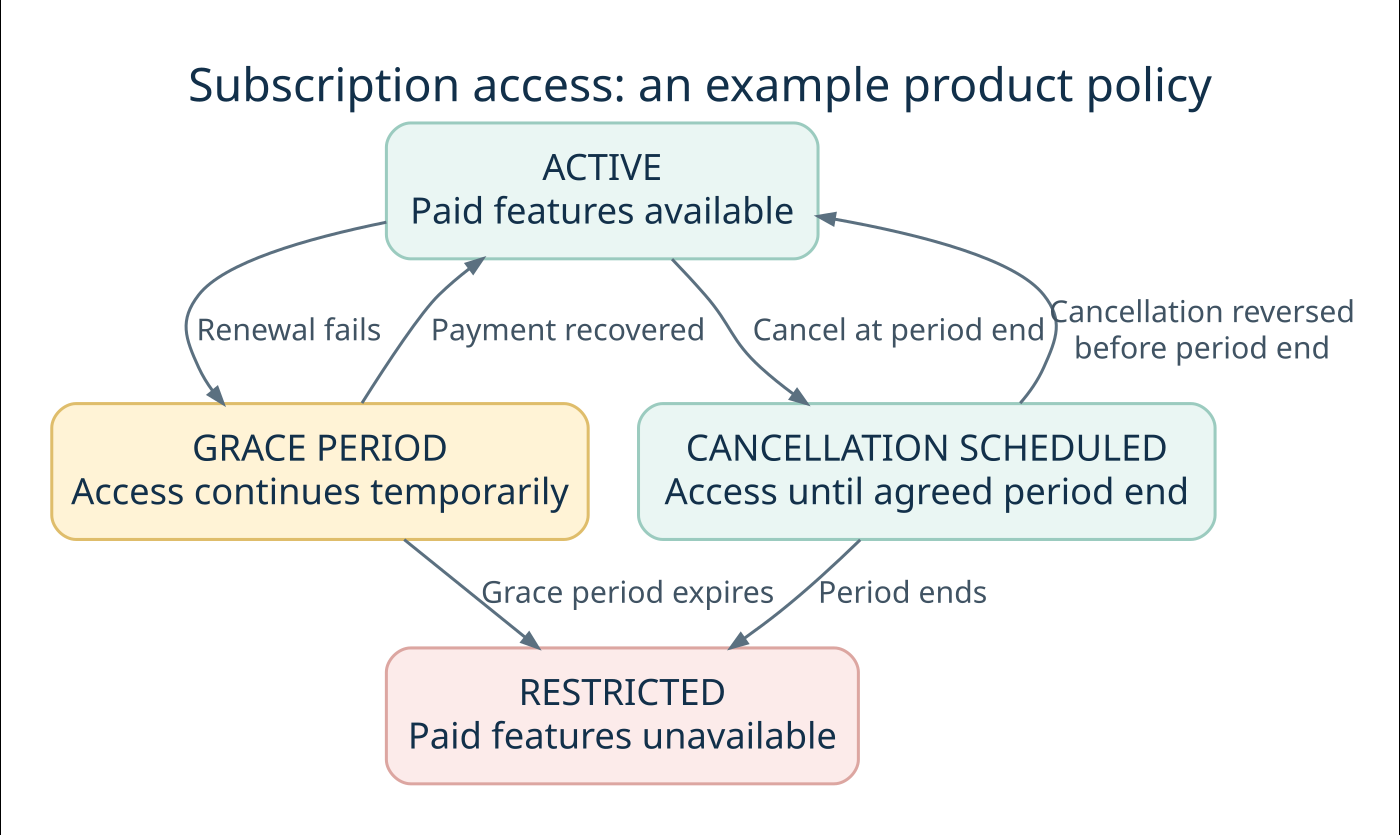
Now walk through a complete scenario. Begin with an active account and confirm that a paid collaboration action succeeds. Send a signed sandbox renewal-failure event and verify the product enters its configured grace state. Advance a controllable application clock past the grace deadline and verify that the paid action is denied while the account still receives the intended recovery information.
Repeat the scenario with payment recovery before expiry. The account should return to active access without creating duplicate credits or notifications. Send the same event twice, deliver an older event after a newer one, and simulate a lost acknowledgement followed by redelivery. Check the final stored state and side-effect count after processing finishes.
For an asynchronous implementation, persist the event or enqueue it durably before acknowledging receipt. Keep event deduplication and state changes consistent with the transaction model; use a durable mechanism for effects that occur outside the database. The precise design depends on the provider and infrastructure. Have the integration owner review recovery after worker crashes, not only normal delivery.
4. Add one realistic browser journey
Choose the smallest browser story that joins the important parts: an administrator signs in, opens the billing page, sees the correct entitlement and successfully uses a paid feature. Add an appropriate negative state, such as the same action after grace expiry. Seed the state through controlled fixtures so the test does not wait for a real billing cycle.
Capture a trace and application correlation ID on failure. A screenshot of an error page may show the symptom, while the request and worker logs show that the entitlement update never completed. Keep credentials and sensitive customer-like data out of published test reports.
What should an automation engagement deliver?
For test automation for SaaS applications, ask for outcomes and maintainable assets. Use this checklist when reviewing a delivery proposal:
- Agree which customer journeys and failure scenarios the first release must protect.
- Request the test architecture, data fixtures and environment setup instructions.
- Define pipeline stages, failure reports and release decision responsibilities.
- Include the work needed to improve application testability.
- Require a handover guide and named owners for ongoing maintenance.
The cost of test automation for SaaS applications depends on product complexity, integration count, environment maturity and ongoing change. Separate initial implementation from routine maintenance and execution costs. A large browser suite on an unstable environment can require more upkeep than the proposal suggests.
Before choosing a partner, request a sample test failure and its diagnostic report. Ask how the team verifies tenant boundaries, controls test data and handles unreliable checks. AppZime Technologies can review the engineering and delivery requirements through a project scoping discussion.
Measure feedback quality, then plan a maintainable rollout
A small operating dashboard
| Metric | Definition | Decision it supports |
|---|---|---|
| Critical-journey coverage | Named priority journeys with current, reviewed evidence | Where is meaningful protection missing? |
| First-run pass rate | Passing executions before retries ÷ executed tests | Is the suite becoming noisy? |
| Flaky outcome rate | Tests that fail and then pass on retry ÷ executed tests | Which checks need investigation? |
| Time to actionable feedback | Elapsed time from change submission to usable diagnosis | Are engineers waiting on execution or investigation? |
| Escaped high-impact defects | Customer-impacting defects missed by the release evidence | Which assumptions or scenarios need revision? |
Keep metric definitions stable across reporting periods. If the number of tests changes, publish the denominator. If a failing check is quarantined, show that it is excluded from the blocking gate and name the owner. A prettier pass-rate chart created by hiding difficult checks is not evidence of improved quality.
Estimate execution capacity without promising impossible speedups
Consider a hypothetical suite of 300 tests averaging 30 seconds each. The serial workload is 9,000 seconds, or 150 minutes. With four workers and perfect distribution, the execution-only lower bound is 150 ÷ 4 = 37.5 minutes. That calculation excludes setup, retries, queues and contention; it is not a forecast of a real run.
Before buying more concurrency, identify tests that share accounts, lock the same records or wait for a slow external dependency. Extra workers can amplify these bottlenecks. Measure the actual critical path, split independent work and compare the result using the same environment and representative changes.
A staged first-month plan
| Stage | Concrete output | Review question |
|---|---|---|
| Week 1: map risk | Priority journeys, tenant model and release responsibilities | Do product, engineering and QA agree what must be protected? |
| Week 2: establish foundations | Independent fixtures, API boundary tests and diagnostic artifacts | Can failures be reproduced and understood? |
| Week 3: join the workflow | Focused browser journeys and CI gates | Does the pipeline run the checks it claims to run? |
| Week 4: stabilize and hand over | Failure triage, ownership, documentation and coverage review | Can the team maintain the suite without its original author? |
Use this as an ordering guide, not a promise that every product is ready in four weeks. Applications with weak fixtures, legacy authentication or unstable environments may need groundwork first. Reserve ongoing capacity for maintenance and exploratory testing; otherwise automation slowly becomes a second product with no team to maintain it.
A good handover includes commands to run each suite, fixture setup, supported versions, artifact locations, triage examples and the process for approving visual baselines. Ask a new team member to diagnose one deliberately introduced defect. Their ability to explain the failure is more useful evidence of maintainability than the number of scripts delivered.
Frequently asked questions
Should every manual test be automated?
No. Prioritize repeatable checks with clear expected results and meaningful customer impact. Exploratory work and subjective usability assessment still need human judgment.
Is Playwright enough for a SaaS testing strategy?
It can support browser and API testing, but the strategy also needs appropriate business-rule tests, integration coverage, security checks and operational evidence. Choose the combination that fits the application.
When should a SaaS team start automation?
Start when a critical workflow has sufficiently clear expected behavior and will be exercised repeatedly. Establish testable architecture and controlled data early, then expand coverage as requirements stabilize.
How do we know the programme is working?
Review whether releases receive timely, credible evidence and whether important regressions are caught. Combine incident review, maintenance effort and feedback speed with coverage of critical journeys; a raw test count is insufficient.
Technical references and linked case studies reviewed on 9 October 2026. Confirm tool capabilities and payment-provider behavior against the versions used by your product.